46
Reference—P, S, A, and M Modes
Long Time-Exposures
At a shutter speed of , the shutter will remain open while the camera
shutter-release but ton is held down. In delayed remote and quick-response
remote modes, is displayed instead of ; the shutter opens when
the shutter-release button on the optional ML-L3 remote control is pressed (2 s
after the button is pressed in delayed remote mode) and remains open until
the remote-control shutter-release button is pressed a second time (maximum
30 minutes). Nikon recommends using a fully-charged battery or an optional EH-5
AC adapter to prevent loss of power while the shutter is open. Note that if the
shutter is open for more than approximately 1 s at any setting, “noise” in the form
of randomly-spaced, brightly-colored pixels may ap pear in the fi nal pho to graph.
Noise can be reduced by turning long exposure noise reduction on before taking
photographs (
78).
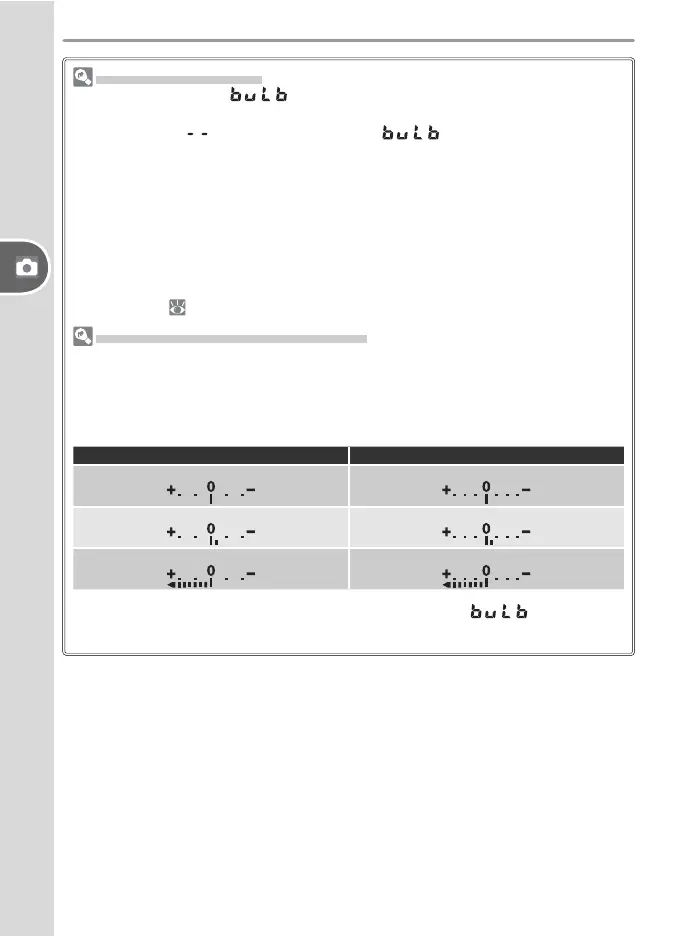
Electronic Analog Exposure Display
The electronic analog exposure display in the viewfi nder shows whether the pho-
tograph would be un der- or over-exposed at current settings. Depending on the
option chosen for Custom Setting 11 (EV Step), the amount of un der- or over-
ex po sure is shown in increments of
1
/
3 EV or ½ EV. If the limits of the ex po sure
metering system are ex ceed ed, the display will fl ash.
“EV Step” set to “1/3 Step” “EV Step” set to “1/2 Step”
Optimal exposure
Optimal exposure
Underexposed by
1
/
3 EV Underexposed by ½ EV
Overexposed by more than 2 EV Overexposed by more than 3 EV
The electronic analog exposure display is not shown when is selected for
shutter speed or a non-CPU lens is attached.



 To Next Page