54
Reference—Viewing Photographs
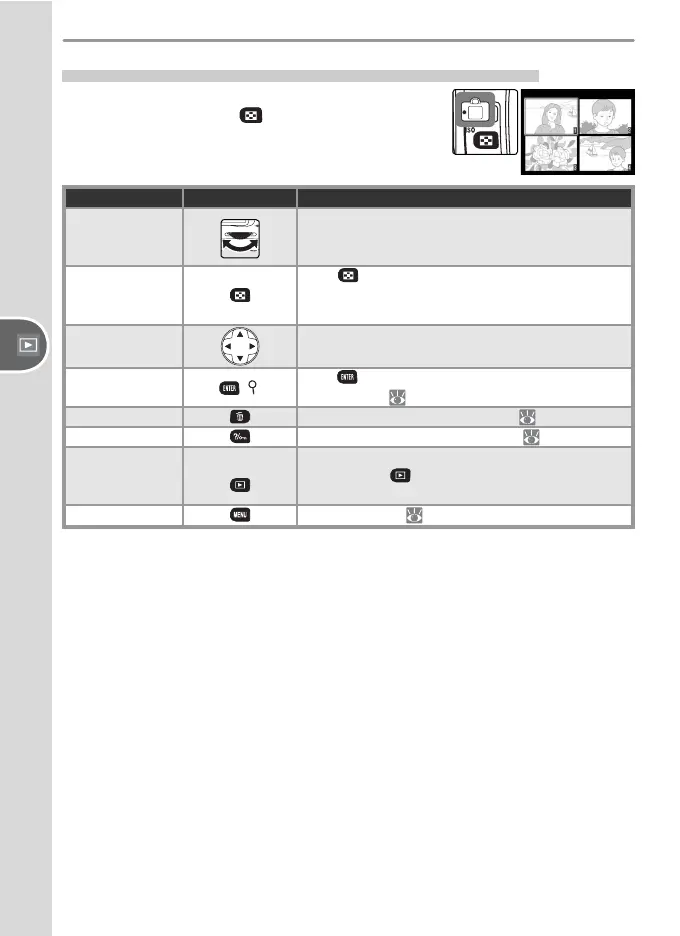
Viewing Multiple Images: Thumbnail Playback
To display images in “con tact sheets” of four or
nine images, press the
button in single-image
playback. The fol low ing operations can be per-
formed while thumb nails are displayed:
To Use Description
View additional
pages of photos
Rotate command dial right to view photographs
in order recorded, left to view photographs in
reverse order.
Change num-
ber of images
displayed
Press button to switch between four-thumb-
nail display, nine-thumbnail display, and single-
image playback.
Highlight
photographs
Press multi selector up, right, left, or down to
highlight thumbnails.
Zoom in on
photograph
( )
Press button for enlarged view of highlighted
photograph ( 55).
Delete photo
Delete highlighted photograph ( 57).
Protect photo
Protect highlighted photograph ( 56).
Return to
shooting mode
Shutter release /
To turn monitor off and return to shooting
mode, press button or press shutter-release
button halfway.
Display menus
Display menus ( 26).



 To Next Page