81
Setup Shooting Options: The Shooting Menu
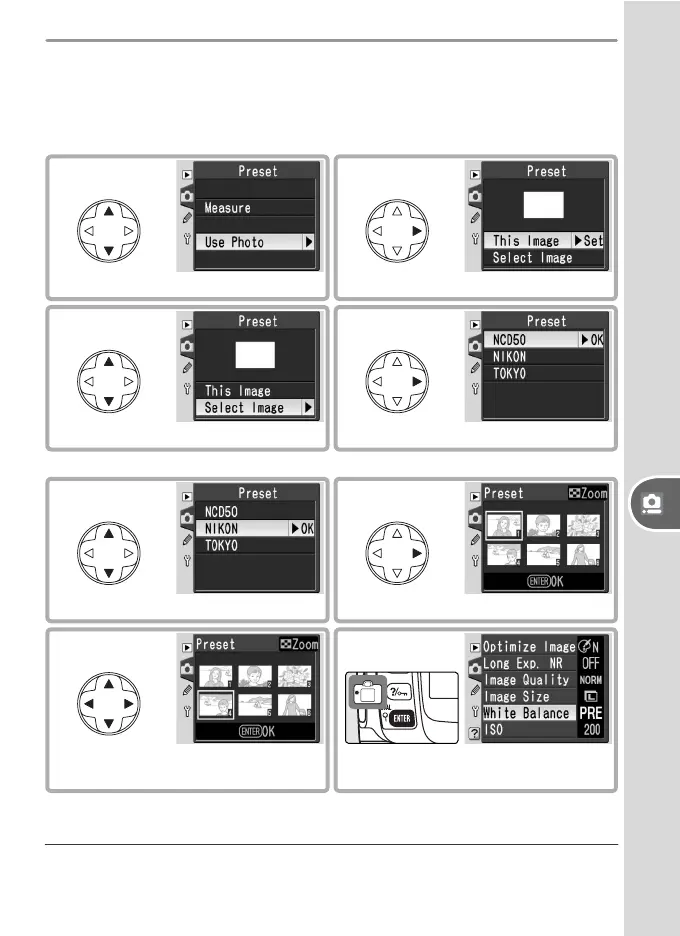
Copying White Balance from a Photograph
Selecting a new source photograph overwrites any white balance values
previously selected with Use Photo. The value for Measure is unaf-
fected.
2
Display current source photo.
1
Highlight Use photo.
* Select This Image to use white balance value for current photo.
4
Display folder list.
3
Highlight Select Image.
*
6
Display images in selected folder.
5
Highlight folder.
† Images displayed may include those created by other cameras, but only photo-
graphs created with D50 can be used as source for preset white balance.
7
Highlight photograph.
†
8
Set preset white balance to value
for highlighted photograph.



 To Next Page