157
t
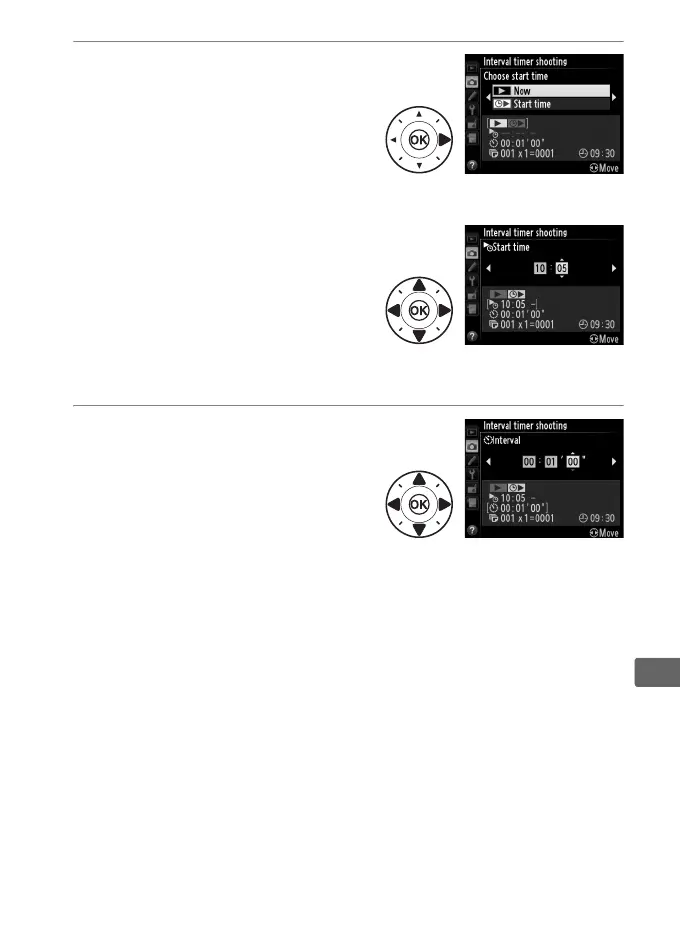
2 Choose a starting time.
Chose from the following
starting triggers.
• To start shooting immediately,
highlight Now and press 2.
Shooting begins about 3 s
after settings are completed; proceed to Step 3.
• To choose a starting time,
highlight Start time and press
2 to display the start time
options shown at right.
Press
4 or 2 to highlight hours or
minutes and press 1 or 3 to
change.
Press 2 to continue.
3 Choose the interval.
Press 4 or 2 to highlight hours,
minutes, or seconds; press 1 or
3 to change.
Choose an
interval longer than the time
needed to take the number of
shots selected in Step 4.
If the interval is too short, the
number of photos taken may be less than the total listed in
Step 4 (the number of intervals multiplied by the number of
shots per interval).
Press 2 to continue.



 To Next Page