320
n
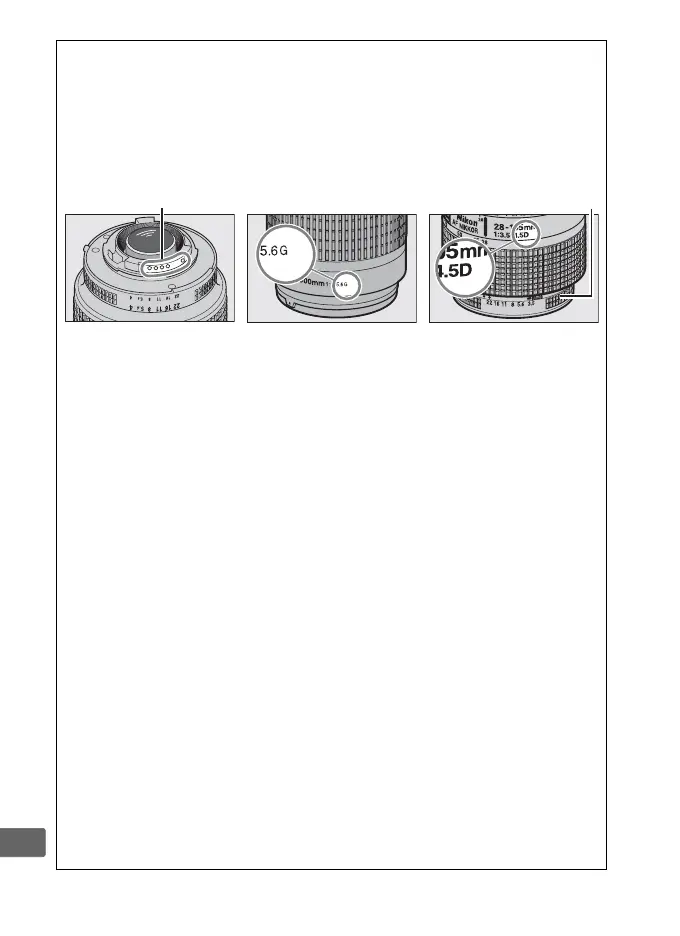
A Recognizing CPU and Type G, E, and D Lenses
CPU lenses (particularly types G, E, and D) are recommended, but note
that IX-NIKKOR lenses can not be used. CPU lenses can be identified by
the presence of CPU contacts, type G, E, and D lenses by a letter on the
lens barrel.
Type G and E lenses are not equipped with a lens aperture
ring.
CPU contacts Aperture ring
CPU lens Type G/E lens Type D lens
A Lens f-number
The f-number given in lens names is the maximum aperture of the lens.
D Incompatible Accessories and Non-CPU Lenses
The following can
NOT be used with the Df:
• TC-16AS AF teleconverter
•
Lenses that require the AU-1
focusing unit (400mm f/4.5, 600mm
f/5.6, 800mm f/8, 1200mm f/11)
• Fisheye (6mm f/5.6, 7.5mm f/5.6,
8mm f/8, OP 10mm f/5.6)
• 2.1cm f/4
• Extension Ring K2
• AF lenses for the F3AF (AF 80mm
f/2.8, AF 200mm f/3.5 ED, AF
Teleconverter TC-16)
• PC 35mm f/3.5 (old type)
• Reflex 1000mm f/6.3 (old type)
• NIKKOR-H Auto 2.8cm/3.5 (28mm/
3.5) lenses with serial numbers
below 362000
• NIKKOR-S Auto 3.5cm/2.8 (35mm/
2.8) lenses with serial numbers
below 928000
• NIKKOR-S Auto 5cm/2 (50mm/2)
• NIKKOR-Q Auto 13.5cm/3.5
(135mm/3.5) lenses with serial
numbers below 753000
• Micro-NIKKOR 5.5cm/3.5
• Medical-NIKKOR Auto 200mm/f5.6
• Auto NIKKOR Telephoto-Zoom 85–
250mm/f4–4.5
• Auto NIKKOR Telephoto-Zoom
200–600mm/f9.5–10.5
Depending on their condition, individual lenses of other types may not be
suitable for use. Do not attempt to forcibly attach a lens that does not mate
smoothly with the camera mount.



 To Next Page