EasyManua.ls Logo

Nikon E5600 - Page 72

Nikon E5600
128 pages
Print Icon
To Next Page IconTo Next Page
To Previous Page IconTo Previous Page
Loading...
62
W Recording Movies
Movies
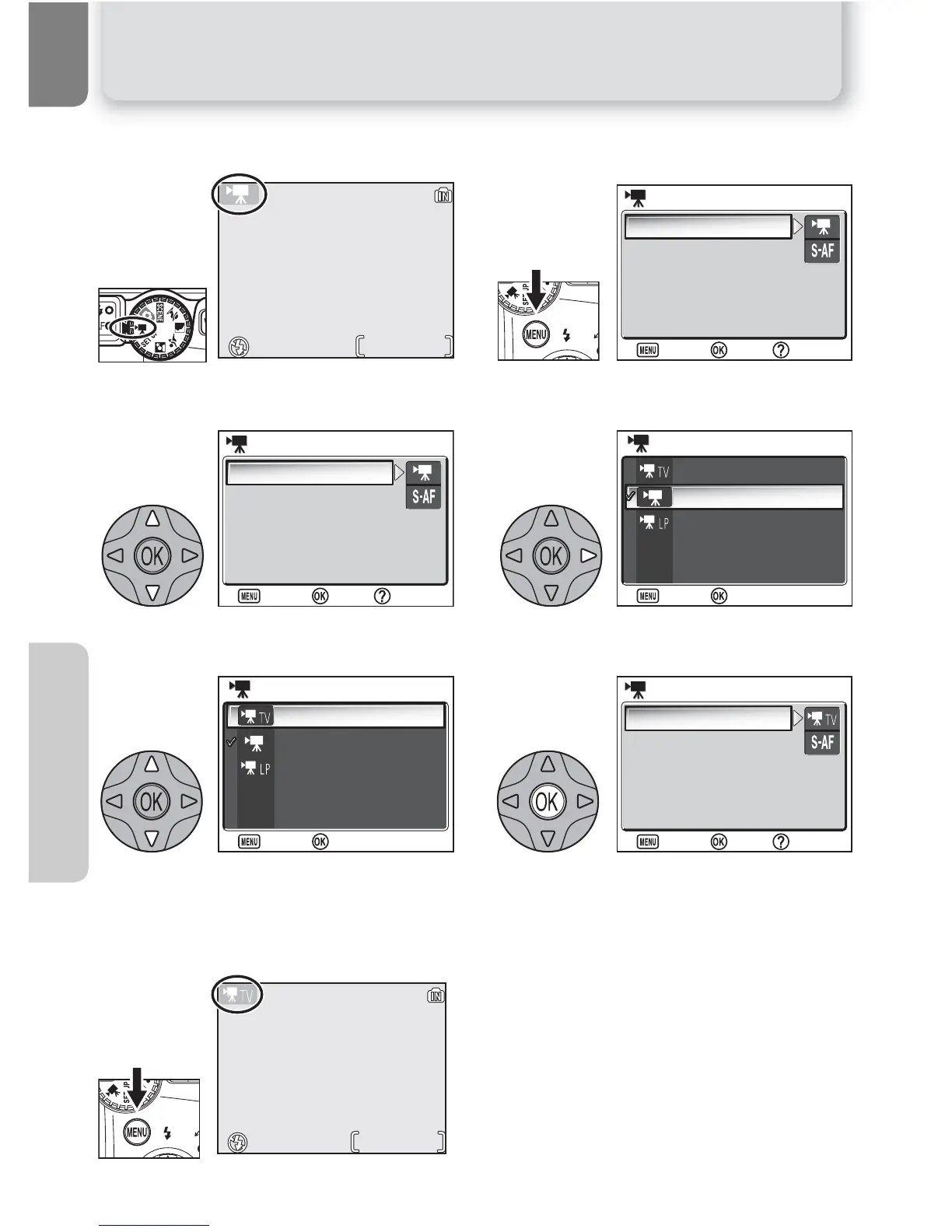
To select a movie mode:
Select W Mode. Display MOVIE menu.
Highlight Movie options. Display MOVIE OPTIONS menu.
Highlight mode.*
*To exit without changing mode,
press ^ button.
Make selection to return to the MOVIE
menu.
Return to shooting mode. Selected movie
mode shown in monitor.
1
0h 0m20s
0h 0m20s
2
Movie options
Auto-focus mode
MOVIE
MOVIE
:
Set
:
Set
:
Help
:
Help
:
Exit
:
Exit
3
Movie options
Auto-focus mode
MOVIE
MOVIE
:
Set
:
Set
:
Help
:
Help
:
Exit
:
Exit
4
TV movie 640
Small size 320
Smaller size 160
MOVIE OPTIONS
MOVIE OPTIONS
:
Set
:
Set
:
Exit
:
Exit
5
TV movie 640
Small size 320
Smaller size 160
MOVIE OPTIONS
MOVIE OPTIONS
:
Set
:
Set
:
Exit
:
Exit
7
0h 0m 8s
0h 0m 8s
6
Movie options
Auto-focus mode
MOVIE
MOVIE
:
Set
:
Set
:
Help
:
Help
:
Exit
:
Exit

Table of Contents

Related product manuals