EasyManua.ls Logo

Nikon E5600 - Page 73

Nikon E5600
128 pages
Print Icon
To Next Page IconTo Next Page
To Previous Page IconTo Previous Page
Loading...
63
W Recording Movies
Movies
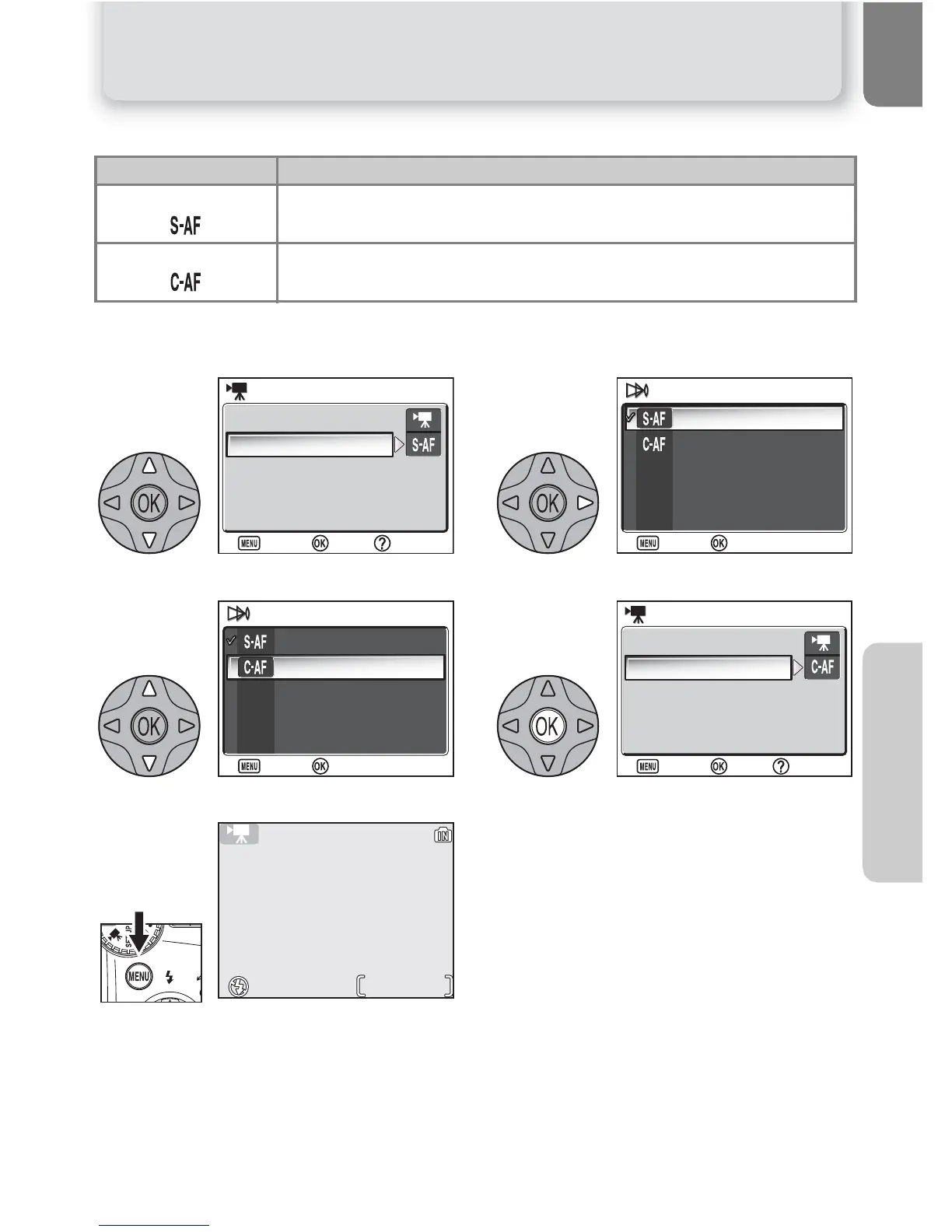
The MOVIE menu also includes the following focus options:
To choose a focus option from the MOVIE menu:
Highlight Auto-focus mode. Display options.
Highlight desired focus mode. Make selection.
Return to shooting mode.
Focus mode Description
Single AF
Camera focuses when shutter-release button is pressed halfway.
Focus locks when focus operation is complete.
Continuous AF
Camera adjusts focus when necessary.
1

:
Help
:
Help
Movie options
Auto-focus mode
MOVIE
MOVIE
:
Set
:
Set
:
Exit
:
Exit
2
Single AF
Continuous AF
AUTO-FOCUS MODE
AUTO-FOCUS MODE
:
Set
:
Set
:
Exit
:
Exit
3
Single AF
Continuous AF
AUTO-FOCUS MODE
AUTO-FOCUS MODE
:
Set
:
Set
:
Exit
:
Exit
4
:
Help
:
Help
Movie options
Auto-focus mode
MOVIE
MOVIE
:
Set
:
Set
:
Exit
:
Exit
5
0h 0m20s
0h 0m20s

Table of Contents

Related product manuals