EasyManua.ls Logo

Nikon N70 AF - Page 78

Nikon N70 AF
128 pages
Print Icon
To Next Page IconTo Next Page
To Previous Page IconTo Previous Page
Loading...
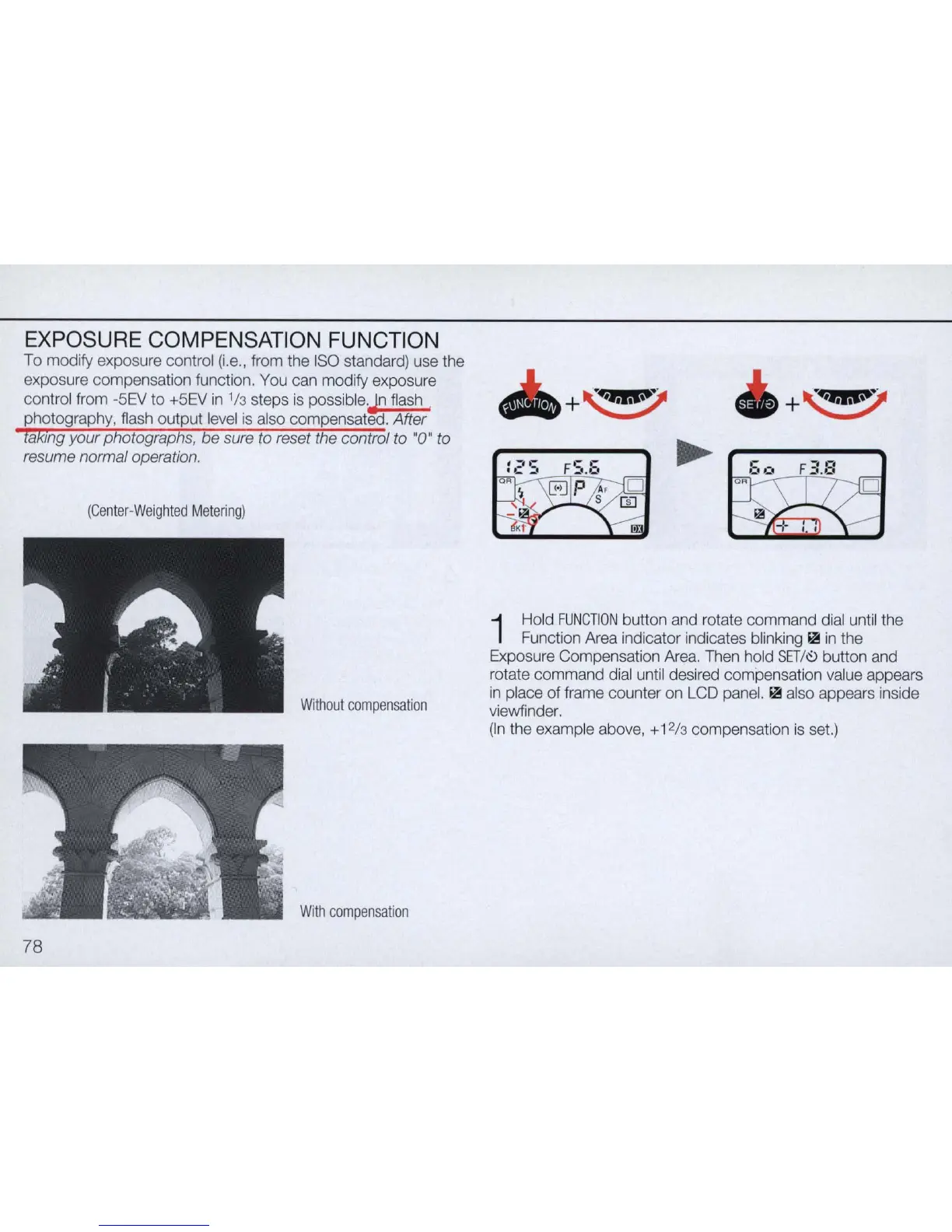
EXPOSURE COMPENSATION FUNCTION
To
modify exposure control
(i.e.,
from
the
ISO
standard)
use
the
exposure compensation function.
You
can
modify exposure
control
from
-SEV
to
+SEV
in
1
13
steps
is
possible.Jn
flash
.
photography,
flash
output
level
is
also
compensated. After
lakmg your photographs,
be
sure to reset the control to "0" to
resume normal operation.
(Center-Weighted
Meter
in
g)
Without
compensation
With
compensation
78
+
~
+
~
1
Hold
FUNCT
I
ON
button
and
rotate command
dial
until
the
Function
Area
indicator indicates blinking
~
in
the
Exposure
Compensation
Area.
Then
hold
SET
/
~
button
and
ro
t
ate
command
dial
until
desired compensation
va
l
ue
appears
in
place of frame counter
on
LCD
panel.
~
also
appears inside
viewfinder.
(
In
the example
above,
+ 12/3 compensation
is
set.)

Related product manuals