EasyManua.ls Logo

nilan CTS 600 - Alarm Management and Troubleshooting; Viewing and Resetting Alarms

nilan CTS 600
25 pages
Print Icon
To Next Page IconTo Next Page
To Previous Page IconTo Previous Page
Loading...
May be subject to change page 10 af 25
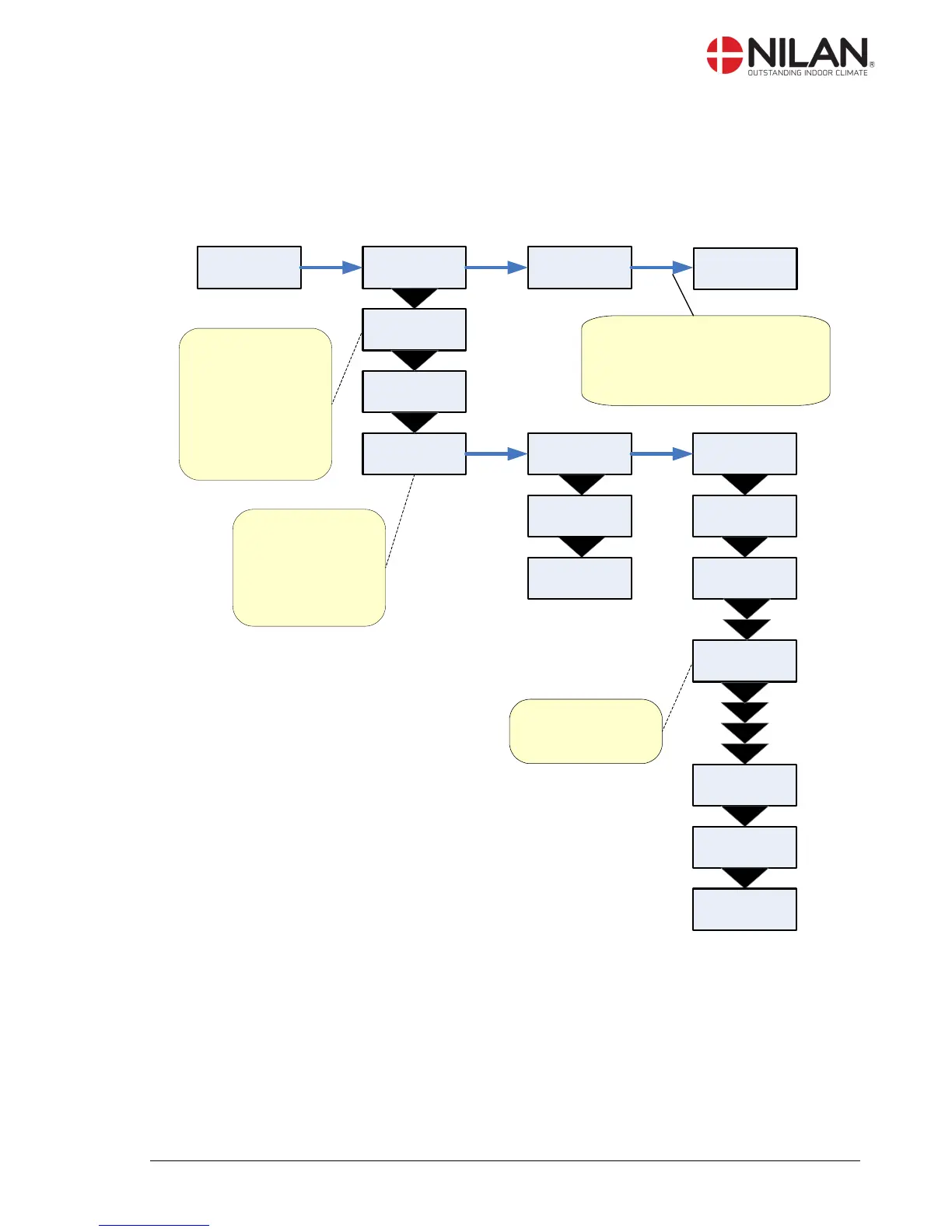
Show alarms
If the unit is in a state of alarm the yellow light-emitting diode on the front of the CTS 600 panel will
flash.
The ”Show alarms” menu indicates the type of alarm and the time of the alarm. This is also the
menu where the alarm should be reset.
06-05-30
TI 11:32
ENTER
06-05-30
TI 10:28
STATUS
ALARM
T1 20°C
T2 20°C
T3 0,00
T4 0,00
OUT 1-8
00000000
OUT 9-16
00000000
OUT 17-24
00000000
ALARMLOG:
The log is recovered
after power cut and
shows the 16 most
recent alarms
AL 1 is the newest.
ALARM 6
DEFROST
SHOW
ALARMS
ENTER ENTER
ALARM 19
FILTER
ALARM 8
FROST
ALARMLOG
AL 1:
6 DEFROST
AL 2:
19 FILTER
AL 3:
8 FROST
LIST OF ALARMS:
Shows from 0-3
active alarms. The
newest and most
critical alarms are
shown first.
The list is erased if
the power is cut.
ALARMLOGDATA:
Snapshots from the
time of the alarm.
Resetting of alarms:Alarms should
be reset individually. Only active
alarms can be reset. ALARM0
indicates that all alarms are reset.
ENTERENTER
00-00-00
TI 00:00
Figure 7: The ”Show alarms” menu

Other manuals for nilan CTS 600

Related product manuals