Control System 25Service Manual – Focus II / Scrubtec R6 Rider Autoscrubber
Service Test Mode
To assist in the troubleshooting and servicing of the electrical system and related components, a special test
mode allows independent control of the various outputs and monitoring of the various inputs. To enter the
service test mode perform the following steps:
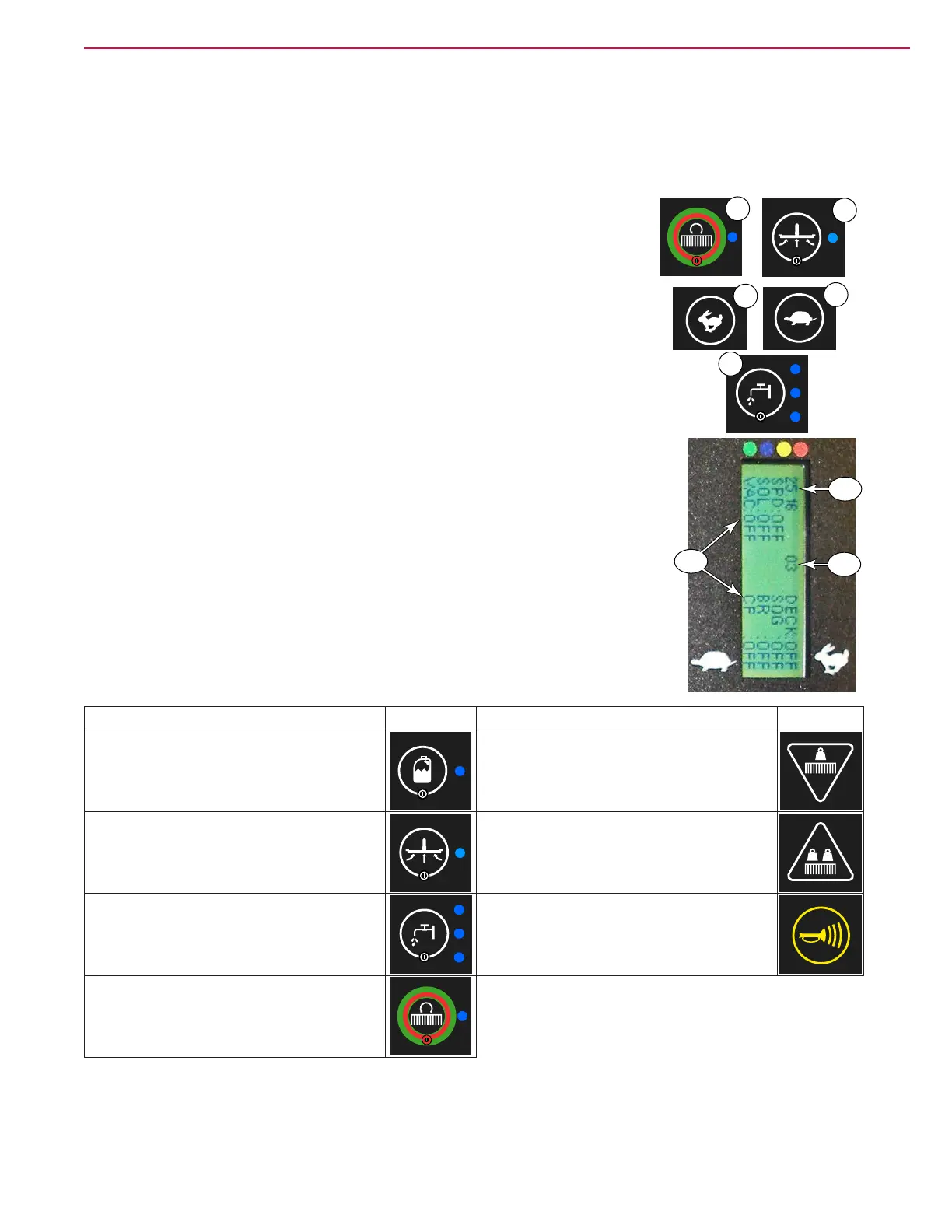
1. To enter the hidden menus, press and hold the Scrub (M) and Vacuum (Q)
switches for 2 seconds while turning the key switch (A) to the On position.
After 2 seconds, the display will show the rst menu item, “1. Deck Type”,
and you can release the switches.
M
Q
2. Use the Speed Increase (E) or Speed Decrease (D) switches to scroll
through the menus until you reach “17. Service Test Mode”.
E
D
3. Use the Solution switch (O) to enter the Service Test Mode submenu.
4. To exit Service Test Mode, turn the key switch to the off position.
O
Test Mode Display
In Service Test Mode, the display will present basic information about the
machine. The battery voltage, as determined by the control board, is shown at
(F10). A listing of current error codes is shown at (F11). If there are several
codes, up to 8 will be displayed in this space. The remainder of the display area
(F12) shows device status. (SPD=Drive, SOL=Solultion Solenoid, VAC=Vacuum
Motor, DECK=Deck Lift Actuator, SQG= Squeegee Lift Actuator, BR=Brush
Motor, CP=Detergent (chemical) Pump)
Test Mode Functions
The other primary aspect of Service Test Mode is to exercise motors and
solenoids. The switches necessary to access these functions are listed below.
Function Switch Function Switch
Operate the Detergent Pump
Lower the Scrub Deck
Operate the Vacuum Motor Raise the Scrub Deck
Operate the Solution Solenoid Cycle the Squeegee Lift
Operate the Brush Motor(s)
F10
F11
F12


 To Next Page
 Loading...