10 11
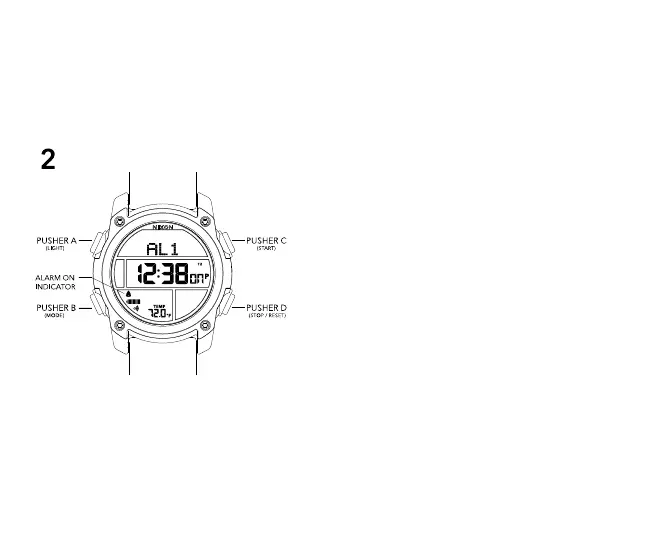
2 ALARM MODE
ALARM MODE features 3 independent alarms
-Press PUSHER D to switch between Alarm 1 (AL1), Alarm 2
(AL2), and Alarm 3 (AL3)
-Press PUSHER C to toggle an alarm on or off (--)
To set the ALARM time:
-Press PUSHER B (MODE) until you are in Alarm Mode
-Press PUSHER D to scroll through the alarms until the
desired alarm is reached
-Press and hold PUSHER B to enter Alarm Setting State (hours
will begin to blink)
-Press PUSHER C to increment the value
-Press and hold PUSHER C to quickly increment the value
-Press PUSHER D to decrement the value
-Press and hold PUSHER D to quickly decrement the value
-Press PUSHER B to advance hour, minute, and time zone
-Press PUSHER A to confirm and exit setting state
-Press PUSHER C to toggle alarm ON or OFF (--)
-Press PUSHER B to advance to TIMER MODE



 To Next Page