12 13
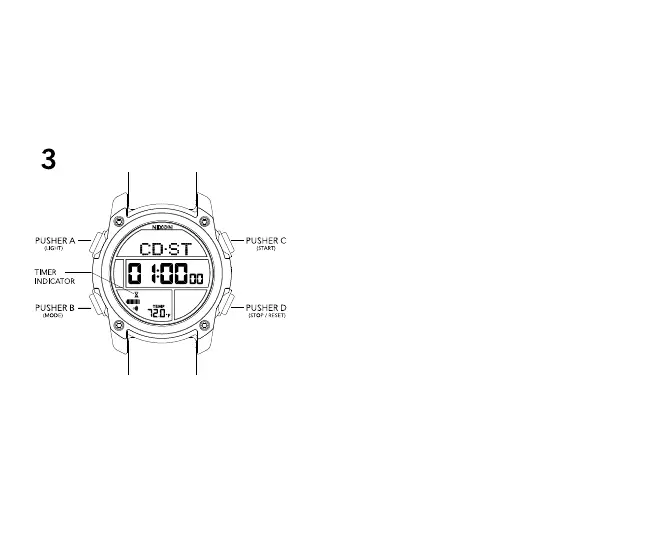
3 TIMER MODE
TIMER MODE features 3 independent timers:
-CD - STOP : Timer stops and triggers alarm when time
expires
-CD - REP : Count down timer starts over and alarm is
triggered when time expires
-CD - UP: Chrono is activated and alarm is triggered when
time expires
To set the TIMER:
-Press PUSHER B (MODE) until you are in Timer Mode
-Press and hold PUSHER B to enter Timer Mode setting state
-Press PUSHER C to increment the value
-Press and hold PUSHER C to quickly increment the value
-Press PUSHER D to decrement the value
-Press and hold PUSHER D to quickly decrement the value
-Press PUSHER B to advance through hour, minute, second,
and timer type
-Press PUSHER A to confirm and exit setting state
To operate the TIMER:
-Press PUSHER C to start the timer
-Press PUSHER D to stop the timer
-Press and hold PUSHER D to restart the timer
-Press any pusher to stop the alarm once time has expired
-Press PUSHER B to advance to CHRONOGRAPH MODE


 To Next Page