18 19
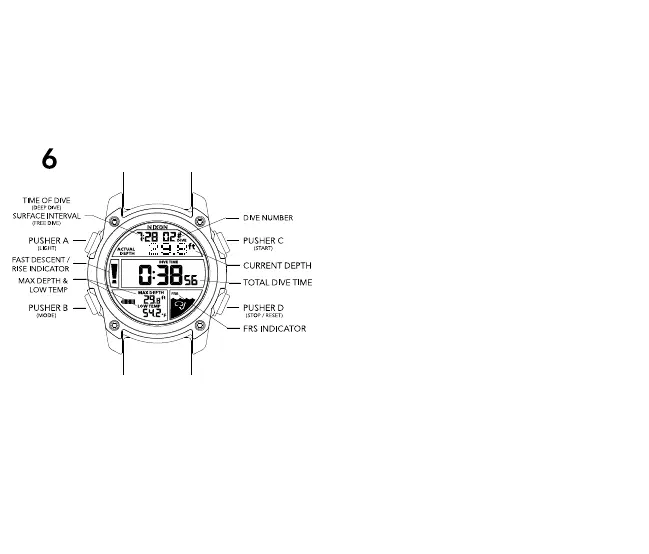
6 DIVE MODE
*Ready to DIVE? DIVE MODE is activated automatically
through Wet Detection once you have descended at least
1.5m (5ft). DIVE MODE cannot be entered manually.
**Before your dive, please ensure you have setup your DIVE
MODE preferences. DIVE MODE preferences are set from
the DIVE LOG MODE.
The UNIT DIVE has 2 distinct DIVE MODE options, “FREE”
and “DEEP”
FREE Dive Mode = Will track each dive individually, and
show your surface interval time between each dive.
DEEP Dive Mode = Will sum the entire time underwater from
ALL your dives, and NOT display a surface interval timer.
Choose either FREE or DEEP dive mode, as well as other
Dive Mode preferences from the DIVE LOG MODE (Section
5):
DIVE MODE PREFERENCES:
Your DIVE MODE preferences can be set from the DIVE LOG
MODE. To set your DIVE MODE preferences, navigate to
DIVE LOG MODE and follow these instructions :
-Press and hold PUSHER B to enter DIVE MODE setting state
-Press PUSHER C or D to toggle between options
-Press PUSHER B to advance to next setting:
-C-m / F-ft = Celsius-meters / Fahrenheit-feet
Press PUSHER C or D to toggle between
Imperial & Metric
-A-EL = Auto-EL Backlight: illuminates automatically
when watch is tilted for 2 seconds while in
DIVE MODE


 To Next Page