16 17
5 DIVE LOG MODE
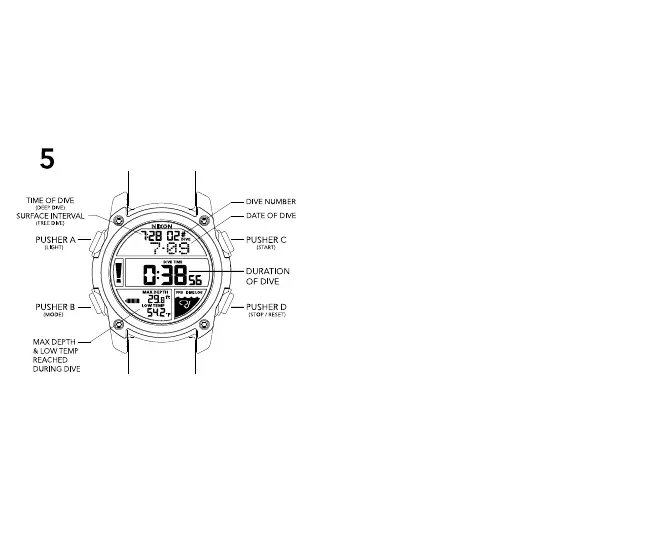
DIVE LOG features:
-Records past 50 dives
-Maintains date and time of dive, dive time (duration), max
depth, and lowest temperature
In DIVE LOG MODE:
-If records are available, press PUSHER C to scroll up dive
record and press PUSHER D to scroll down dive record
-Press and hold PUSHER D to clear entries from the DIVE
LOG
DIVE MODE PREFERENCES:
Your DIVE MODE preferences can be set from the DIVE LOG
MODE. To set your DIVE MODE preferences, navigate into
DIVE LOG MODE and follow these instructions :
-Press and hold PUSHER B to enter DIVE MODE setting state
-Press PUSHER C or D to toggle between options
-Press PUSHER B to advance to next setting:
-C-m / F-ft = Celsius-meters / Fahrenheit-feet
Press PUSHER C or D to toggle between
Imperial & Metric
-A-EL = Auto-EL Backlight: illuminates automatically when
watch is tilted for 2 seconds while in DIVE MODE
-FRS = Fast Rise Speed: Alert will sound if descent speed
exceeds 10m/min or if ascent speed exceeds 50
m/min (in FREE dive mode) or 6m/min (in DEEP
dive mode)
-Dive Type = Choose FREE or DEEP Dive Type
-FREE Dive Mode = Will track each dive
individually, and show your surface interval
time between each dive.
-DEEP Dive Mode = Will sum the entire time
underwater from
ALL your dives, and NOT display a surface
interval timer.
-Press PUSHER A to confirm and exit setting state
-Press PUSHER B to advance to TIME MODE


 To Next Page