asks for the city in which you are located, time, and date.
You can change the settings later.
1. Select the city in which you are located from the list
and OK. To browse for a city, start to type the name of
the city, or scroll to a city. It is important to select the
correct city, because scheduled calendar entries that
you create can change if the new city is located on a
different time zone.
2. Set the time, and select OK.
3. Set the date, and select OK.
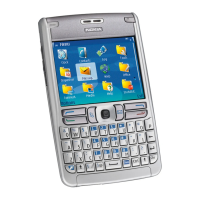
Keys and parts
1 — Power key
2 — Integrated loudspeaker
3 — Display
4 — Joystick. Press the joystick to enter a selection. Use
the joystick to scroll left, right, up, down, or to move
around on the screen.
5 — Right selection key. Press either selection key to
perform the function shown above it on the display.
6 — End key. Press the end key to reject a call, end active
calls and held calls, close applications, and with a long
keypress, end data connections (GPRS, data call).
7 — Clear key
8 — Menu key. Press the Menu key to access the
applications installed in your device. With a l ong keypress,
you can see a list of the active applications and switch
between them. In this User Guide, "select Menu" refers to
pressing this key.
9 — Memory card slot
10 — Internet key. Press and hold the key in the standby
mode to browse the Web.
11 — Microphone. Do not cover the microphone with
your hand during phone calls.
12 — Pop-Port™ . Connector for the USB data cable,
headset, and loopset.
13 — Charger connector
14 — Infrared port
15 — Edit key
16 — Call key
13
Get started
file:///C:/USERS/MODEServer/zmao/15544327/rm-49_mars/en/issue_3/rm-49_mars_en_3.xml Page 13 Feb 23, 2006 10:58:54 AMfile:///C:/USERS/MODEServer/zmao/15544327/rm-49_mars/en/issue_3/rm-49_mars_en_3.xml Page 13 Feb 23, 2006 10:58:54 AM




 To Next Page