This setting allows you to adjust the volume level for each
tone zone.
Especially in trashy sites, you can detect conveniently by turning
off or lowering the volume of unwanted targets' audio responses.
The Tone Volume can be adjusted for each target zone. For
example; in 1-Tone you can adjust the volume for 1 zone but in
6-Tone, you can adjust the volume of each zone separately.
Tone Volume setting range is from 0 to 10.
Tone Volume setting only affects the mode currently
selected; changes made in one mode do not affect
the others.
Tone Volume setting does not work in the Goldfield mode.
Adjusting the Tone Volume
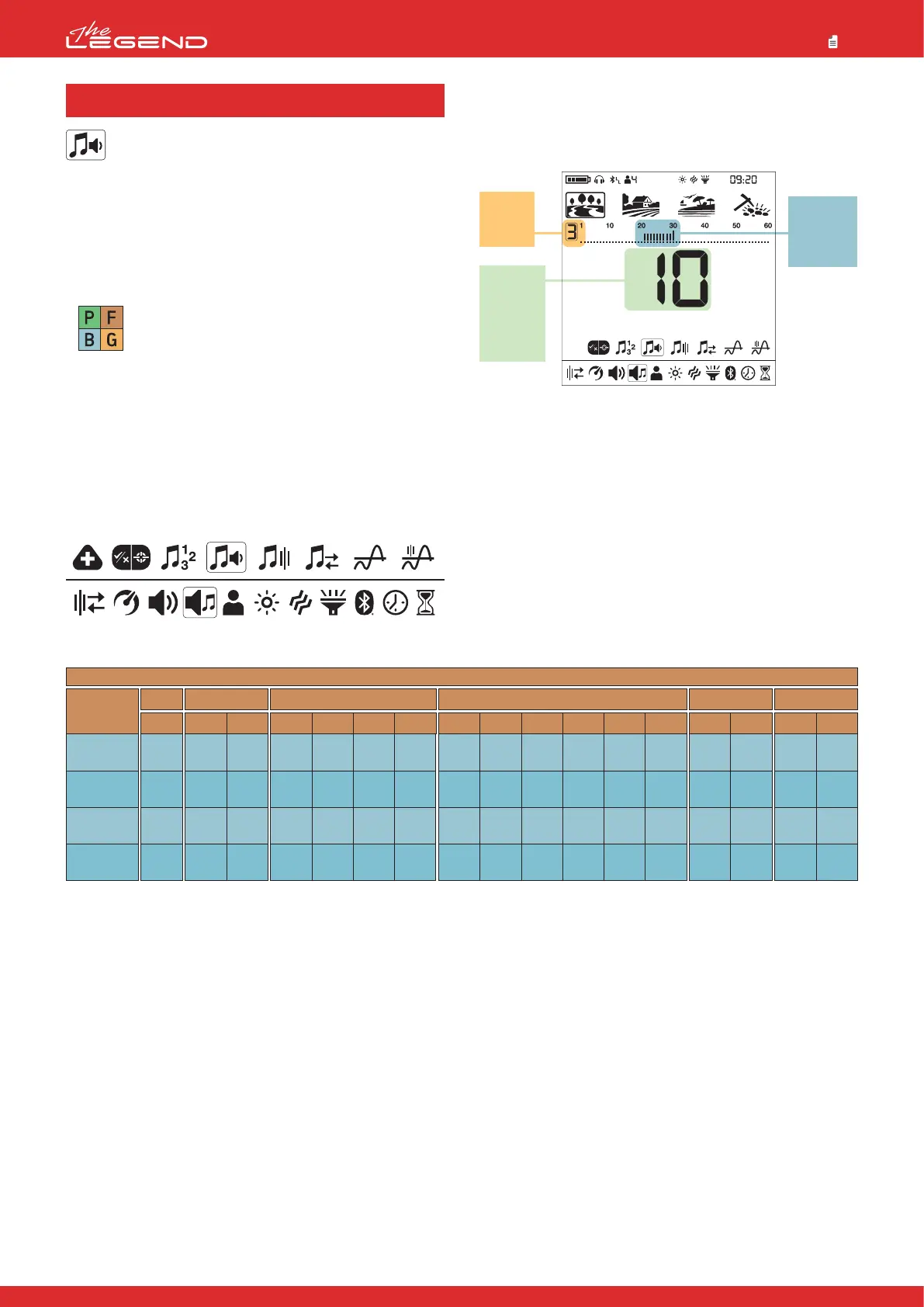
1. Press the Power & Settings Button once. Select the tone setting
using the right and left buttons.
2. The tone settings menu will appear at the top with a plus (+) icon
on the left. Press the plus (+) button once.
3. Using the right and left buttons, select the Tone Volume setting.
The selected setting will be shown framed.
Default Tone Volumes
PARK
FIELD
BEACH
GOLDFIELD
Search
Mode
Z-1
10
10
10
10
Z-2
10
10
10
-
Z-2
10
10
10
-
Z-3
10
10
10
-
Z-4
10
10
10
-
Z-1
4
3
3
-
Z-1
4
3
3
-
Z-2
10
10
10
-
Z-3
10
10
10
-
Z-4
10
10
10
-
Z-5
10
10
10
-
Z-6
10
10
10
-
Z-1
4
3
3
-
Z-2
10
10
10
-
Z-1
4
3
3
-
2-Tone1-Tone 4-Tone 6-Tone 60-Tone
Z-2
10
10
10
-
Z-1
4
3
3
-
P-Tone Pitch
4.2 Tone Volume
4. Press the plus (+) button to go into the Tone Volume setting.
5. The Tone Volume of the selected zone will be displayed on screen.
To the left of the ID scale, the selected zone will be displayed
numerically.
6. Using the right and left buttons, select the zone of which you
want to change the Tone Volume.
7. Once the zone is selected, you can change the Tone Volume using
the plus (+) and minus (-) buttons.
8. Once you are done, you can go back to tone setting by pressing
the Pinpoint & Accept/Reject Button once or back to the main
settings menu by double clicking it. To go back to the main screen,
press the Power & Settings Button once.
22
Target IDs
for the
selected
zone
Selected
target
zone
Tone
Volume
Level
for the
selected
zone
Park
Goldfield
Beach
Field



 To Next Page