ACCESS GATEWAY
98 System Administration
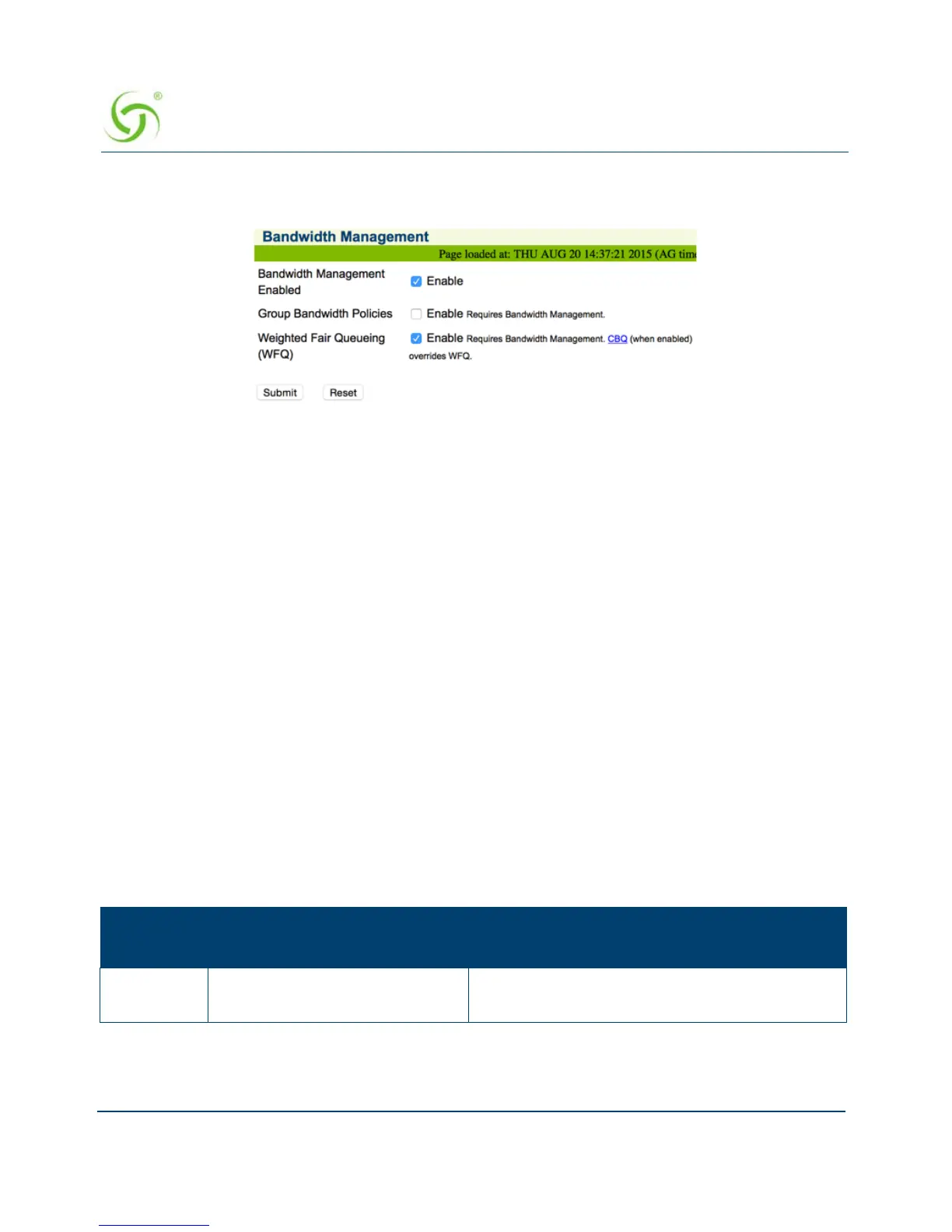
1. From the Web Management Interface, click on Configuration, then Bandwidth
Management. The Bandwidth Management screen appears:
2. If required, click the check box for Bandwidth Management Enabled.
3. If required, select Group Bandwidth Policies. Bandwidth Management must be enabled
before you can enable and specify Group Bandwidth Policies.
Note: The Bandwidth Management page only globally Enables and Disables Bandwidth
Management and Group Bandwidth Policies. Bandwidth settings themselves are set for each WAN
interface in Ethernet Ports/WAN.
4. If you made any changes to the settings on this screen, you must click the check box for
Reboot after changes are saved? (the Access Gateway must be rebooted).
5. Click on the Submit button to save your changes and reboot the system, or click on the
Reset button if you want to reset all the values to their previous state.
Group Bandwidth Limit Policy
The Group Bandwidth Limit Policy allows the you to assign a common bandwidth rate limiting
policy to a group of subscriber devices. All devices within the group share the total bandwidth
allocated to the policy.
The Group Bandwidth Limit Policy feature defines the following vendor-specific attributes
(VSAs):
Nomadix
VSA #
Name Role/Value
19 GROUP_BW_POLICY_ID Defines the ID the for the group policy. Integer
between 1 and 16777215, inclusive.



 To Next Page