17
9 Frequently Asked Questions
9.1 Nothing happens when Connect is clicked.
a) Ensure the power is turned on.
b) Try cycling the power OFF then ON and reconnecting the UC5
Toolsuite Software.
c) Check the COM port settings (under Settings) to make sure it is
set up correctly with the proper COM port chosen.
d) Check all cable connections to be sure everything is properly
connected.
9.2 Sensor information does not display after connecting.
Cycle the power OFF then ON and exit the software and restart.
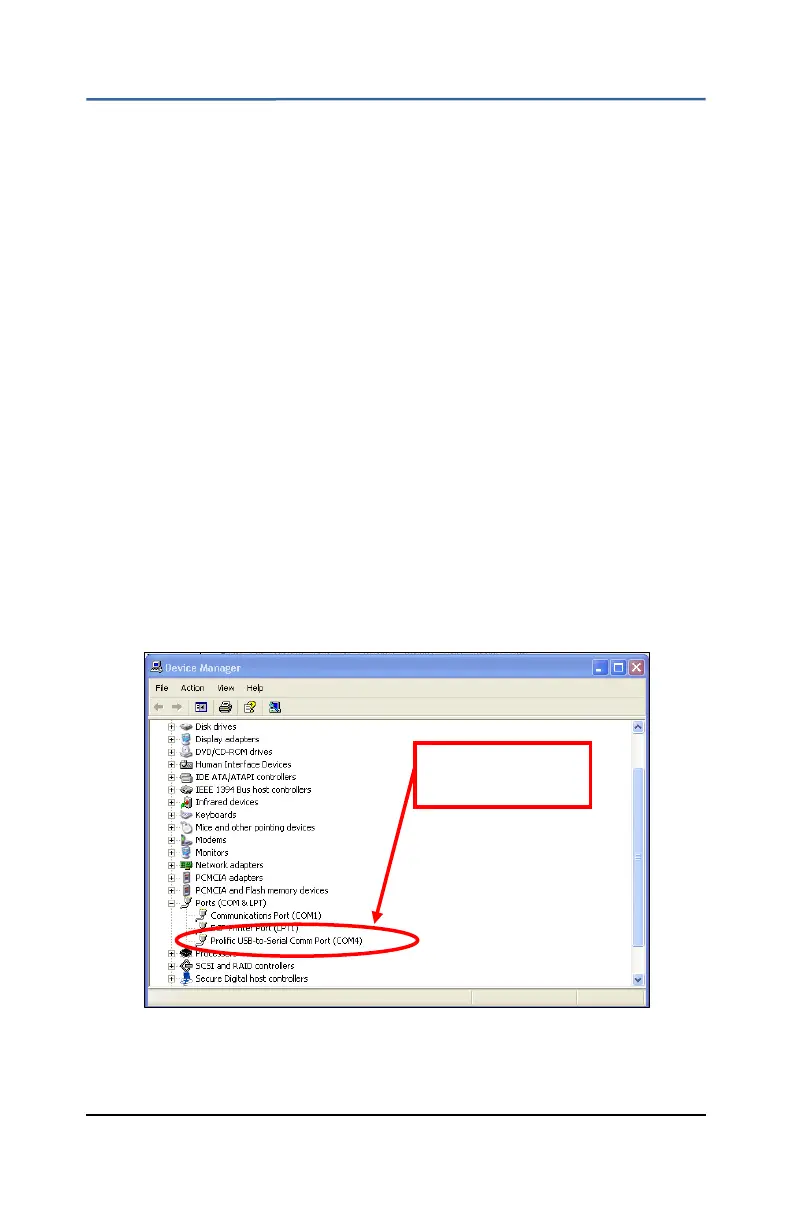
9.3 The correct COM port is not displayed in the Settings window.
a) In Windows go to Start->Control Panel->System
b) Click on the Hardware tab and then the Device Manager button.
c) Click the + sign beside Ports (COM & LPT)
d) Check for the com port with USB-to-Serial in the title. If that port
is not listed reinstall the supplied driver. If it is listed make sure the
UC5 Toolsuite software is set up to connect to that COM port.
This is the correct
COM port


 To Next Page