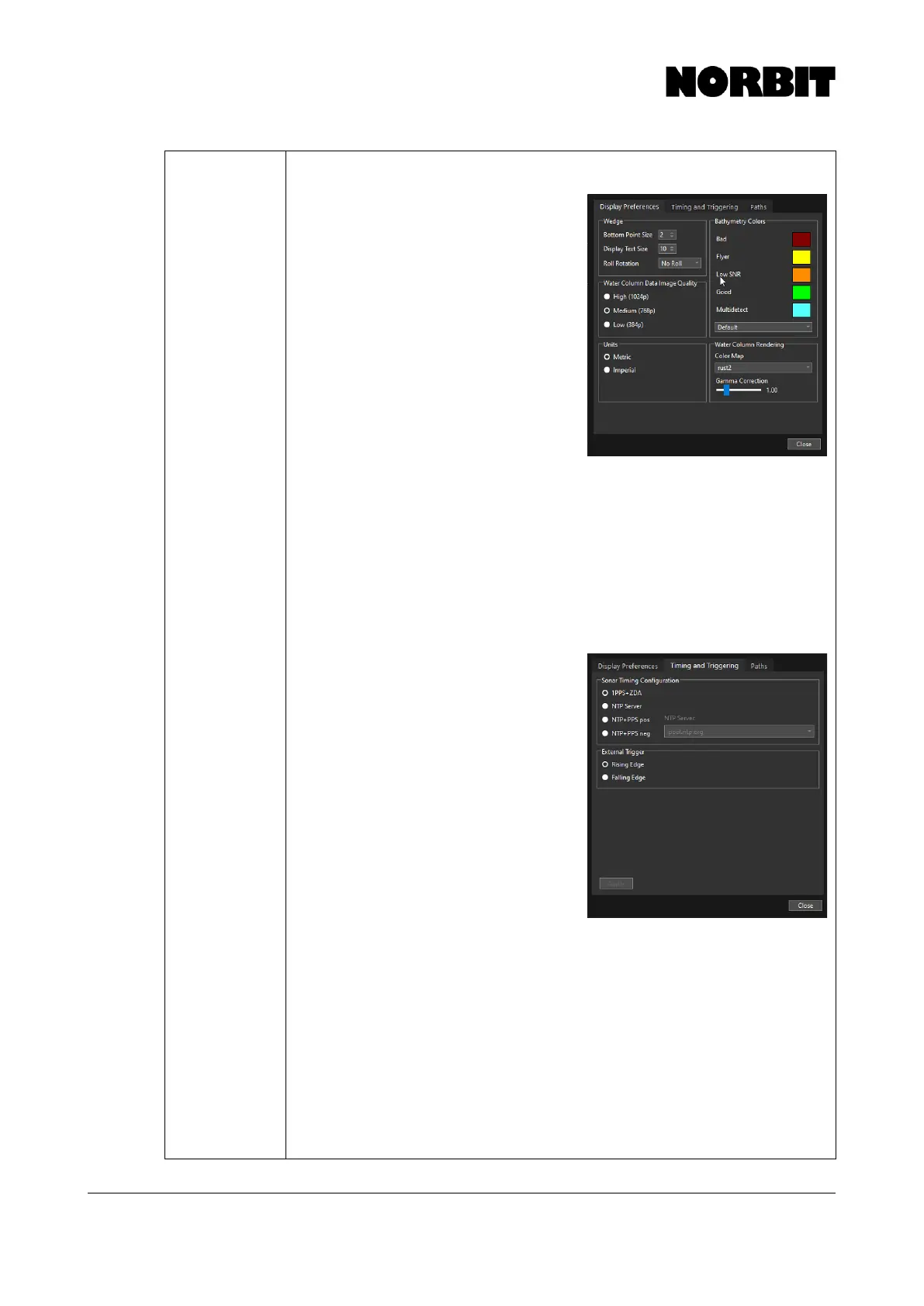
Display Preferences
Bottom Point Size – Changes the point
size on the wedge. Adjustable from 1-10.
Display Text Size – Changes the text size
on the wedge area. Adjustable from 1-12.
Roll Rotation – Viewing options to show
the roll stabilized wedge.
Water Column Data Image Quality – Sets
the resolution of the water column display.
This does not affect output resolution. To
ensure system resources are kept to a
minimum for low-grade field laptops, run
with medium or low graphics selected.
Units – Selects the display units in the GUI
to be either metric or imperial.
Bathymetry Quality Colors – Changes
color palette of bottom detection quality
flags.
Color Map – Offers different color settings for visualizing the swath intensity data.
Gamma Correction – Changes the visual contrast of the wedge intensity data.
Setting the gamma too low will mute the intensity in the wedge display to nearly all
off (black). Setting gamma too high will fuse the darkest areas with brightest areas. A
value of 2 is often the best.
Timing and Triggering
Users can specify the synchronization method for sonar timing. For more installations,
1PPS+ZDA should be selected, in which
case the GNSS signal provides the time
stamp and associated 1PPS signal to the
sonar.
If timing direct from the SIU (via the GNSS
receiver) is not possible, e.g. on ROV/AUV
or other types of custom installations, then
timing from an NTP Server may be used.
NTP+PPS has the same accuracy as
1PPS+ZDA and is recommended for all
other installation types where 1PPS+ZDA is
not possible. A PPS pulse must be sent to
the system on the timing pin, and an NTP
server should be made available on the
network. If the timing error exceeds 10ms,
the sonar will discard timing. Select
NTP+PPS pos/neg if using time from an NTP server to provide PPS. “pos” and “neg”
refers to a positive and negative signal spike, respectively. When this mode is
activated, an error of >100ms renders the data unusable.
If there is no PPS available, NTP without PPS can be used by selecting NTP Server.
It possesses less accuracy but is OK to use for platforms with lower dynamics. This
option requires that the NTP server is at a low STRATUM (<2) value and not too far
away in the network (public servers are usually not good enough).
More advanced users can use an external signal to trigger the sonar. The External
Trigger polarity can be set to Rising Edge or Falling Edge. NOTE: For integrated
systems, triggering via the BNC connector is not possible. Inputting any
voltage to the BNC of an integrated SIU can cause damage to the internal
electronics.



 To Next Page