Installation and Owner’s Manual 6
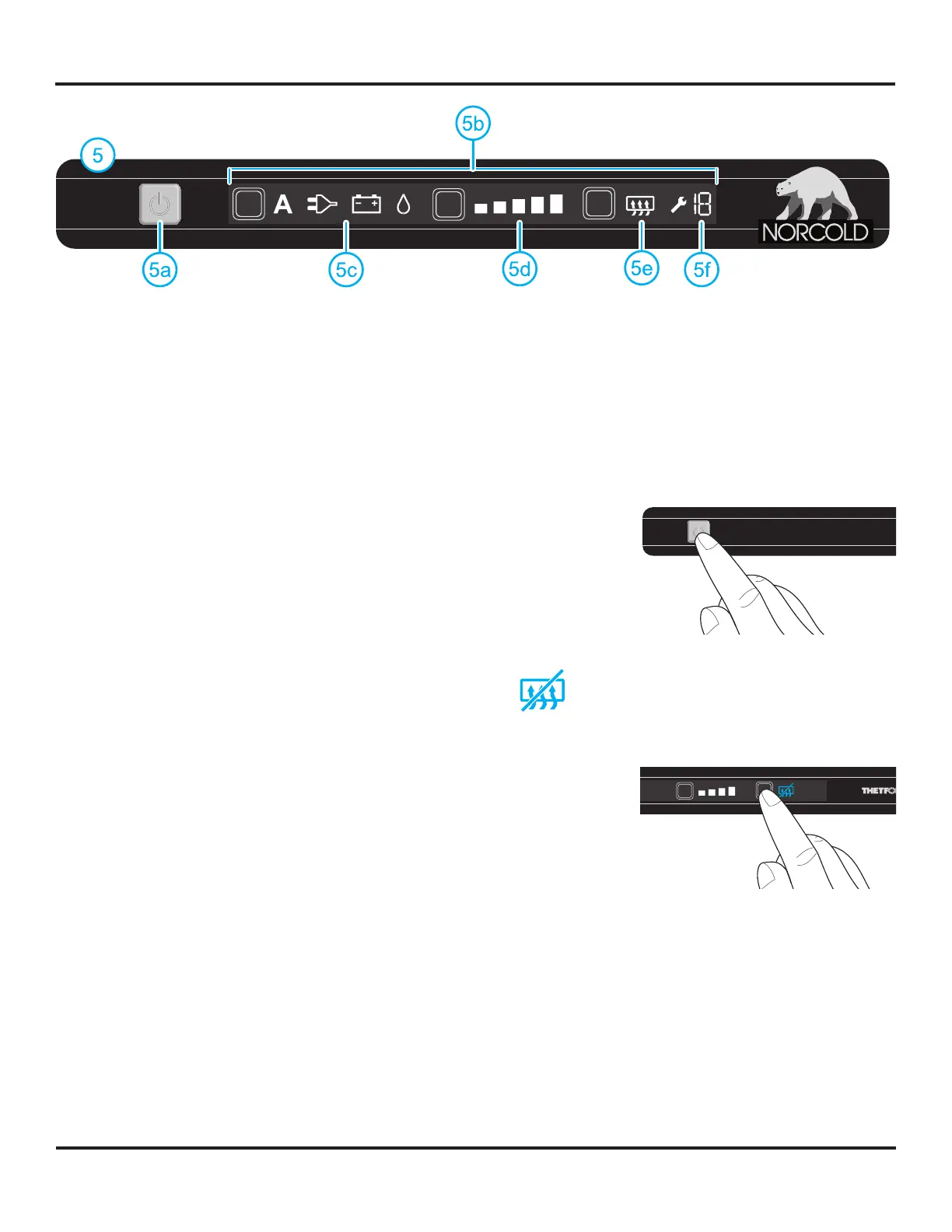
5........................................................................................................................................................ Control panel with LCD touchscreen
5a........................................................................................................................................................................................... On/off switch
5b........................................................................................................................................................................................... Touchscreen
5c .........................................................................................................................................................................................Mode symbols
5d...........................................................................................................................................................................Cooling level indicators
5e............................................................................................................................... Symbol ‘anti-condensation’ (only for model N3150)
5f................................................................................................................................................................................................Error code
Turn refrigerator on
Start up the refrigerator and let it cool for eight hours before loading with food. If the refrigerator does not start to cool down after about
two hours, contact your dealer or a Norcold authorized service center.
For best cooling performance, level your vehicle before operating the refrigerator.
To turn the refrigerator on, push the on/off switch and hold it for 1 second, as illustrated. A
light in the on/off switch will turn green.
After 10 seconds the settings will dim. The green light indicates the refrigerator is still
functioning.
To check the settings push the on/off button again. The currently active settings will light up.
For optimal performance, turn the refrigerator on eight hours before placing food.
Anti-condensation heater (present on refrigerator model N3150 only)
To prevent condensation from forming on the control panel , the anti-condensation function is automatically turned on (no symbol
visible). Only turn this function off when it is necessary to conserve vehicle battery charge.
To turn OFF the anti-condensation heater, push on the anti-condensation button. The
symbol on the control panel will light up, indicating that the anti-condensation heater has
been turned OFF.
To turn the anti-condensation heater back on, push the anti-condensation button again. The
symbol on the control panel will go off, indicating that the anti-condensation heater has been
turned ON.
Control Panel With Touchscreen
Art02352
Art02369



 To Next Page