EasyManua.ls Logo

NordicTrack GX 4.6 PRO - User Manual

NordicTrack GX 4.6 PRO
36 pages
Print Icon
To Next Page IconTo Next Page
Loading...
USER’S MANUAL
Serial
Number
Decal
Model No. NTEVEX76919.0
Serial No.
Write the serial number in the space
above for reference.
CAUTION
Read all precautions and
instructions in this manual before
using this equipment. Keep this
manual for future reference.
iconeurope.com
CUSTOMER SERVICE
UNITED KINGDOM
Call: 0330 123 1045
From Ireland: 053 92 36102
Website: iconsupport.eu
E-mail: csuk@iconeurope.com
Write:
ICON Health & Fitness, Ltd.
Unit 4, Westgate Court
Silkwood Park
OSSETT
WF5 9TT
UNITED KINGDOM
AUSTRALIA
Call: 1800 993 770
E-mail: australiacc@iconfitness.com
Write:
ICON Health & Fitness
PO Box 635
WINSTON HILLS NSW 2153
AUSTRALIA
Question and Answer IconNeed help?

Do you have a question about the NordicTrack GX 4.6 PRO and is the answer not in the manual?

Overview

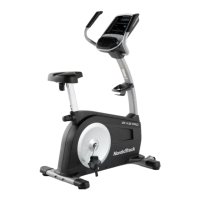
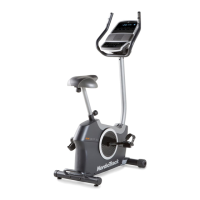
The NordicTrack GX 4.6 Pro is an exercise bike designed for home use, offering a range of features for cardiovascular fitness, endurance building, and body toning. It incorporates wireless technology, a full-color touch screen console, and various workout options to enhance the user experience.

Function Description:

The primary function of the NordicTrack GX 4.6 Pro is to provide a stationary cycling exercise. Users pedal to engage a resistance mechanism, which can be adjusted manually or automatically during workouts. The console serves as the central control and display unit, offering interactive features and exercise feedback.

Important Technical Specifications:

  • Dimensions: Length: 3 ft. 10 in. (117 cm), Width: 2 ft. 1 in. (63 cm)
  • Weight: 104 lbs. (47 kg)
  • Maximum User Weight: 286 lbs. (130 kg)
  • Resistance System: Silent Magnetic Resistance (SMR)
  • Power Source: Requires a power adapter (included)
  • Connectivity: Bluetooth® (for heart rate monitors and sound system), Wi-Fi (for iFit workouts and updates), HDMI (for external display)
  • Heart Rate Monitoring: Handgrip heart rate monitor and included chest heart rate monitor (compatible with all Bluetooth® Smart heart rate monitors)
  • Console: Full-color touch screen tablet with iFit integration, onboard workouts, and various display modes.

Usage Features:

  • Assembly: Requires two persons and includes tools like a Phillips screwdriver and an adjustable wrench.
  • Powering On/Off: The console turns on by touching the screen or pressing any button when the power adapter is plugged in. It pauses if pedals don't move for several seconds and turns off after several minutes of inactivity or by unplugging the power adapter.
  • Seat Adjustment: The seat height and lateral position can be adjusted. To adjust height, loosen and pull the seat post knob, slide the seat post to the desired position, ensure the knob engages an adjustment hole, and then tighten. For lateral adjustment, loosen the seat knob, move the seat forward or backward, and then tighten.
  • Pedal Straps: Straps can be tightened by pulling downward on the end or loosened by pressing a tab and pulling upward.
  • Leveling: Leveling feet beneath the rear stabilizer can be turned to eliminate rocking motion.
  • Tablet Holder: Designed for most full-size tablets. To insert, set the bottom edge of the tablet in the tray, then pull the clip over the top edge. Ensure the tablet is firmly secured. The tablet holder can be rotated/pivoted if applicable to the model.
  • Console Navigation: The touch screen functions like other tablets, allowing users to slide or flick fingers to move images. A keyboard appears for text input, with options for numbers, symbols, and capital letters.
  • Manual Mode: Users can start a manual workout and adjust pedal resistance using numbered resistance buttons or increase/decrease buttons.
  • Workout Modes:
    • Map Workouts: Allows users to follow pre-programmed map routes or create their own. Requires Wi-Fi connection. The console displays a map of the route and tracks progress.
    • Onboard Workouts: Pre-programmed workouts that automatically control pedal resistance.
    • iFit Workouts: Access to a large and varied workout library, personalized workouts, and result tracking through an iFit account. Requires Wi-Fi connection and adding workouts to the iFit.com schedule.
  • Exercise Feedback: The console displays continuous exercise feedback, including speed, distance, calories burned, and heart rate. Users can select different display modes or view statistics and charts.
  • Heart Rate Monitoring:
    • Chest Heart Rate Monitor: Worn around the chest, under clothes, with electrode areas wetted for accuracy. The logo should be right-side-up.
    • Handgrip Heart Rate Monitor: Users hold metal contacts on the handlebars. Avoid moving hands or gripping too tightly for accurate readings.
    • Priority: If both are used, the chest heart rate monitor has priority.
  • Fan: Several speed settings, including an auto mode that adjusts fan speed based on pedaling speed.
  • Sound System: Play music or audio books by plugging a 3.5 mm audio cable into the console and a personal audio player. Volume can be adjusted via console buttons or the audio player.
  • Bluetooth Sound System: Connect smart devices via Bluetooth. Hold the Bluetooth button for 3 seconds to enter pairing mode. The console can save up to 8 paired devices.
  • HDMI Connectivity: Connect an HDMI cable (not included) to the console and a TV/monitor to display the console screen.

Maintenance Features:

  • Regular Inspection: Inspect and properly tighten all parts each time the exercise bike is used. Replace worn parts immediately.
  • Cleaning: Use a damp cloth and a small amount of mild soap. Avoid liquids near the console and direct sunlight. Do not use alcohol, abrasives, or chemicals.
  • Chest Heart Rate Monitor Care: Thoroughly dry electrode areas after each use. Store in a warm, dry place (not in plastic bags). Avoid excessive bending, stretching, or extreme temperatures. Clean with a damp cloth and mild soap; air dry the chest strap.
  • Console Troubleshooting:
    • No Power: Ensure the power adapter is fully plugged in and external wires are correctly connected.
    • Heart Rate Display Issues: For handgrip monitor, ensure proper hand positioning and clean contacts. For chest monitor, adjust position or re-wet electrodes.
    • Wireless Network/iFit Issues: Refer to support.iFit.com.
    • Console Freeze/Boot Issues: Unplug the power adapter, locate the small reset opening (A) near the USB port, press and hold the reset button with a bent paper clip while a second person plugs in the power adapter. Continue holding until the console turns on.
  • Firmware Updates: Regularly check for and install firmware updates via the console settings (Maintenance > Update). Do not unplug the power adapter during updates.
  • Tablet Holder Stability: If the tablet holder does not stay in place, rotate it backward and tighten the indicated screw (B).
  • Reed Switch Adjustment: If the console does not display correct feedback, unplug the power adapter. Pull apart the shields, locate the Reed Switch (57), rotate the Left Crank Arm (20) until a Magnet (55) aligns with the switch. Slightly loosen the #8 x 18mm Screw (34), slide the switch toward or away from the magnet, and retighten. Plug in the power adapter and rotate the crank arm to check feedback.

NordicTrack GX 4.6 PRO Specifications

General IconGeneral
BrandNordicTrack
ModelGX 4.6 PRO
CategoryExercise Bike
LanguageEnglish

Related product manuals