EasyManua.ls Logo

NordicTrack NTEX13808.0 - User Manual

NordicTrack NTEX13808.0
24 pages
Print Icon
To Next Page IconTo Next Page
Loading...
USER'S MANUAL
CAUTION
Read all precautions and instruc-
tions in this manual before using
this equipment. Keep this manual
for future reference.
Serial
Number
Decal
Model No. NTEX13808.0
Serial No.
Write the serial number in the
space above for reference.
QUESTIONS?
As a manufacturer, we are commit-
ted to providing complete customer
satisfaction. If you have questions,
or if parts are damaged or missing,
DO NOT CONTACT THE STORE;
please contact Customer Care.
IMPORTANT: You must note the
product model number and serial
number (see the drawing above)
before contacting us:
CALL TOLL-FREE:
1-888-825-2588
Mon.–Fri. 6 a.m.–6 p.m. MT
Sat. 8 a.m.–4 p.m. MT
ON THE WEB:
www.nordictrackservice.com
www.nordictrack.com
All manuals and user guides at all-guides.com
all-guides.com
Question and Answer IconNeed help?

Do you have a question about the NordicTrack NTEX13808.0 and is the answer not in the manual?

Summary

Product Information and Support

Customer Support and Contact Information

Details for contacting customer care for questions or issues with the product.

Warning Decal Placement

Important Precautions

Assembly Process

Front and Rear Stabilizer Assembly

Attaching the front and rear stabilizers to the main frame using bolts and locknuts.

Seat Handlebar and Book Holder Attachment

Connecting the seat handlebar and attaching the book holder to the backrest tubes.

Seat and Upright Assembly

Mounting the seat, attaching the upright, and connecting the handlebar to the main frame.

Console and Handlebar Cover Installation

Connecting console wiring and securing handlebar covers with screws.

Pedal Attachment and Power Connection

Firmly tightening pedals and connecting the power adapter to the exercise cycle.

Operating the Exercise Cycle

Console Functions and Modes

Using Manual Mode

Using Preset Workouts

Using iFit Workouts

Maintenance and Troubleshooting

General Maintenance and Cleaning

Routine inspection, tightening of parts, and cleaning procedures for the cycle.

Drive Belt and Reed Switch Adjustment

Adjusting the drive belt for proper tension and calibrating the reed switch for console accuracy.

Exercise Guidelines

Part List

Ordering Replacement Parts

Overview

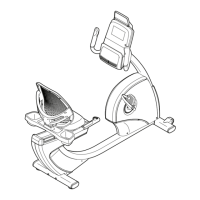
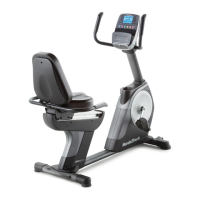
This document describes the NordicTrack Commercial™ VR exercise cycle, Model No. NTEX13808.0, a recumbent exercise bike designed for home use.

Function Description

The NordicTrack Commercial™ VR exercise cycle is a fitness device primarily used for cardiovascular exercise, endurance building, and body toning. It provides a low-impact workout experience, making it suitable for a wide range of users. The exercise cycle features a console that allows users to select manual mode, preset workouts, or iFit workouts, and provides continuous exercise feedback such as time, distance, calories burned, power output (watts), and pedaling speed (MPH/KPH). It also includes a sound system for connecting an MP3 or CD player, and a fan for user comfort during workouts.

Important Technical Specifications

  • Model Number: NTEX13808.0
  • User Weight Capacity: Not to exceed 350 lbs. (159 kg).
  • Power Source: Requires a power adapter (included) to be plugged into a socket.
  • Resistance Levels: Adjustable via numbered "1 Step Resistance" buttons on the console.
  • Workout Programs:
    • Manual mode with adjustable resistance.
    • Thirty preset workouts, each with programmed resistance levels and target speeds.
    • iFit Interactive Workout System compatible with iFit cards (sold separately) for guided workouts with automatic resistance control and personal trainer voice coaching.
  • Display Feedback: Time (elapsed/remaining), Distance (miles/kilometers), Calories (approximate), Watts (power output), MPH/KPH (pedaling speed), Heart Rate (via handgrip pulse sensor).
  • Pulse Sensor: Handgrip pulse sensor for heart rate measurement (not a medical device; intended as an exercise aid).
  • Fan: Integrated fan with high, low, and auto speed settings, capable of automatically adjusting speed based on pedaling intensity or turning off after thirty seconds of inactivity.
  • Sound System: Audio input jack for MP3/CD players.
  • Adjustability: Adjustable seat (forward/backward) and pedal straps.
  • Mobility: Equipped with front wheels for easy relocation.

Usage Features

The exercise cycle is designed for user-friendly operation with several features enhancing the workout experience:

  • Console Operation: The console can be activated by pressing any button or by simply beginning to pedal. It features dedicated buttons for "WORKOUTS," "ENTER," "START," "DISPLAY," and "FAN," as well as arrow buttons for navigation and "1 STEP RESISTANCE" buttons for quick resistance adjustments.
  • Manual Mode: Allows users to control resistance manually and track their progress. The display shows various metrics, and users can cycle through different views using the "DISPLAY" button.
  • Preset Workouts: Offers a variety of pre-programmed workouts with varying resistance profiles and target speeds. Users can select a workout profile using the arrow buttons and confirm with "ENTER." The console guides users through the workout, prompting them to adjust pedaling speed and automatically changing resistance.
  • iFit Workouts: Provides an interactive workout experience using iFit cards. When an iFit card is inserted, the console accesses specialized workouts that control resistance and offer voice coaching.
  • Heart Rate Monitoring: Handgrip pulse sensors allow users to monitor their heart rate during exercise. For accurate readings, users are advised to hold the contacts firmly for at least 15 seconds and ensure their hands are clean.
  • Comfort Features:
    • Adjustable Seat: The seat can be easily adjusted forward or backward to accommodate different user heights and preferences, ensuring a comfortable pedaling position.
    • Pedal Straps: Adjustable straps on the pedals secure the user's feet, preventing slippage and ensuring efficient power transfer.
    • Integrated Fan: The fan provides cooling during workouts, with adjustable speed and direction.
    • Sound System: Users can connect their MP3 or CD players to listen to music or audio books through the console's speakers.
  • Console Settings: Users can enter a user mode to adjust the display contrast and switch between miles (ENGLISH) and kilometers (METRIC) for distance and speed measurements.
  • Automatic Shut-off: The console automatically pauses after several seconds of inactivity and turns off after about five minutes to conserve power.
  • Leveling Feet: Adjustable leveling feet under the rear stabilizer help to eliminate rocking motion on uneven floors, ensuring stability during use.
  • Moving the Cycle: The exercise cycle can be easily moved by lifting the rear stabilizer handle and rolling it on its front wheels.

Maintenance Features

Regular maintenance is crucial for the longevity and proper functioning of the exercise cycle:

  • Regular Inspection and Tightening: All parts should be inspected and tightened regularly. Any worn parts must be replaced immediately to ensure safety and performance.
  • Cleaning: The exercise cycle should be cleaned with a damp cloth and a small amount of mild soap. It is important to keep liquids away from the console and out of direct sunlight to prevent damage.
  • Drive Belt Adjustment: If the pedals slip even at the highest resistance setting, the drive belt may need adjustment. This involves removing the shields, loosening specific screws, and adjusting the belt tension using a screwdriver.
  • Reed Switch Adjustment: If the console does not display correct feedback (e.g., speed or distance), the reed switch may need adjustment. This involves removing the shields, loosening a screw, sliding the reed switch closer to or further from a magnet on the pulley, and then re-tightening the screw.
  • Pulse Sensor Care: For optimal performance of the handgrip pulse sensors, users should ensure their hands are clean and clean the metal contacts with a soft cloth. Alcohol, abrasives, or chemicals should not be used on the contacts.
  • Power Adapter Management: After exercising, it is important to unplug the power adapter. Failure to do so may cause premature wear of the electrical components. If the exercise cycle has been exposed to cold temperatures, it should be allowed to warm to room temperature before plugging in the power adapter to prevent damage to electronic components.
  • Post-Assembly Check: After assembly, all parts should be properly tightened. Placing a mat beneath the exercise cycle is recommended to protect the floor.

NordicTrack NTEX13808.0 Specifications

General IconGeneral
ModelNTEX13808.0
Resistance TypeMagnetic
DisplayYes
Display TypeLCD
InclineNo
Adjustable SeatYes
Adjustable HandlebarsYes
Warranty5-Year Frame, 90-Day Parts & Labor
Display FeaturesCalories, Distance, RPM, Speed, Time

Related product manuals