50 Installing and connecting a Series 2332 Access Point
NN47250-302 (324136-A Version 01.03)
a Insert a drywall anchor into each hole, up to the beginning of the threads on the anchor.
b Screw each anchor the rest of the way into its hole using a #2 Phillips-head screwdriver.
c Remove the screw from each anchor and save the screw(s) for step 6 on page 51.
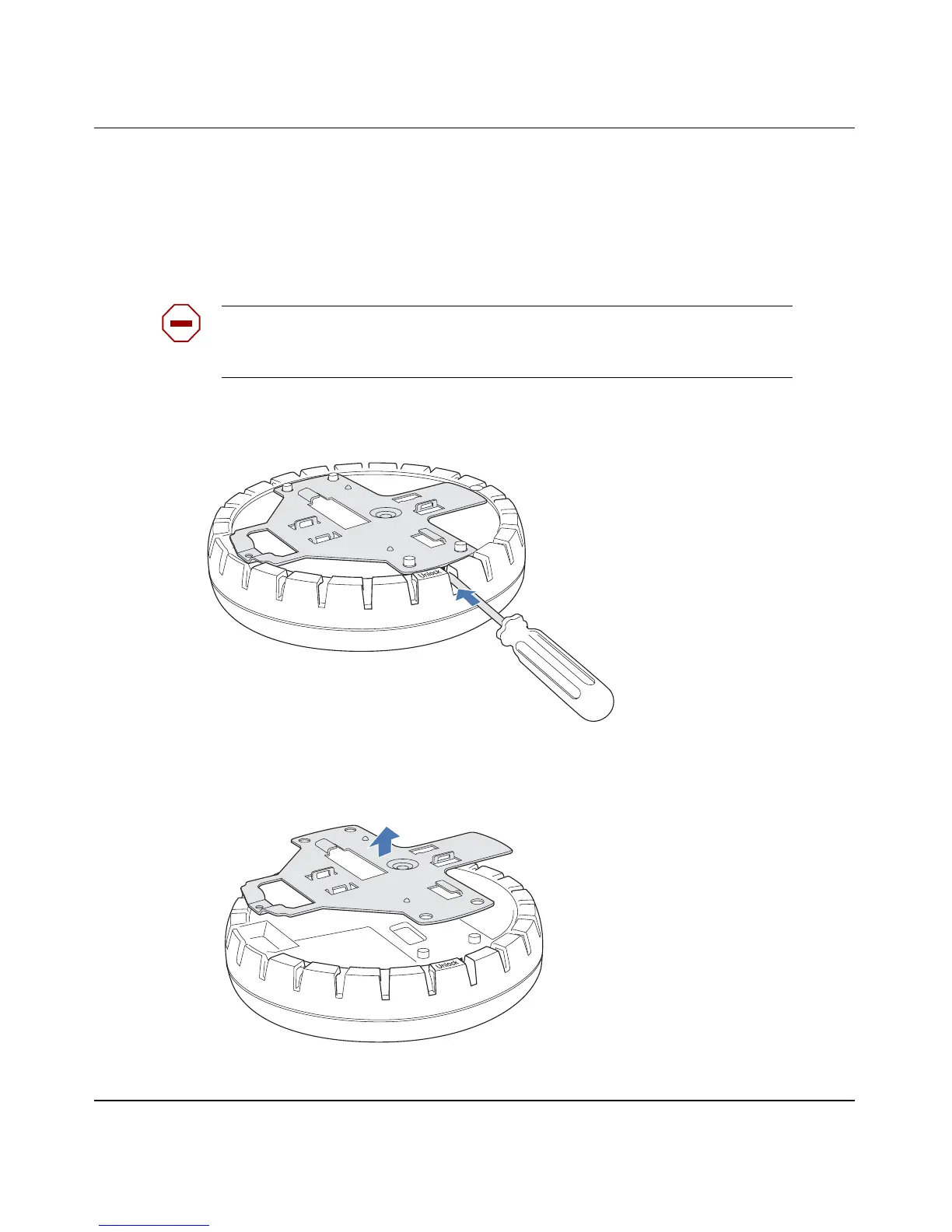
3 Unlock the universal mounting bracket from the AP by inserting the 3-mm or 1/8-inch screwdriver into
the Unlock hole on the AP as shown in Figure 25 on page 50.
Figure 25. Step 3—Unlocking the Bracket
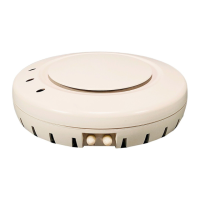
4 Remove the bracket as shown in Figure 26.
Figure 26. Step 4—Removing the Bracket
Caution! To avoid damage to the AP’s lock mechanism or electronic
components, do not use excessive force when inserting a tool into the Unlock or
Lock hole.
840-9502-0011
840-9502-0008


 To Next Page