Installing the 8010co chassis into the rack 19
Installing the 8010co chassis in a Hendry rack
Use the 12 hex-head screws and a nutdriver to install the chassis in a
Hendry rack.
To install the 8010co chassis in a Hendry rack:
Step Action
1
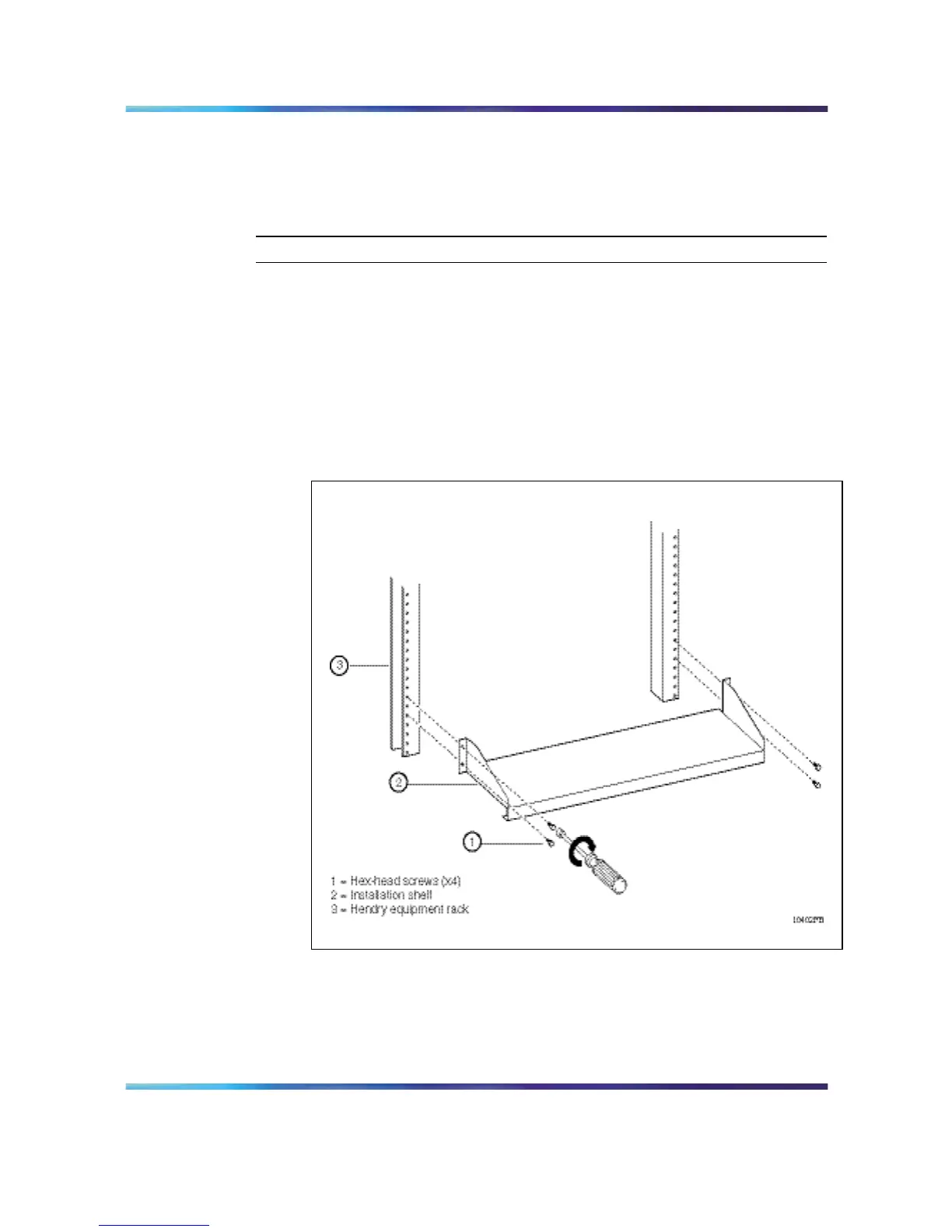
Place the installation shelf at the bottom of the rack.
2
Holding the installation shelf in position, align the shelf’s mounting
rail with two holes on each side of the vertical rack support.
3
Insert a hex-head screw through each installation shelf mounting
hole and into the corresponding hole in the rack (Figure 6 "Installing
the shelf in a Hendry rack: 8010co chassis" (page 19)).
Figure 6
Installing the shelf in a Hendry rack: 8010co chassis
4
Tighten each screw with a nutdriver.
5
Using a Phillips screwdriver, remove the 5 screws securing each of
the two mounting rails to the 8010co chassis (Figure 7 "Removing
the mounting rails from the 8010co chassis" (page 20)).
Nortel Ethernet Routing Switch 8600
Quick Start
NN46205-310 01.01 Standard
4.1 21 December 2006
Copyright © 2006 , Nortel Networks Nortel Networks Confidential
.



 To Next Page