Installing the Charger
CHG-120 Instruction Manual 11/06/2002 PN 50641:B1 13
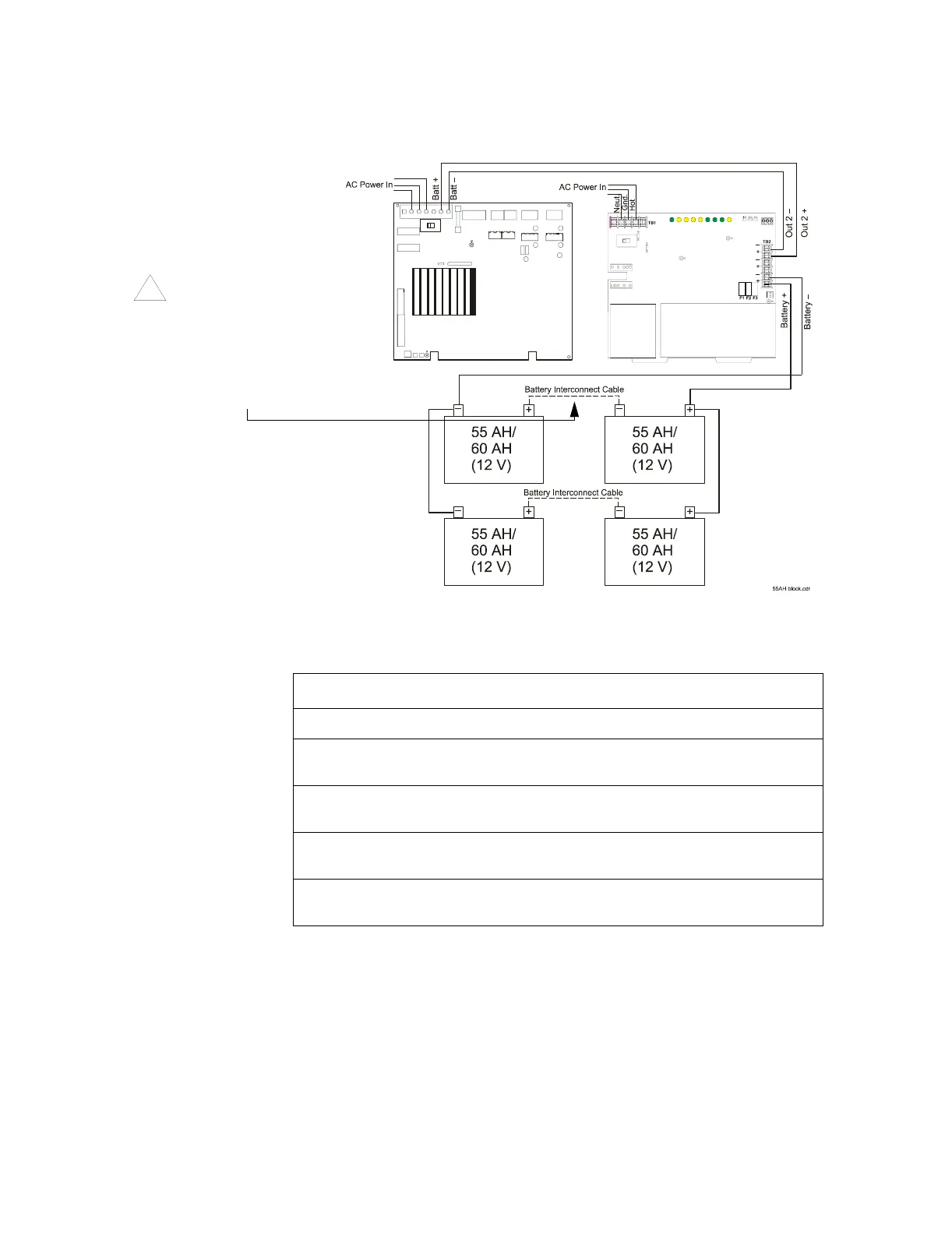
Connecting Four Batteries Figure 6 shows how to connect four 55 AH batteries to the
charger:
Figure 6 Connecting Four Batteries to a Charger
Table 4 contains instructions for connecting four batteries to the charger:
Warning: Do not
connect the Battery
Interconnect Cable
at this time.
Refer to “Starting the
Charger” on page 23.
!
Charger
MPS-400
TB2
TB1
Step Action
1 Remove all power sources to the charger.
2 Tie the batteries in pairs by connecting the battery negative terminals and the
battery positive terminals as shown in Figure 6.
3 Connect the battery negative cable to the TB2 terminal (on the charger labeled
“Battery –”) as shown in Figure 6.
4 Connect the battery positive cable to the TB2 terminal (on the charger) labeled
“Battery +”) as shown in Figure 6.
5 Proceed to the section “Connecting the Charger.” Do not connect the Battery
Interconnect Cable at this time—refer to “Starting the Charger” on page 23.
Table 4 Connecting 55 AH Batteries



 To Next Page