Installing the Charger
14
CHG-120 Instruction Manual 11/06/2002 PN 50641:B1
Mounting the Charger
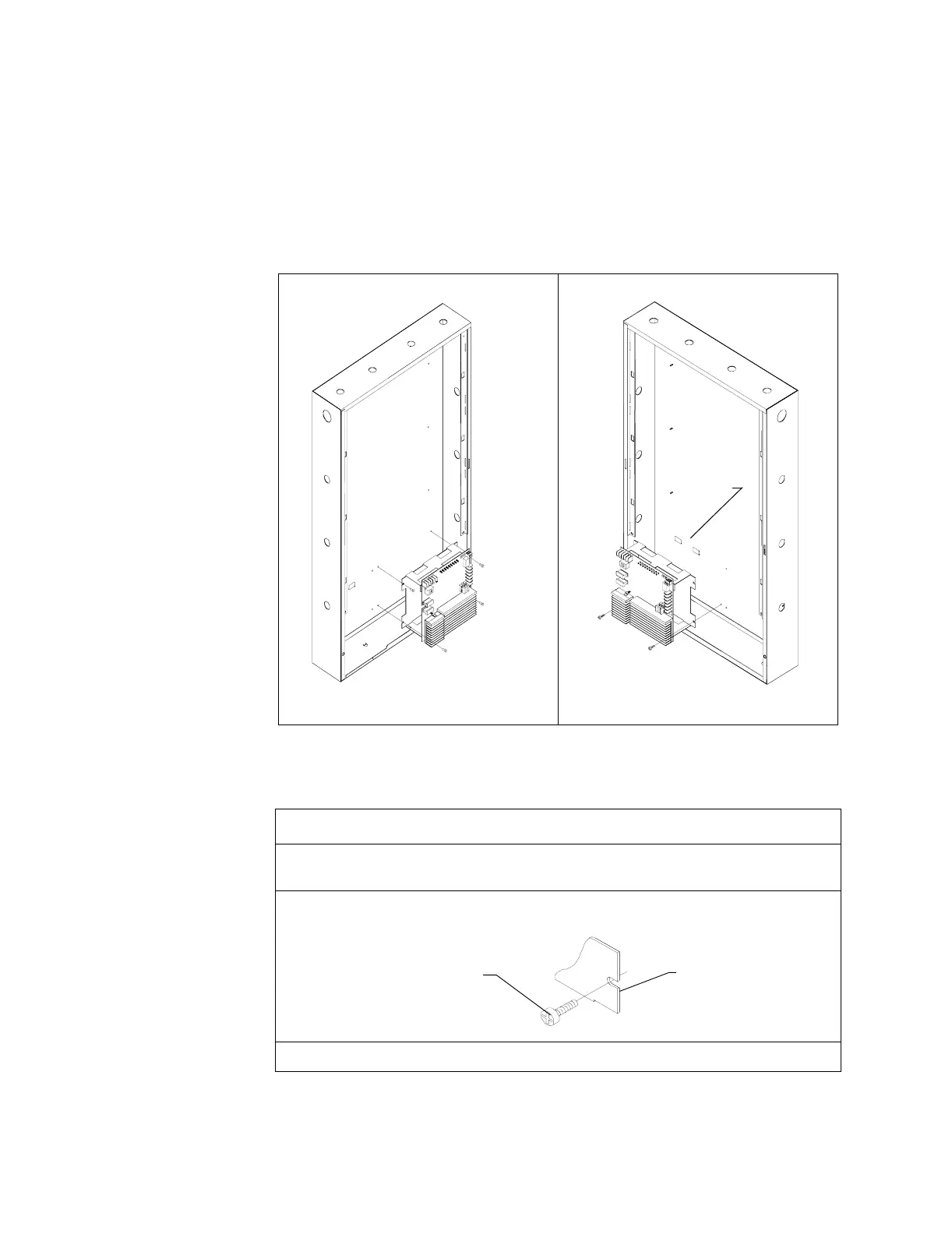
Mounting the Charger into a CAB-3 Series Cabinet You can mount a charger into the
bottom row of a CAB-3 Series Cabinet, as long as the charger is within 20 feet of the load.
Typically, a charger mounts into the lower right corner of the CAB-3—beside the power
supply (Figure 7, position 2). If using an additional CAB-3, you can mount the charger in
the lower left corner (Figure 7, position 2). Figure 7 shows the two mounting positions of a
charger into a CAB-3 Series Cabinet.
Figure 7 Mounting a Charger into a CAB-3 Series Cabinet (CAB-C3 shown)
To mount a charger into a CAB-3 Series Cabinet, follow these instructions:
Position 1: Lower right corner. Position 2: Lower left corner.
Step Action
1 Place the charger chassis mounting slots in line with the mounting holes in the cabinet. If
mounting in position 2, place the charger chassis onto the mounting hooks in the cabinet.
2 Insert the self-tapping screws through the charger chassis mounting slots and into the
mounting holes in the cabinet.
3 Tighten the self-tapping screws.
Mounting
hooks
Self-tapping screw
Chassis mounting
slot



 To Next Page