EasyManua.ls Logo

NovaStar VX200 - Chapter 2 Function Brief; Input;Output Interfaces; Front Panel Controls and Operations

NovaStar VX200
19 pages
Print Icon
To Next Page IconTo Next Page
To Previous Page IconTo Previous Page
Loading...
-2-
VX200 User’s Manual
Chapter 2 Function Brief
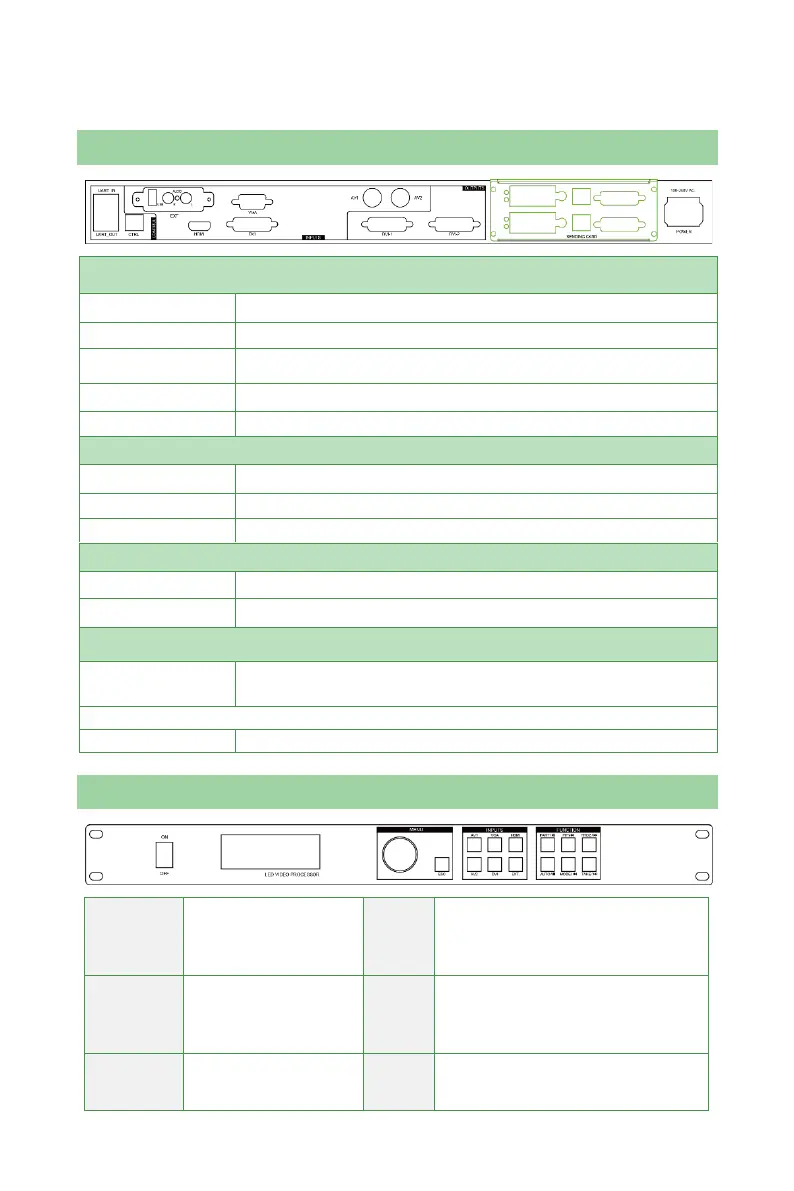
Input/Output Interface Diagram
INPUT
AV1, AV2
Video input interface, BNC interface, coaxial signal line
VGA
VGA input interface
DVI
DVI input interface
HDMI
HDMI input interface
USB
USB drive interface
OUTPUT
DVI1, DVI2
DVI output
VGA
VGA output
AUDIO
Audio output of USB media files
CONTROL
UART IN, OUT
Synchronous call communication interface of the processor
CTRL
USB upper computer control interface
SENDING CARD
Sending Card
Two receiving cards can be installed with 5V power cords
inside
POWER
Power
AC 100~240V input, power switch
Front Panel Control Display Diagram
Call out main menu or
confirm
Rotate
the
knob
Choose a menu item or adjust
parameters
Directly return to main
interface
ESC
Return button
AV1 signal switching
PART
Shortcut for switching between
Part and Full Display;

Related product manuals