Chapter 4 Menu Operations
Main Interface
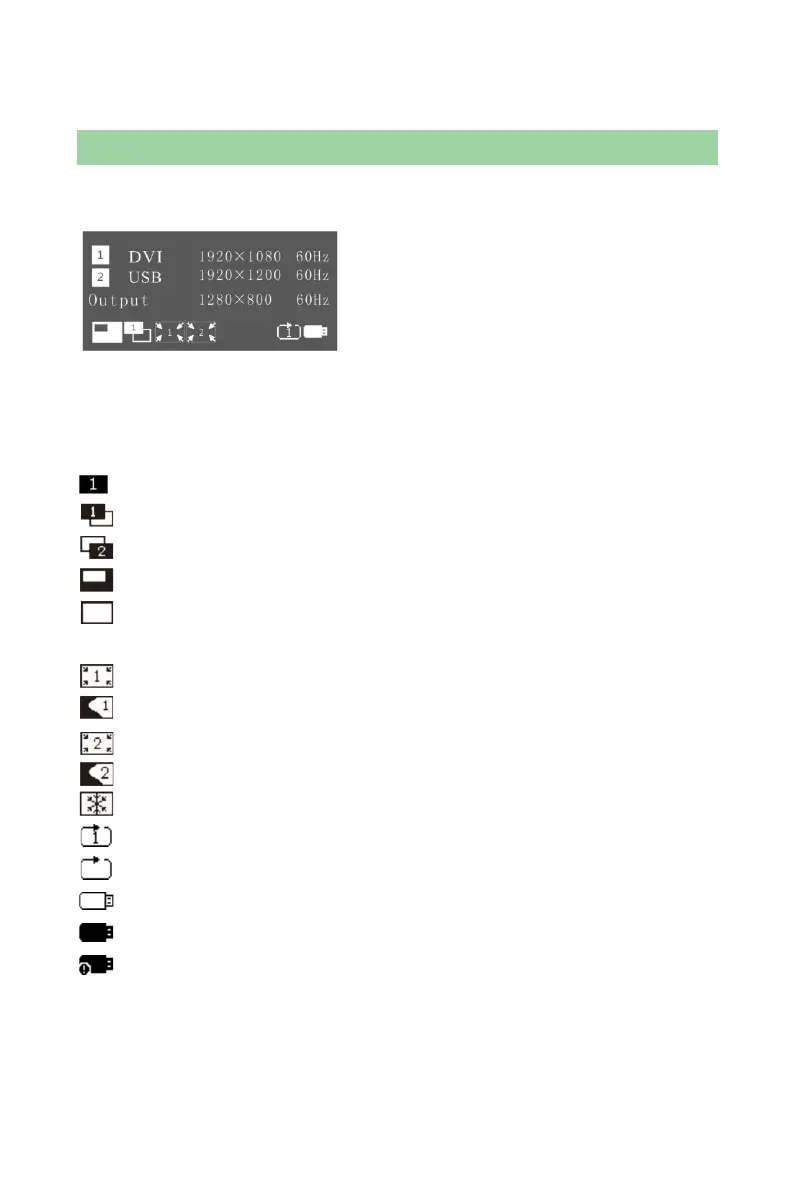
Switch on the processor and the main interface on operation screen is shown as
follows:
1
st
line: Channel1, signal source, format of input signal;
2
nd
line: Channel2, signal source, format of input signal;
3
rd
line: Output, resolution and refresh rate of output signal;
4
th
line: Status line, the meaning of each icon is described as follows;
: PIP closed;
: PIP opened, Channel1 picture is moved to the top layer;
: PIP opened, Channel2 picture is moved to the top layer;
: Part function is enabled and size of output image is the same as window size;
: Full screen function is enabled and the size of output image is the same as
the input size;
: Channel1 Image Crop is closed and the output is complete image;
: Channel1 Image Crop is opened and the output is cropped image;
: Channel2 Image Crop is closed and the output is complete image;
: Channel2 Image Crop is opened and the output is cropped image;
: Freeze is opened and current output image is frozen;
: Current USB drive is set to single round play;
: Current USB drive is set to list round play;
: USB drive hasn't been plugged;
: USB drive has been plugged;
: USB drive has been plugged, but the format of USB drive is not supported.



 To Next Page