28
20 The Connection Cable & Connection Box
The connection cable is the coiled, stretchy cord that runs from the device to the connection box. The four black
(2) and white (2) transducer array connectors plug into the connection box. The black and white coding matches
with the transducer array position on the head.
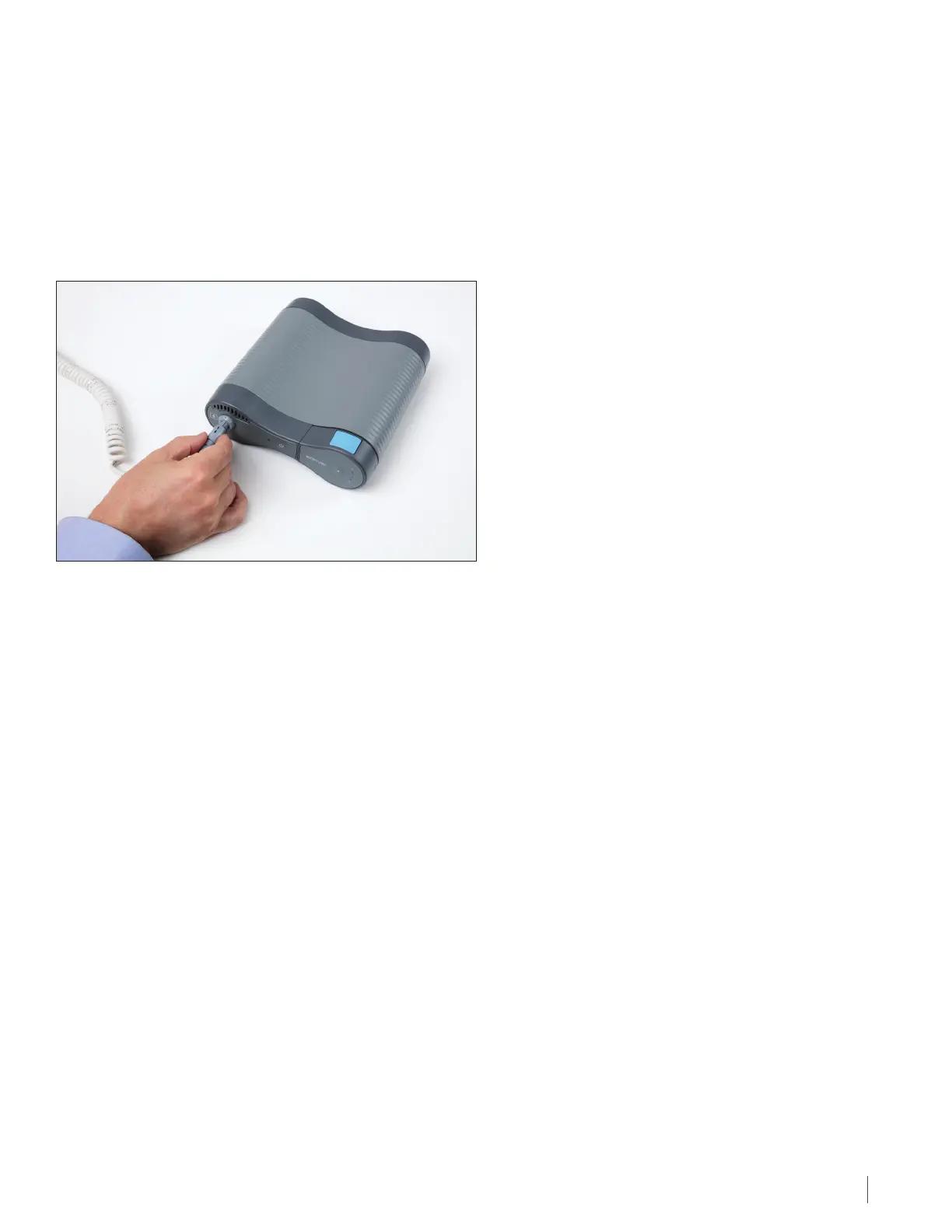
The connection cable plugs into the device in the port on the left of the front panel. The connection cable port
has a picture of a person next to it. The connection cable plugs into the socket with the arrows facing up. Push in
the connector until you hear a click. The click means it is secure.
There are two ways to unplug from the device to take a break from treatment (after turning o the device):
1. Unplug the connection cable from the device.
2. Unplug the transducer arrays from the connection cable.
To Unplug the Connection Cable from the Device:
Stop treatment by pressing the TTFields button.
Turn o the device using the power button.
Unplug the connection cable from the socket by holding the gray collar and pulling back. Do not pull on the cord.
You may now move around without the device, but you will still be connected to the connection cable and box. To start
treatment again after your break:
1. Plug the connection cable into the port with the arrows pointing up.
2. Turn on the device using the power button. Wait for self-check to be completed (about 10 seconds).
3. Turn on the TTFields using the TTFields button.
The Connection Cable & Connection Box\\DC - 099263/000001 - 12620961 v1


 To Next Page