6
Part 2 - Operating Instructions
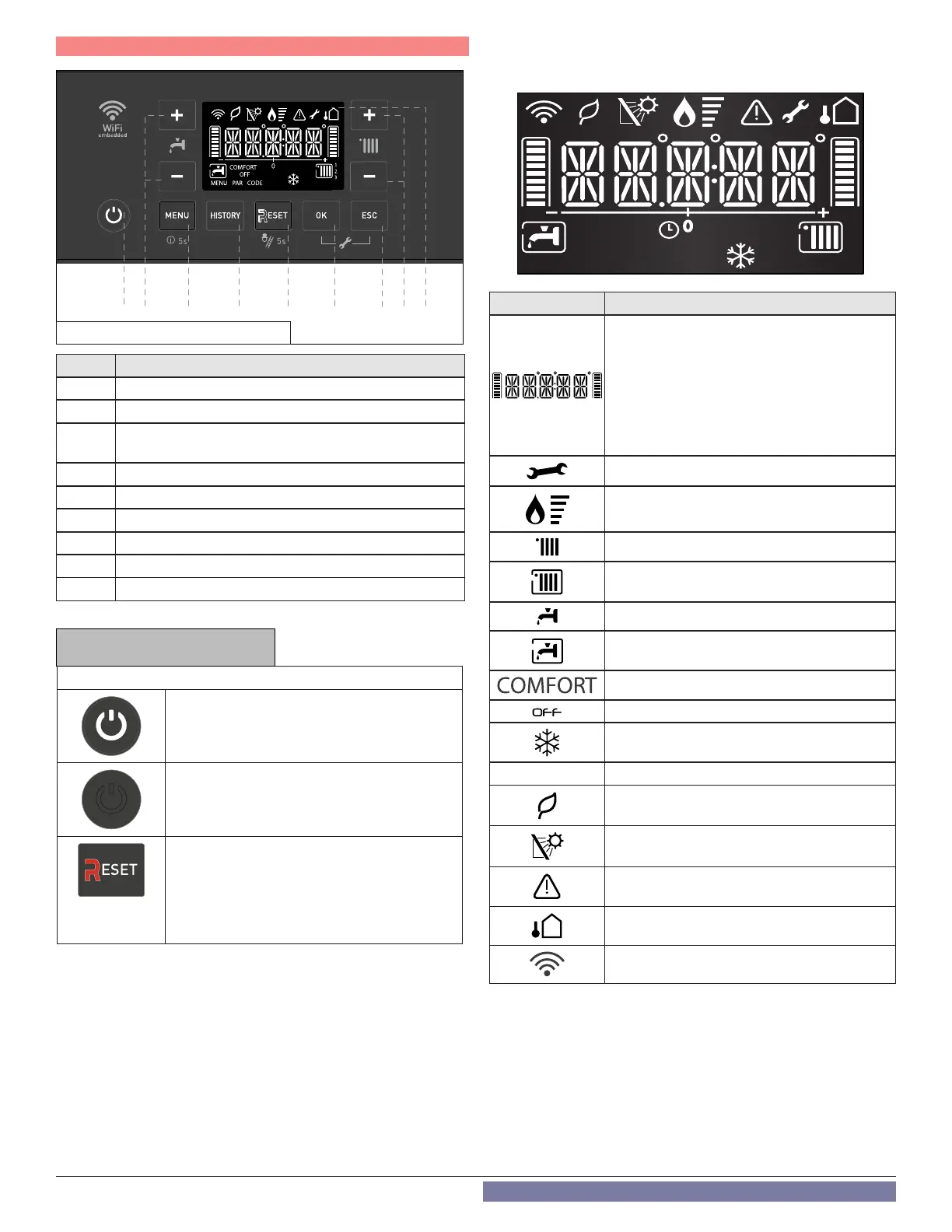
Item # Description
1 ON / OFF Button (see NOTICE below)
2 Domestic Hot Water Adjustment Button
+
/-
3
MENU
(short press = User Menu); (long press = Info Menu)
4 HISTORY Button - view last 10 errors
5 RESET Button (see NOTICE below)
6 OK – confirms menu selection
7 ESC – exits menu selection
8 Heating Temperature Adjustment Button
+
/-
9 Display
Table 2 - Control Descriptions
Operating Description
On / Off Button
The button lights (white) when the boiler is
electrically powered.
On / Off Button
The button is not lit in the event of an error or
power failure.
RESET BUTTON
The button lights (red) in the event of a lockout
error.
After pressing the Reset button to clear an
error condition, the button will flash for five (5)
seconds.
Display Icon Description
Digits Indicating:
• Boiler Status
• Temperature indication (
o
F) with bar
level
• Error Codes (ERROR)
• Press Reset Button Request (RESET)
(boiler lockout)
• Menu Settings
Technical assistance request
Flame detected with indication of power used
CH Heating Operation Set
CH Heating Operation Active
DHW Operation Set
DHW Operation Active
Hot Water Comfort Activated (Combi Only)
Boiler off with Antifreeze Function Active
Antifreeze Function Active
AUTO Automatic Temperature Control activated
High Efficiency Operation
(Low CH flow temperature)
Solar inlet temperature probe connected -
Optional
Error signal - Display will also show a code and
description
Outdoor Sensor Connected - Optional
WiFi Active
Table 3 - Display Icon Descriptions
AUTO
0
ON OFF
COMFORT
MENU PAR
CODE
SRA
21 3 4 5 6
7
8 9
NOTICE
Figure 1 - Control and Display Overview



 To Next Page