9
Part 2 - Operating Instructions
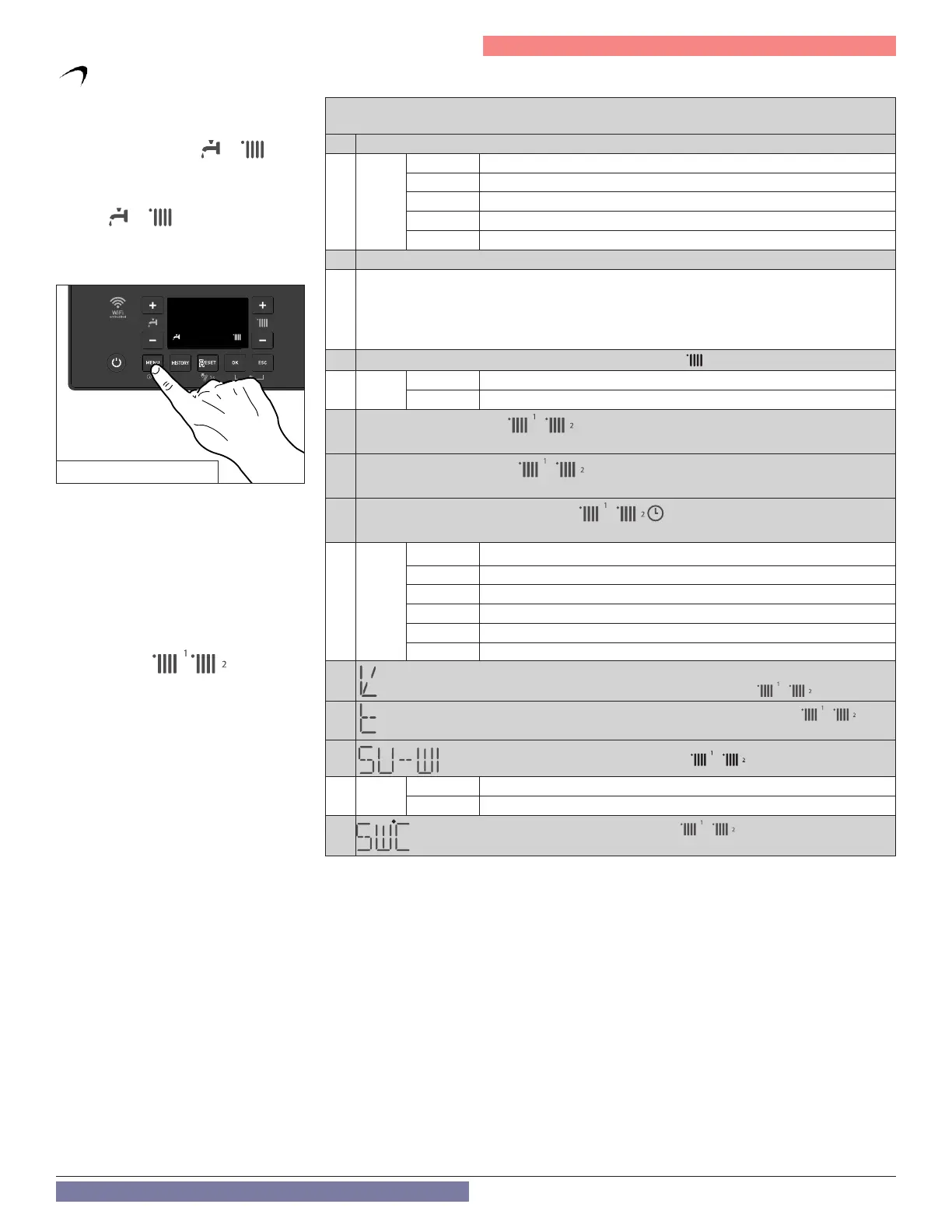
Press the MENU button to open the user
menu.
To navigate within the menu or parameters,
press the + and - buttons (
or )
.
To change a parameter, select it by pressing
the OK button.
To change the set value, press the + and -
buttons (
or )
.
Press the OK button to save.
To exit or save the changes, press the ESC
button.
For parameters 5 to 12 it is also possible
to set / change the heating zone 2 (if
available).
By pressing the HISTORY button after
accessing the parameter, the number 1 or
2 of the selected zone appears next to the
heating symbol: / .
Continue to change the setting as
described above.
(*) Press +/- button for setting hours
Press +/- button for setting the minutes)
Press OK to confirm the entered data.
Activate change with OK button, + / - buttons change the value, OK button for confirmation,
ESC to return without change.
1. NTI Wi-Fi
WIFI ON/OFF Wi-Fi
AP Access point open for 10 minutes
SN Shows Wi-Fi serial number (Not Appliance)
RESET Delete Wi-Fi settings Disconnect user account
ITEMP
Set Internet weather (only without outdoor sensor)
2. Date and Time
The following values are displayed in a sequence. For setting, select OK and +/-.
Day (1-31)
Month (1-12)
Year (year)
Time (hh: mm) (*)
5.
Automatic C.H. temperature control / AUTO function
OFF AUTO function deactivated
ON AUTO function Active (AUTO appears on the display)
6.
Room temperature Day /
only applicable if using NTI room sensor(s)
7.
Room temperature Night /
only applicable if using NTI room sensor(s)
8.
Time programs – heating schedule /
only applicable if using NTI room sensor(s)
0+24 h
Always active
P1
Family program
P2
Program no lunch
P3
Program with lunch
06-22 h
C.H. active from 06:00 to 22:00
P EXT Time program defined by REMOCON room unit or NTI NET app.
9.
Outdoor Heating Curve Slope (only with AUTO function active) /
10.
Outdoor Heating Curve Parallel Shift (only with AUTO function active) /
Setting range + -7 at low temperature and + -14 at high temperature range (each step + or - 1.8°C)
11.
Automatic summer / winter changeover /
ON Active
OFF Function deactivated
12.
Summer / winter changeover temperature /
F. User Menu
Table 2 -
User menu
Figure 5 - Access user menu



 To Next Page