65
TRX Series II - Installation - Startup - Maintenance Instructions
Part 9 - Controls
F. Boiler Details
The BOILER DETAILS menu provides the status
of each of the boiler’s inputs and outputs.
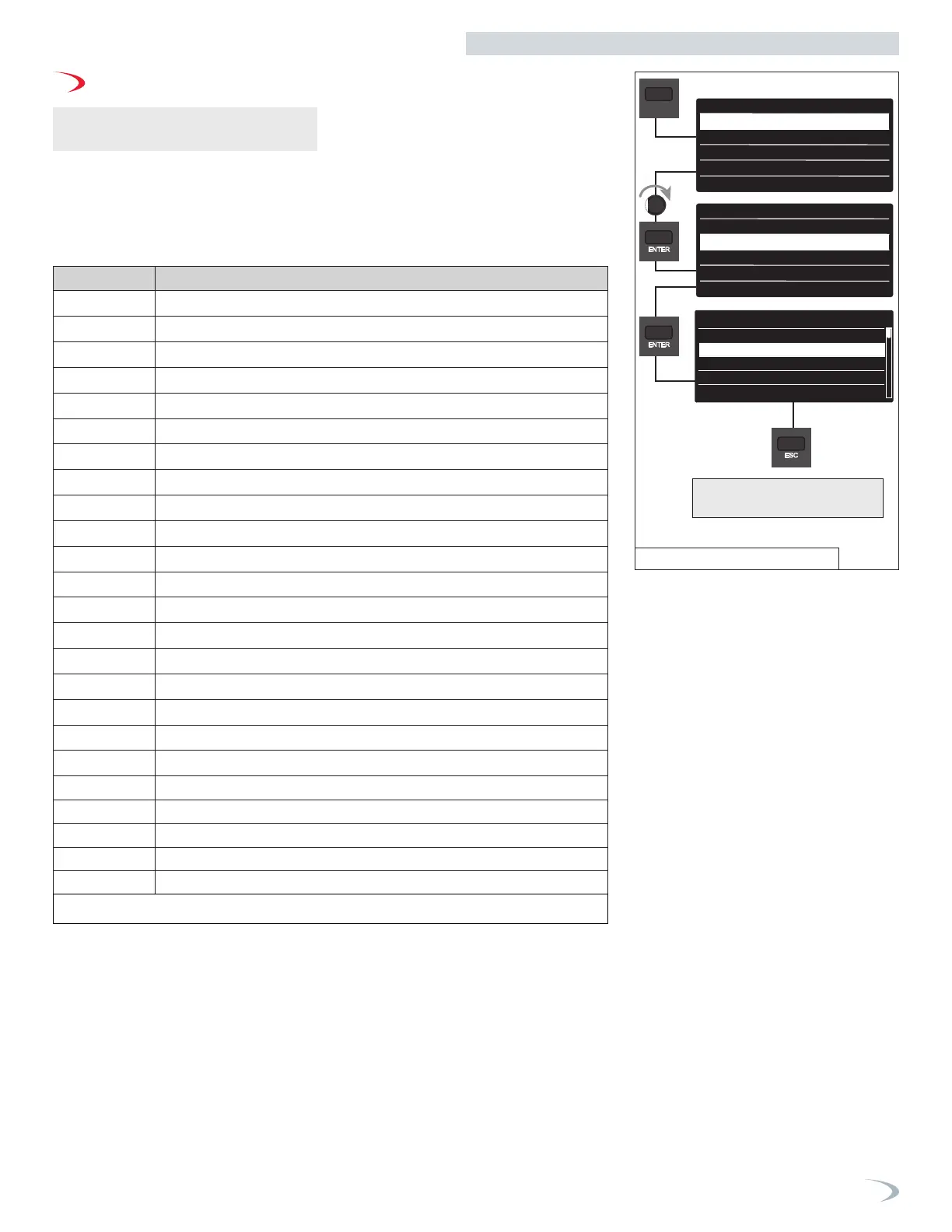
Navigate the Boiler Details menu as follows:
1. From the Main Menu, turn the dial to
highlight “Boiler Details” and press ENTER.
2. Turn the dial to scroll through the
parameter readings.
3. Press ESC to return to the previous screen.
Parameter Description
8.2.2
Fan speed
8.2.8
Gas Power (kW)
8.7.9
Ionization current
8.7.8
Boiler power level (%)
8.3.0
CH Supply Setpoint Temperature (°F)
8.3.1
CH Supply Temperature (°F)
8.3.2
CH Return Temperature (°F)
8.3.4
Exhausts Flue Temperature (°F)
8.3.3
DHW Flow Temperature (°F)
8.4.0
Tank Storage Temperature (°F)
8.7.4
Boiler Flowswitch
8.2.5
DHW Flow Rate *
2.0.0
DHW Setpoint Temperature
8.2.1
Fan Status
8.7.6
Safety Flame Sensor
8.2.4
3 Way Valve Position
8.2.6
Air Pressure Switch Status
8.3.5
Outdoor Temperature
8.5.0
Months to Next Service
8.2.9
Heating Circuit Pressure
42.2.0
BMS Status
42.2.2
BMS Setpoint
42.2.3
BMS Input Voltage (V)
42.2.4
BMS Input Current (mA)
The display reverts to showing
the previous screen.
MENU
8.2.8
Gas Power
8.7.9
Ionization current
8.3.0
CH Suppluy Setpoint
xxx
xxx
xxx
xxx
xxx
Boiler Details
8.2.2 Fan Speed
8.7.8
Boiler Power Level
Main Menu
Setup wizard
Boiler Details
User Menu
Tech menu
Test mode
Setup wizard
Boiler Details
User Menu
Tech menu
Test mode
Table 27 - Boiler Details Menu
Figure 80 - Boiler Details Menu



 To Next Page