66
420012001500 - 03182024 - Rev. 04
Part 9 - Controls
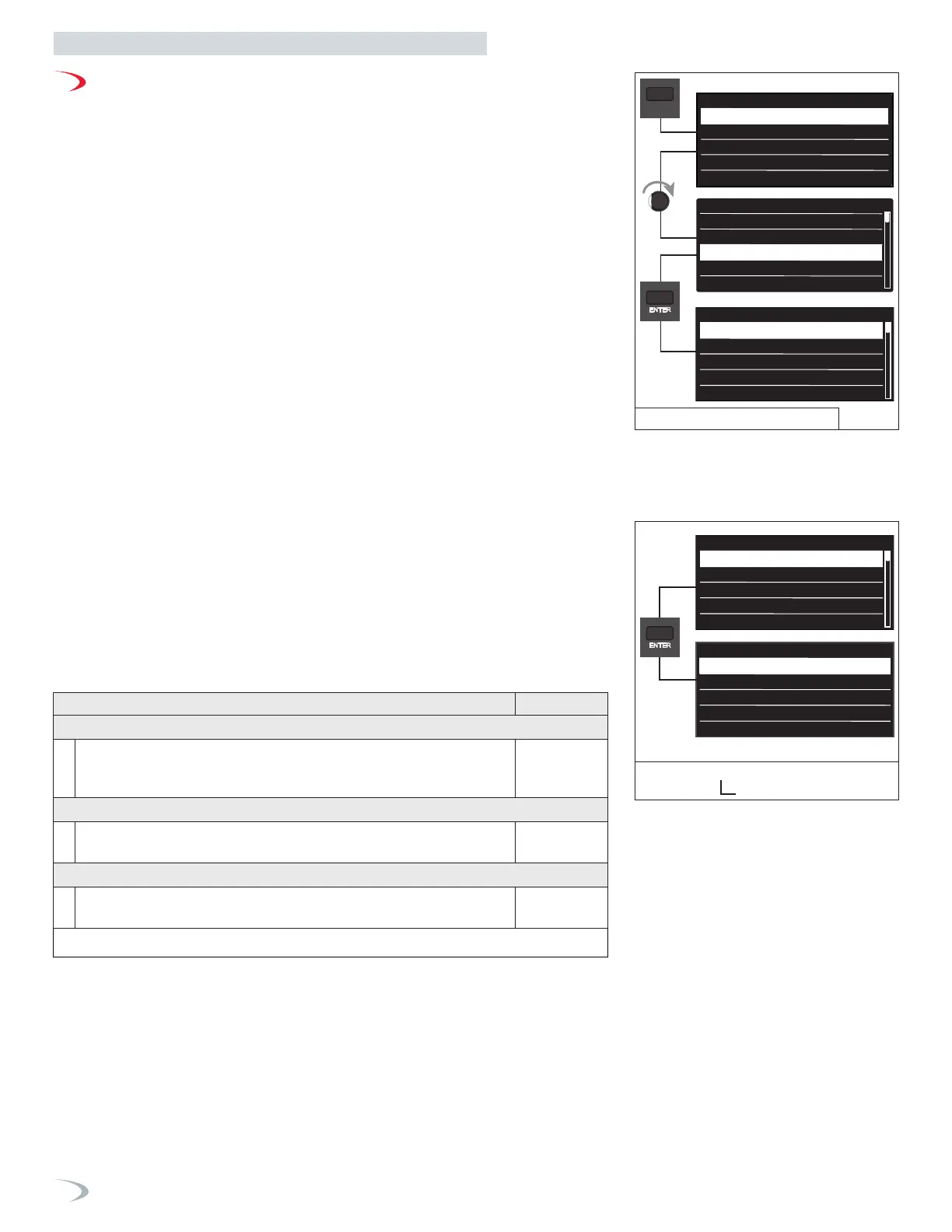
Figure 81 - User Menu
Screen Settings Menu
G. User Menu
Navigate the User Menu as follows:
1. From the Main Menu, turn the dial to highlight “User Menu” and press ENTER.
2. Turn the dial to highlight the option you wish to access then press ENTER.
3. Press ESC to return to the previous screen.
Setup wizard
Boiler Details
User Menu
Tech menu
Test mode
Inserisci codice tecnico
222
Inserimento codice
Save
Inserisci codice tecnico
234
Inserimento codice
Save
Outdoor rest
AUTO Function
CH - Select the number of heating zone
directly controlled by the boiler
CH
1
Max Temperarture
CH Zone 1
179°F
Min Temperarture
CH Zone 1
104°F
AUTO Temp Contrl Mode
Outdoor Temp
CH Zone 1
Select the type of heating
High Temperature
(e.g Fin-tube Baseboard)
CH Zone 1
Disabled Enabled
Outdoor rest
AUTO Function
Disabled Enabled
Save
MENU
Thechnical Area
Setup wizard
Boiler Details
User Menu
Tech menu
Test mode
MENU
Screen Settings
Time & Date
CH Setup
DHW Setup
Operating Mode
Screen Settings
Time & Date
CH Setup
DHW Setup
1. User Menu - Screen settings
Navigate the Screen Settings menu as follows:
1. From the User Menu select “Screen Settings” and press ENTER.
2. Turn the dial to highlight the option you wish to select and press ENTER; repeat as necessary
for subsequent menus.
3. Turn the dial to modify the respective parameter and press ENTER to save it. Note: pressing
ESC will exit the setting without saving the new value.
4. Press ESC to return to the previous screen.
Screen Settings
System unit of measurament
Screen brightness
Language
System unit of measurament
International System
US System
Set to
International System
Screen Settings
System unit of measurament
Screen brightness
Language
Screen Settings
Time & Date
CH Setup
DHW Setup
Screen Settings
Time & Date
CH Setup
DHW Setup
Table 28 - Screen Settings
Figure 82 - User Menu
Menu Option | Description (Range Default
SYSTEM UNITS OF MEASUREMENT
User can select between customary US or International system units.
International System (dd/mm/yy); (°C); (kW); (bar)
US System (mm/dd/yy); (°F); (MBH); (PSI)
US System
SCREEN BRIGHTNESS
User can select the brightness of level of the display
(23-100%)
23%
LANGUAGE
User can select the display language.
(English, French, Italian, Spanish)
English



 To Next Page