67
TRX Series II - Installation - Startup - Maintenance Instructions
Part 9 - Controls
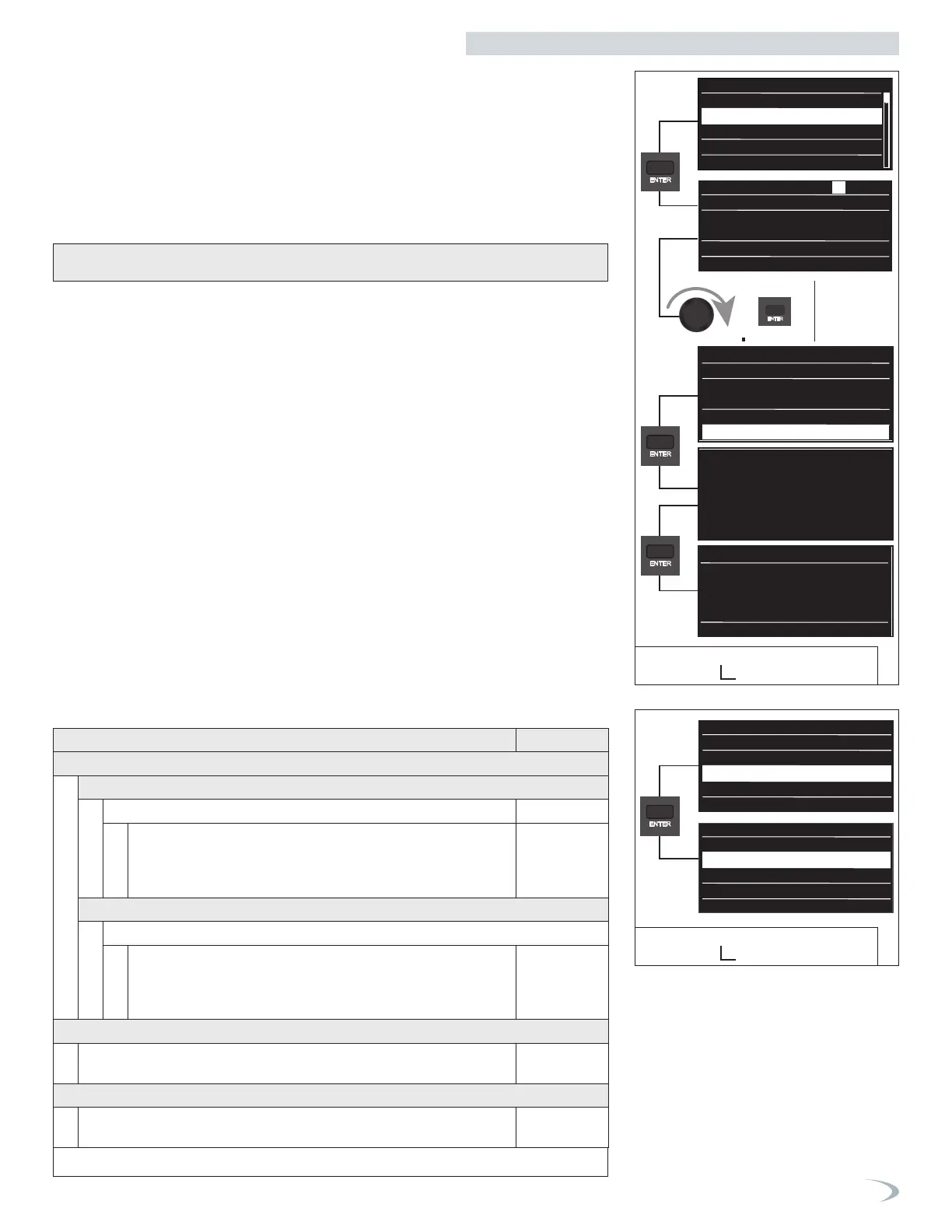
Figure 83 - User Menu
Time and Date
2. User Menu - TIME & DATE
3. User Menu - CH Setup
Navigate the Time & Date menu as follows:
1. From the User Menu select “Time & Date” and press ENTER.
2. Turn the dial to highlight the parameter you wish to modify and press ENTER.
3. Turn the dial to modify the value and press ENTER to save it.
4. With the date and time correctly adjusted, turn the dial to advance to the SAVE option and
press ENTER.
5. When complete, the display returns to the HOME screen.
Navigate the CH Setup menu as follows:
1. From the User Menu select “CH Setup” and press ENTER.
2. Turn the dial to highlight the option you wish to select and press ENTER.
3. Turn the dial to modify the value and press ENTER to save it. Note: pressing ESC will exit the
setting without saving the new value.
4. Press ESC to return to the previous screen.
09/28/2023
Single Boiler
Status
Demand
Outlet:
Standby
158 °F 0 %
Power:
66°F
10:36
Date
Thursday
00 : 00
Time
Legal hour
Manual
each item
Thursday 09 / 28 / 2023
10 : 36
Legal hour automatic
09 / 28 / 2023
Date
Thursday
00 : 00
Time
Legal hour Manual
09 / 28 / 2023
+
Save
09/28/2023
Single Boiler
Status
Demand
Outlet:
Standby
158 °F 0 %
Power:
66°F
10:36
Date
Thursday
00 : 00
Time
Legal hour
Save
Manual
each item
Thursday 09 / 28 / 2023
10 : 36
Legal hour automatic
09 / 28 / 2023
Date
Thursday
00 : 00
Time
Legal hour Manual
09 / 28 / 2023
+
09/28/2023
Single Boiler
Status
Demand
Outlet:
Standby
158 °F 0 %
Power:
66°F
10:36
Date
Thursday
00 : 00
Time
Legal hour
Save
Manual
each item
Thursday 09 / 28 / 2023
10 : 36
Legal hour automatic
09 / 28 / 2023
Date
Thursday
00 : 00
Time
Legal hour Manual
09 / 28 / 2023
Save
09/28/2023
Single Boiler
Status
Demand
Outlet:
Standby
158 °F 0 %
Power:
66°F
10:36
Date
Thursday
00 : 00
Time
Legal hour
Save
Manual
each item
Thursday 09 / 28 / 2023
10 : 36
Legal hour automatic
09 / 28 / 2023
Date
Thursday
00 : 00
Time
Legal hour Manual
09 / 28 / 2023
+
Save
09/28/2023
Single Boiler
Status
Demand
Outlet:
Standby
158 °F 0 %
Power:
66°F
10:36
Date
Thursday
00 : 00
Time
Legal hour
Save
Manual
each item
Thursday 09 / 28 / 2023
10 : 36
Legal hour automatic
09 / 28 / 2023
Date
Thursday
00 : 00
Time
Legal hour Manual
09 / 28 / 2023
+
Save
Screen Settings
Time & Date
CH Setup
DHW Setup
Operating Mode
CH Setup
Auto Function 0
Heating Curve OFFSET --
Room Setpoint (Holiday/Anti-frost)
41
Auto Function
0
1
Maximum value
Auto Function
1
1
0
Maximum value
Minimum value
0
Minimum value
User Menu
Screen Settings
Time & Date
CH Setup
DHW Setup
Operating Mode
CH Setup
Auto Function 0
Heating Curve OFFSET --
Room Setpoint (Holiday/Anti-frost)
41
Auto Function
0
1
Maximum value
Auto Function
1
1
0
Maximum value
Minimum value
0
Minimum value
User Menu
Screen Settings
Time & Date
CH Setup
DHW Setup
Operating Mode
Screen Settings
Time & Date
CH Setup
DHW Setup
NOTE: if connecting the boiler to WiFi you have the option to use Internet Time, and therefore
do not have to set the date and time manually.
Table 29 - CH Setup
Figure 84 - User Menu
CH Setup Menu
Menu Option | Description (Range Default
HEATING CURVE OFFSET
ZONE 1
HEATING CURVE OFFSET (4.2.3)
Provides a means to offset (+/-) the calculated reset boiler target
temperature for zone 1 up or down. (-25-25°F)
Note: the setting is not applicable AUTO Function (Outdoor Reset) is
disabled.
0
ZONE 2
HEATING CURVE OFFSET (5.2.3)
Provides a means to offset (+/-) the calculated reset boiler target
temperature for zone 2 up or down. (-25-25°F)
Note: the setting is not applicable AUTO Function (Outdoor Reset) is
disabled.
0
AUTO FUNCTION (OUTDOORRESET) (2.2.4)
Allows the operator to globally enable/disable the Automatic Temperature Control
Mode for all zones.
On
ROOM SETPOINT (HOLIDAY/ANTI-FROST) (4.0.3)
Sets the global room temperature setpoint during holiday or inactive periods. Only
applicable when using an NTI Room Sensor. (35-75°F)
41°F


 To Next Page
 Loading...