80
420012001500 - 03182024 - Rev. 04
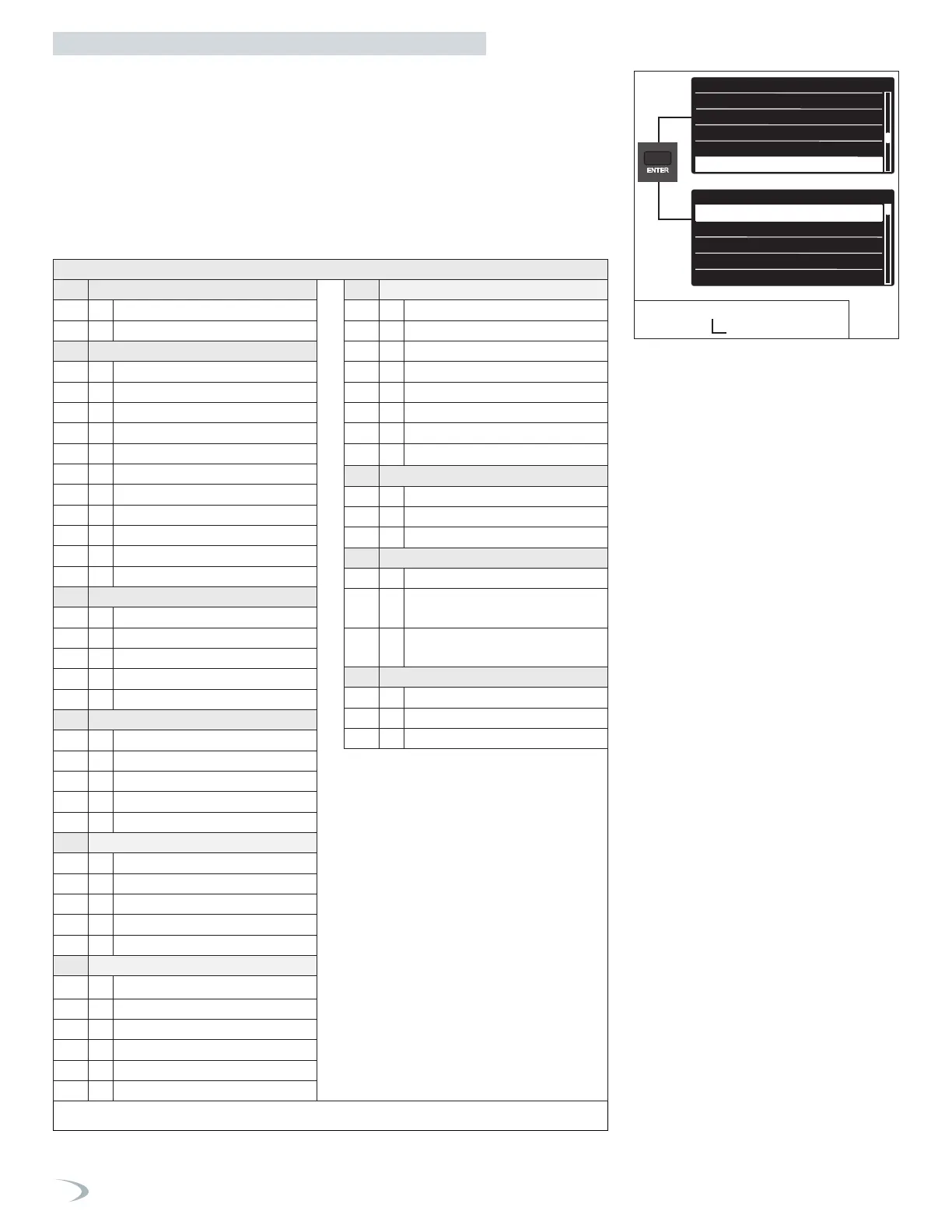
To navigate the Complete Menu proceed as follows:
1. From the Tech Menu, turn the dial to highlight “Complete Menu” and press ENTER.
2. Turn the dial to select the menu level and press ENTER.
3. Turn the dial to select the sub menu level and press ENTER.
4. Turn the dial to select the parameter and press ENTER.
5. Modify the setting by turning the dial, press ENTER to save the value.
Note: pressing ESC exits the screen without saving the new value.
6. Press ESC to return to the previous screen.
0 NETWORK
0. 2 Bus Network
0. 4 User interface
2 Boiler parameters
2. 0 General
2. 1 Free parameters
2. 2 Settings
2. 3 Boiler CH parameters - 1
2. 4 Boiler CH parameters - 2
2. 5 DHW parameters
2. 6 Boiler Manual Control
2. 7 Test & Utilities
2. 8 Reset Factory Settings
2. 9 Other parameters 1
2. 10 Other parameters 2
4 Zone 1 parameters
4. 0 Temperature Settings
4. 1 Automatic Winter Mode
4. 2 Zone 1 settings
4. 3 Diagnostics
4. 7 Zone 1 regulation parameters
5 Parametri Zona 2
5. 0 Temperature Settings
5. 1 Automatic Winter Mode
5. 2 Zone 2 settings
5. 3 Diagnostics
5. 7
Zone 2 regulation parameters
6 Parametri Zona 3
6. 0 Temperature Settings
6. 1 Automatic Winter Mode
6. 2 Zone 3 settings
6. 3 Diagnostics
6. 7 Zone 3 regulation parameters
7 External 3-zone control module
7. 0
7. 1 Manual Mode
7. 2 General Zone Module
7. 3 Cooling
7. 8 Error History
7. 9 Reset Menu
COMPLETE MENU - see table on following pages
6. Complete Menu
6a. Complete Menu Structure
8 Service Paramters
8. 0 Statistics - 1
8. 1 Statistics - 2
8. 2 Boiler Current Status
8. 3 Boiler Current Temperatures
8. 4 Storage Current Status
8. 5 Service
8. 6 Error History
8. 7
Free parameters
19 Connectivity
19. 0 WiFi Configuration
19. 1 Connectivity Info
19. 2 Reset Menu
21 2-Zone Control Module
21. 1 2-Zone Control Module Test
21. 4 2-Zone Control Module
Diagnostics
21. 8 2-Zone Control Module
Configuration
42 BMS Control
42. 0 General
42. 1 Analog level settings
42. 2 Diagnostics
Table 38 - Complete Menu structure
DHW setup
Cascade Setup
Restore/Backup
BMS Control
Complete Menu
Complete menu
0 Network
1
<
Not Available
>
2
Boiler parameters
4
Zone 1 parameters
5
Zone 2 parameters
Tech Menu
DHW setup
Cascade Setup
Restore/Backup
BMS Control
Complete Menu
Complete menu
0 Network
1
<
Not Available
>
2
Boiler parameters
4
Zone 1 parameters
Figure 97 - Tech Menu
Complete Menu
Part 9 - Controls



 To Next Page