N4
Manual Mode
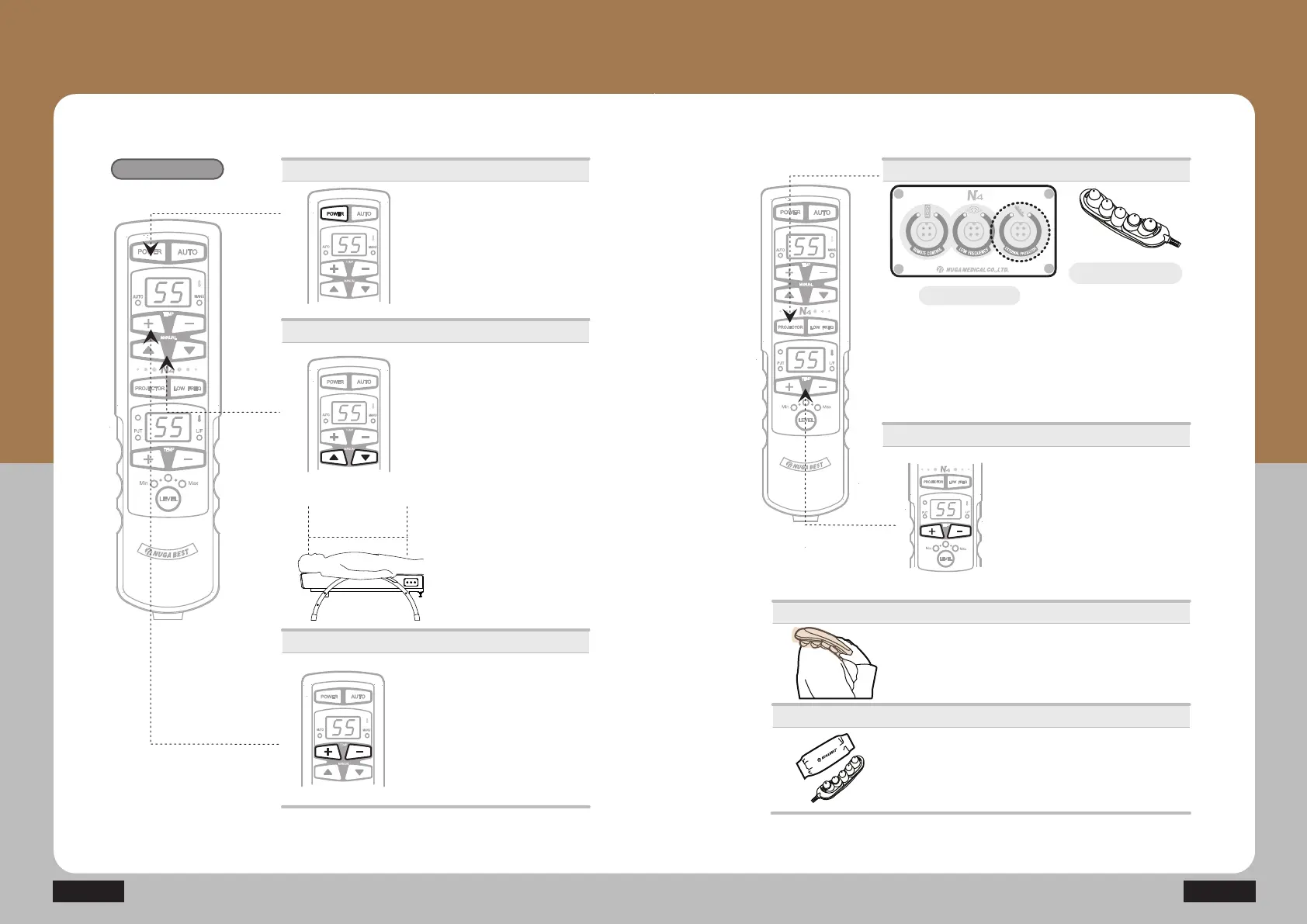
Power supply
Temperature control
ⴚ Control temperature with +/- button.
(Moderate temperature: 55~60Ⳅ)
· Range of temperature setting for
internal projector: 40~70Ⳅ
(Temperature of cervical vertebrae
SURMHFWRULVIL[HGDWÛ&
· Temperature setting unit
40~70Ⳅ : Temperature setting per 1Ⳅ
Manual Mode
ⴙ Use the product after placing the
internal projector at the desired
position with manual button
ŸźGXULQJWKHPDQXDOPRGH
The internal projector moves while
ŸźLVEHLQJSUHVVHG
Ÿ0RYHVWKHLQWHUQDOprojector
toward the cervical region.
Âź0RYHVWKHLQWHUQDOprojector
toward lumbar region.
ⴘ Press the power button.
· Check out the connecting conditions
of the controller.
· Press the power button once : On
Press it once again : Off
Moving
path
How to Use Product
How to Use Controller
- How to Use External Projector
ⴘ Connect the external projector into the connection part
on the right side of the main device and press the projector
button.
· Check the connection of the projector.
· Press the projector button once: ON
/ Press the projector button one more time: OFF
Operations
Temperature control
Applied to the specific area
Caution
ⴙ Control temperature with +/- button.
(Moderate temperature: 55~60Ⳅ)
·The projector is not turned on when
the actual temperature is higher than
the setting temperature, which is not
meant to be any failure.
· Temperature setting unit
40~70Ⳅ : Temperature setting per 1Ⳅ
· Apply to the desired area.
· Put the projector cover on before applying it.
* The method of using the abdominal heating pad is the same as that of the
external heating projector.
· Ensure the projector to be covered by the projector cover
while the external projector is being used.
· Be aware that any direct contact from the projector to the
skin during the high temperature setting might cause burns.
Connector bay
External projector


 To Next Page