30
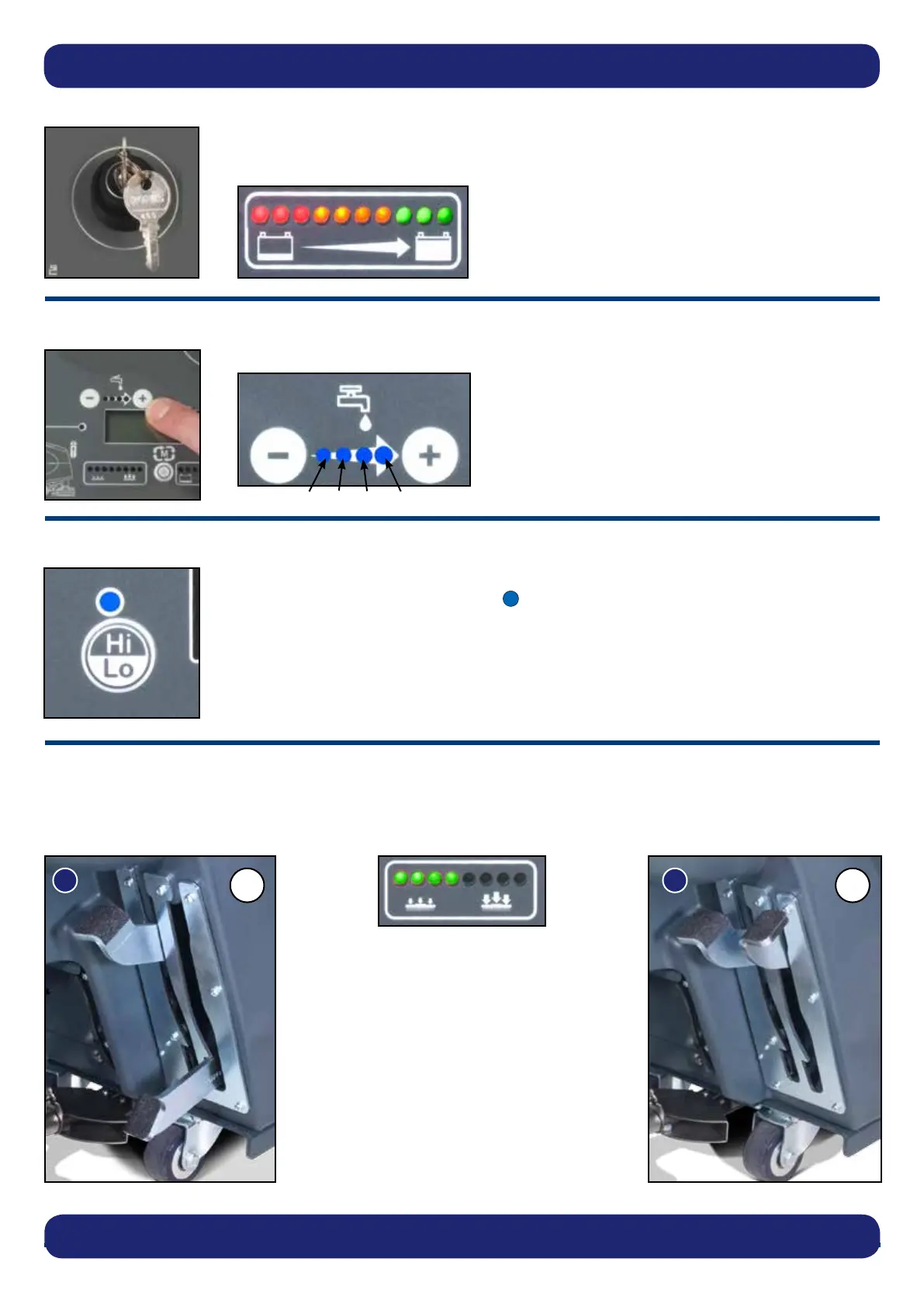
When the machine is running normally the Hi - Lo light will be illuminated blue, this means
the Vacuum motor is running at 100%.
With the machine running press the Hi - Lo button once the Vacuum motor will reduce speed
to 75% of capacity and the Hi - Lo light will not illuminate.
Hi - Lo Setting
Brush pressure / Load adjustment
The brush load lever is located to the right hand side of the machine.
This option is for hard to clean patches, adding extra pressure to the brushes.
The brush load indicator on the control display
shows the pressure applied, when the machine
is being operated.
Turning the Machine On
Set Water Flow Rate as required, depending on oor type and level of soiling
Insert the key, turn the main control on / off key to position ‘1’.
The battery charge level meter will illuminate for 5 seconds.
Setting the Water Flow Rate
Setting the cleaning controls
(A) Standard Duty
17 Kg Pressure
(Fig.20)
(B) Heavy Duty
30 Kg Pressure
(Fig.21)
B
A
NOTE: It is recommended this option is NOT used all the time and is for spot cleaning only.
The run-time of the machine may decrease if the load on the brushes is increased.
0.5L/Min, 1L/Min, 2L/Min, 3L/Min





 To Next Page