63
PRONTOBAR TOUCH
IT
7.8
SCHERMO
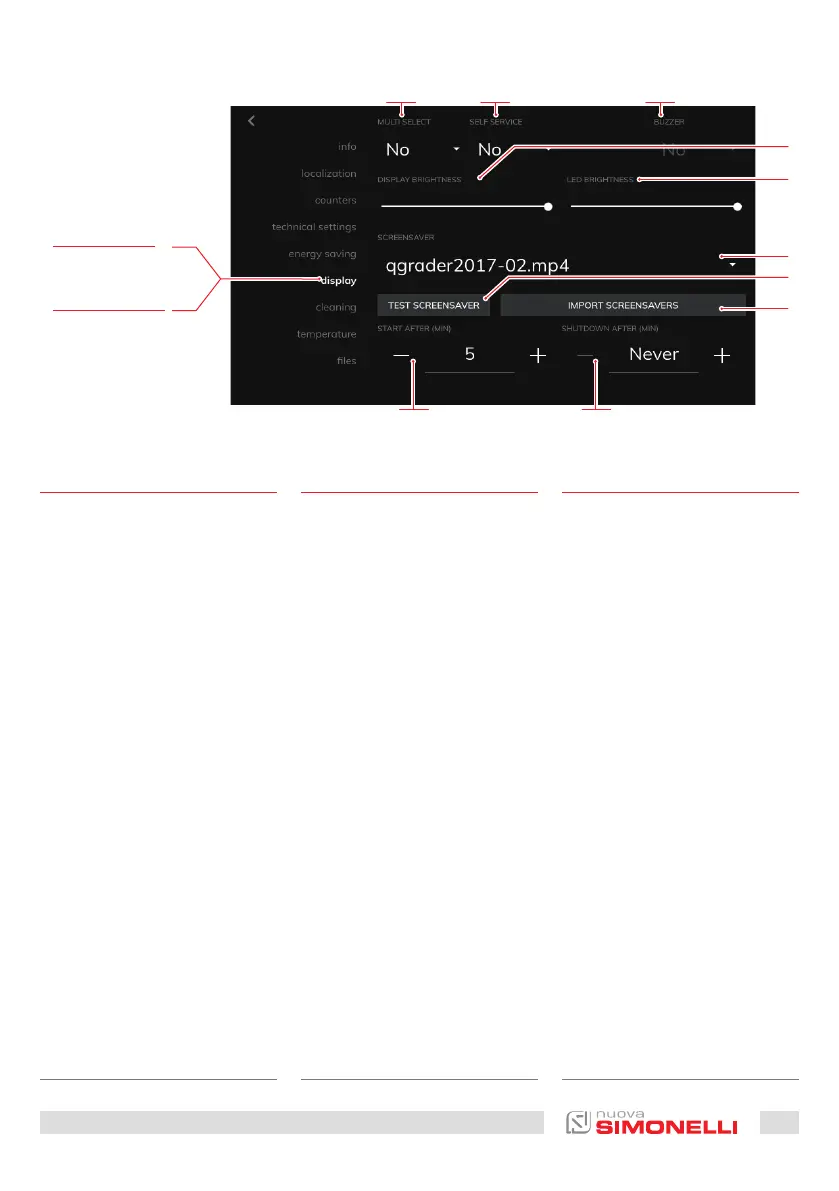
Pagina di impostazioni del di-
splay. Permette di impostare:
1 Erogazione multipla (SI/NO)
2 Modalità self service
(SI/NO)
3 Segnalatore acustico
(SI/NO)
4 Luminosità del display
5 Luminosità dei led
6 Screen saver
7 Premere per testare lo
screen saver
8 Premere per importare
lo screen saver da un
supporto USB
9 Tempo di attivazione dello
screen saver
10 Tempo di disattivazione
dello screen saver
È possibile importare uno screen
saver solo se in formato “mp4”.
EN
7.8
DISPLAY
Display settings page.
Allows to set:
1 Multiple dispensing (YES
/ NO)
2 Self-service mode
(YES NO)
3 Bell (YES NO)
4 The brightness of the
display
5 Brightness of the LEDs
6 Screen saver
7 Press to test the screen
saver
8 Click to import the screen
saver from USB support
9 Activation time of the
screen saver
10 Time to deactivate the
screen saver
You can import a screen saver
only if it is in “mp4” format.
FR
7.8
ÉCRAN
Page de configuration de l'ai-
cheur. Permet de configurer:
1 Distribution multiple (OUI/
NON)
2 Mode libre-service
(OUI/NON)
3 Avertisseur acoustique
(OUI/NON)
4 Luminosité aicheur
5 Luminosité des DELs
6 Écran de veille
7 Appuyer pour essayer
l'écran de veille
8 Appuyer pour importer
l'écran de veille d'un
support USB
9 Temps d'activation de
l'écran de veille
10 Temps de désactivation de
l'écran de veille
Il n'est possible d'importer un
écran de veille qu'en format
«mp4».
Immagini Esemplificative
Exemplifying Images
Images à titre d’exemple
IT
SCHERMO
FR
ÉCRAN
109
5
6
8
7
4
1 32











 To Next Page