68 26.11.07 1 689 979 924N
Slowly increase the braking force.
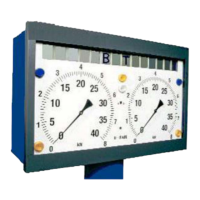
The display unit shows the braking forces of the left-hand and
right-hand wheel brakes. If the braking force difference exceeds
25 %, the indicator light „Braking force difference! (1) lights up.
The braking force difference of 25 % is factory-set. -The Nuss-
baum customer service can set a different value.
If the slip limit is reached, the drive motors of the roller sets are
deactivated automatically. The indicator light „Slip deactivation
RH/LH“ (3) indicates the side having caused the slip.
If the brake test braking force is so low that the automatic slip
deactivation is not actuated,
press the key S (58).
The attained measuring value is stored by the computer. The
driving motors will be deactivated. The braking force displays still
show the attained measuring value.
The brake force course is stored. Maximally 15 seconds are
stored (memory capacity: 300 measuring values). If the braking
force course has a longer duration, only the final 15 seconds are
stored.
If the axle brake test must be repeated, the stored braking force
course will be overwritten.
After 4 s, the driving motors are activated again. The brake force
display will be deleted.
i Increase braking force – especially prior to slip deactivation
only slowly. This reduces the influence of different response
of the braking system when extrapolating the deceleration
(braking).
Allocate the measuring values of the SBS from the current
axle to AUBS 1 or 2 by the keys „HBA“ (54) 1 or 2 and
EE
EE
E (60).
Drive off axle 1 from the roller set.
Drive axle 2 into the roller set for carrying out the test.
Test of SBS - axle 2
Press the key a (64) or
if there is no digital display
press key a (64) 2 and E (60).
By this, axle 2 is selected and the rolling friction of axle 2 is taken
over.
The testing of axle 2 and all further axles is carried out exactly like
with axle 1.
PBS test
Press the key h (55).
By this, all measuring values of the following PBS brake test are
allocated to the current axle.
If there was a change-over to PBS, you must select SBS again for
the next axle. Otherwise, PBS remains active.
The driving motors are activated again automatically.
Slowly increase the parking brake braking force.
If the slip limit is reached, the drive motors of the two roller sets
are deactivated automatically.
If the brake test braking force is so low that the automatic slip
deactivation is not actuated,
press the key S (58).
The attained measuring value is stored by the computer.
The driving motors will be deactivated.
Allocate the measuring values of the PBS from the current
axle to AUBS 1 or 2 by the keys „HBA“ (54) 1 or 2 and
EE
EE
E (60).



 To Next Page