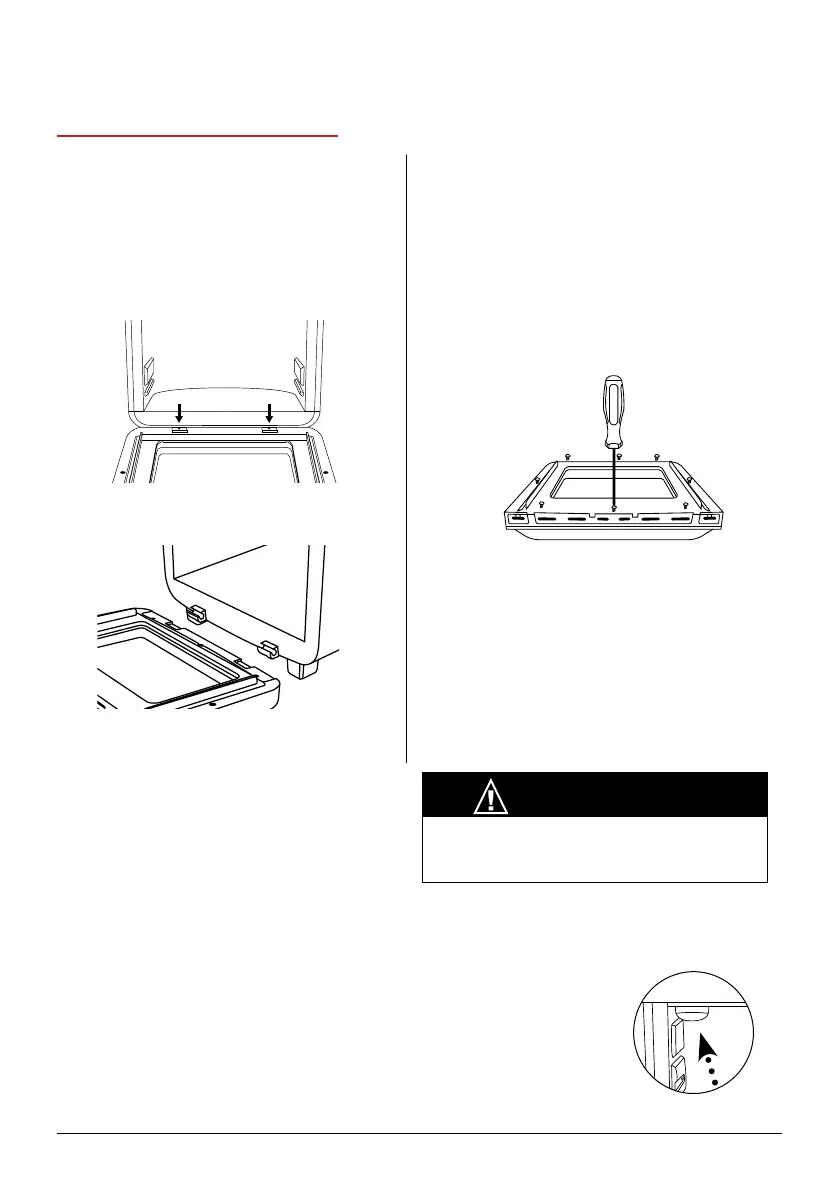
To Remove the Plastic Window
1. The Brio Door can be disassembled
to clean the inner plastic window.
Fully open the Brio Door.
2. Using a screwdriver, unscrew the
screws around the inner Door border
(See below).
3. To reassemble the Plastic Window,
secure it with the screws.
Note: Do not disassemble the Door
unless it is absolutely necessary for
cleaning or maintenance. Do not use
abrasive material for cleaning as this can
damage the plastic window.
To Remove the Brio Door
1. Open the Brio Door.
2. Using a screwdriver, unscrew both
screws located at the Door hinge to
remove the Door (as shown in image
below).
3. Lift the door to unhook the hinges.
4. To put the Door back onto the Brio,
hook the hinges together and secure
them with the screws.
Light Bulb Replacement
Turn off and unplug the Brio. Ensure that the Brio, bulb cover, and the bulb have cooled
completely. Unscrew the light bulb cover and light bulb.
Note: You can order the light bulb by contacting Customer Service.
Use part number BGP1. The light bulb can also be purchased at your
local hardware store. The Brio uses an oven incandescent light bulb
25W - 120/125 Volt -T6 E14 screw.
For Amazon Purchases: support@nuwavenow.com
For All Other Purchases: help@nuwavenow.com
CAUTION
The Brio Door will be hot after use. Make sure
your Brio has completely cooled before any
cleaning and maintenance.
Removing the Door for Cleaning
CLEANING & MAINTENANCE
26 | nuwavenow.com



 To Next Page