nuwavenow.com | 13
The Program Function
This gives you access to preset cooking
settings. Presets 1–50 are Preprogrammed
by Nuwave, while Preset slots 51–200 are
for your own creations. Wattage must be
set for 1800W and only 1 plate may be
used.
Program functions include Memory Entry
(the storage of frequently used stage
cooking programs), Memory Recall (retrieval
of stage cooking sequences), and Stage
Cooking Mode.
Using Existing Presets
1. Press Program. “PROG” indicator will
ash and “0” will appear on the display.
2. Enter the number of the preset you
wish to use with the numeric touchpad.
Ex: 3, 1 is 31.
3. Press Start.
BASIC FUNCTIONS
Programming Your Own Presets
1. Enter your stages with temperatures
and times, then press Program. Enter
the number you wish to save it as. Ex:
1, 3, 7 is 137.
2. Press Program to conrm the number
you selected.
• Up to 10 cooking stages can be
stored with each Memory Entry.
• If you are unsure of the remaining
cooking time at the current
stage while the unit is cooking,
press Cook Time to display
the remaining time.The display
will automatically revert to the
cooking temperature after several
seconds.
Total Cooking Time
Before starting a Preset, you can view the
total number of cooking stages and total
cooking time.
1. Press Program, then enter the
appropriate recipe number on the
numeric touchpad.
2. Press Program again. The total
number of cooking stages will be
displayed above “STAGE” and the total
cooking time will be displayed on the
LED display.
Individual stages may also be edited and
saved when displaying the total cooking
time.
1. Press Stage and the stage number to
select which stage to edit.
2. To change the temperature, press
Cook Temp and enter the desired
temperature using the numeric
touchpad or + and –. To change the
time, press Cook Time and enter
the desired time using the numeric
touchpad or + and –.
3. Press Start to begin your edited recipe.
You can also save your edited recipe.
1. Press Program, and “PROG” will ash
and a “0” will show on the screen.
2. Enter the desired number for your
program using the numeric touchpad or
+ and –.
3. Press Program again to save your new
preset.
The Wattage Function
The PIC Double operates on a default
of 1800 watts when using one plate. To
change the wattage to 900 watts, press
1800W. Repeat to switch back.
• Presets may only be operated with their
programmed wattage. Any wattage
changes will result in an error message.
Presets require 1800W.
• Each plate may be set to 900W or
1800W. When using both plates, the PIC
Double will switch to 900W for each.
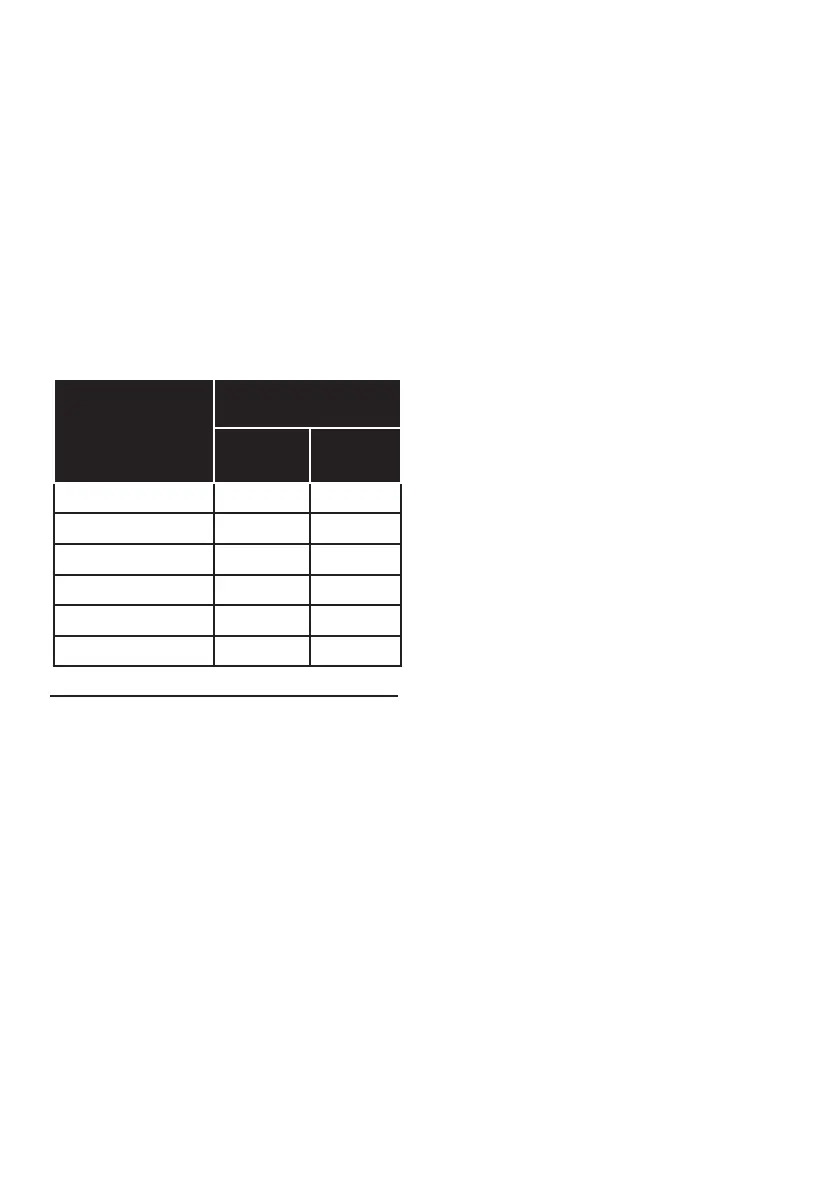
Power and
Temperature
Setting
Wattage
(Based on 120V)
900W
7.5 Amps
1800W
15 Amps
Sear 575°F 900W 1800W
High 425°F 900W 1500W
Med/High 375°F 900W 1300W
Med 275°F 900W 1000W
Med/Low 175°F 600W 600W
Low 100°F 600W 600W



 To Next Page