SPECIAL MODES
5-40
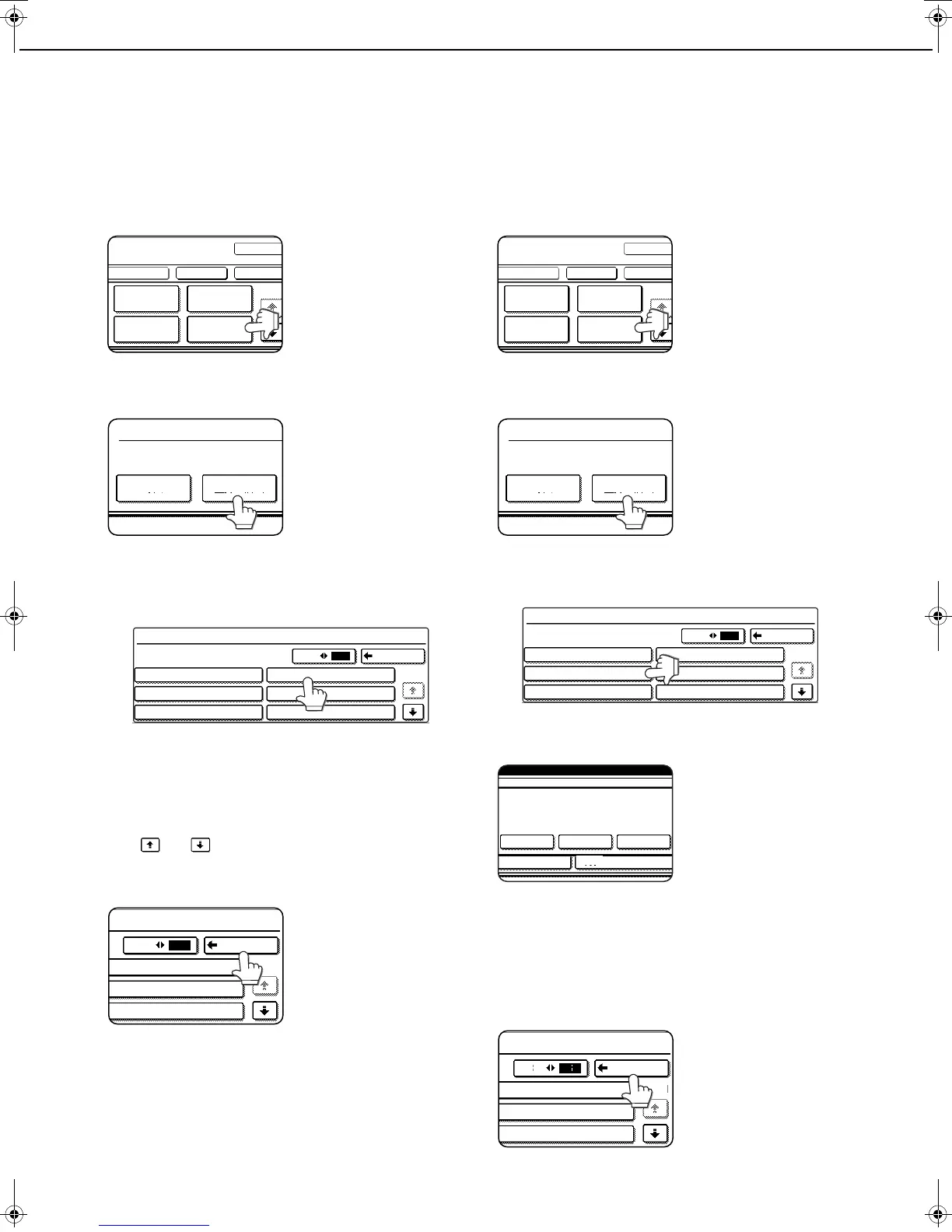
Storing text sequences
1
Follow steps 1 and 2 of "Common
operation procedure for using the print
menu" (page 5-31).
2
Touch the [TEXT] key.
3
Touch the [STORE/DELETE] key.
4
Touch a key that has not been
programmed (a key in which No. xx
appears).
When touched, the character entry screen
appears. Enter the text (max. 50 characters). For
information on entering characters, see page 7-
29. When finished, touch the [OK] key to close the
character entry screen.
If no free keys appear, change screens with the
or key.
5
Touch the [BACK] key.
The entered text is
stored.
Editing and deleting stored text
1
Follow steps 1 and 2 of "Common
operation procedure for using the print
menu" (page 5-31).
2
Touch the [TEXT] key.
3
Touch the [STORE/DELETE] key.
4
Touch the text key that you wish to edit or
delete.
5
To edit the text, touch the [AMEND] key. To
delete the text, touch the [DELETE] key.
When the [AMEND] key is
touched, the character
entry screen appears.
The selected text
sequence is entered. For
information on entering
characters, see page
7-
29
. When finished, touch the [OK] key to close the
character entry screen.
If you touch the [DELETE] key, the text will be deleted
and you will return to the screen of step 4.
To cancel editing or deletion, touch the [CANCEL] key.
6
Touch the [BACK] key.
PAGE
NUMBERING
OK
OK
CANCEL
LAYOUT
STAMP
DATE
TEXT
1/2
RECALL STORE/DELETE
PRE-SET
TEXT
STORE/DELETE
No.01 TARO YAMADA
No.02 Meeting
No.03
No.04
No.05
No.06
BACK
1/5
3 6
3 6
BACK
1/5
06
05
04 Minutes of meeting
PAGE
NUMBERING
OK
OK
CANCEL
LAYOUT
STAMP
DATE
TEXT
1/2
RECALL STORE/DELETE
PRE-SET
TEXT
STORE/DELETE
No.01 TARO YAMADA
No.02 Meeting
No.03
No.04 Minutes of meeting
No.05
No.06
BACK
1/5
3 6
A TEXT HAS BEEN ALREADY STORED TO
LOCATION.CHANGE THE TEXT?
No.06
CANCEL DELETE AMEND
3 6
BACK
1/5
06
05
04 Minutes of meeting
Copy_SEC.book 40 ページ 2007年9月12日 水曜日 午後1時33分



 To Next Page