1-9
1
PART NAMES AND FUNCTIONS
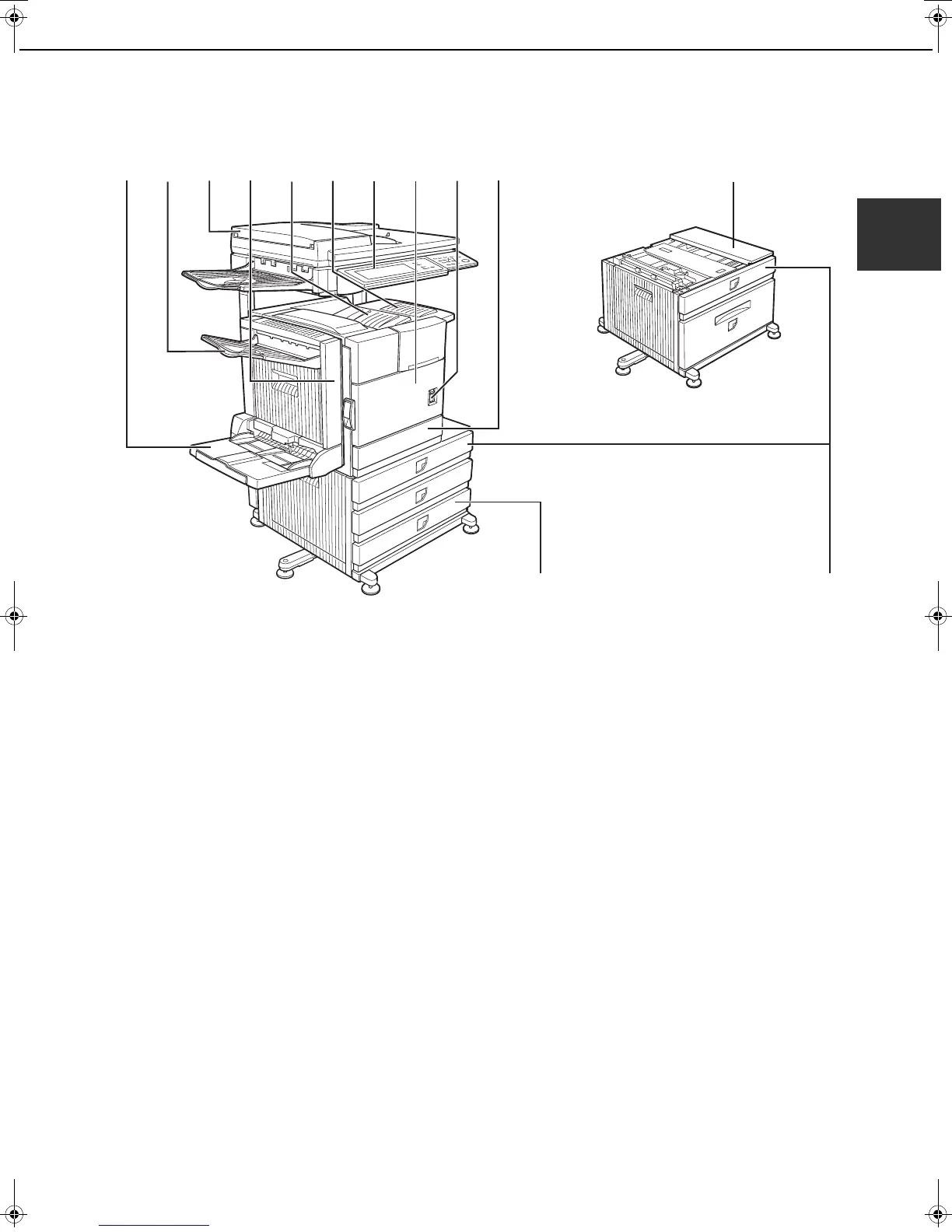
Exterior
(1) Bypass tray*
(2) Exit tray*
(3) Automatic document feeder (See page 4-2.)
This automatically feeds and scans multiple sheet
originals. Both sides of two-sided originals can be
scanned at once.
(4) Duplex module*
Module for two-sided printing
(5) Upper paper output area (Center tray)
Finished sheets are deposited here.
(6) Upper exit tray extension*
Provides support for large size paper.
(7) Operation panel
(8) Front cover
Open to add toner.
(9) Power switch
Press to turn power on and off.
(
10
)Paper tray 1
(11)
Stand/3 x 500 sheet paper drawer*
(12)
Stand/MPD & 2000 sheet paper drawer* (See
page 2-11.)
(13)
Multi purpose drawer (See page 2-8.)
The upper tray of the stand/3 x 500 sheet paper
drawer and stand/MPD & 2000 sheet paper drawer.
Up to 500 sheets of plain paper from a maximum size
of 11" x 17" (A3) to a minimum size of 5-1/2" x 8-1/2"
(A5R) can be loaded. Certain types of special paper
such as envelopes (standard size only) and
postcards can also be loaded.
* (1), (2), (4),
(
6
)
,
(11)
and (
12
) are peripheral devices. For description of these devices, see page 1-11.
Peripheral devices are basically optional, but some are provided as standard equipment for some models.
(1) (2) (3) (4) (5) (6) (7) (8) (9) (10)
(11)
(12)
(13)
Copy_SEC.book 9 ページ 2007年9月12日 水曜日 午後1時33分



 To Next Page