- 7 -
1) ON/OFF ( ) - Press and Hold until display turns on or off
2) Mode – Switch between radio operating modes
3) Skytune Search – Enter keywords to find internet radio
stations
4) Sleep – Setup delay timer before the radio automatically
turns off
5) Dim – Turn on/off backlight; Press and hold for dimmer
setup
6) Speaker – Loud speaker; turned off when earphone
plugged in
7) Preset Buttons 1-5 – Press and Hold to add current audio
source to Favorite list;
Press and release to recall favorite audio source
8) Navigation Control Left ( ◄ ) – Move Back to previous
display or item in lists
9) Dial Knob – Rotate to adjust volume, menus or station list
10) OK – Press and release to select function displayed or
highlighted item in list
11) Navigation Control Right ( ► ) – Move forward to next
display or item in lists
12) Color Display – 1.77” color screen
13) Home ( ) – Go to My Favorite mode or press and hold to
go to EQ setup option list
14) My Favorite ( ) – Go to favorite list or press and hold to
add (preset) audio source to favorite list
15) Earphone Connector – Stereo 3.5 mm (can be used as
Audio Out)
16) USB-C Connector – Battery charger; use USB-C cable
provided
17) LED – Red LED = battery charging; Green LED = battery
fully charged
18) Micro SD Card Slot – Playback audio files stored in MP3
19) Reset – Insert small pin (e.g. paper clip) to activate switch
to turn the radio off
20) Telescopic FM radio antenna
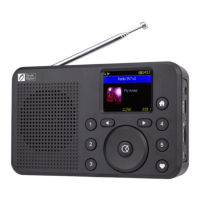
Location of Controls













 To Next Page