Configuration
Manage my Media U
You can tailor your own favorite station list using your computer.
1) Go to http://www.mediayou.net/ and sign up to become a
member.
2) Then, you have to find out the Mac Address to register on the
Media U website.
To locate the MAC address, please follow the path below:
2a) Go to Main Menu and select <Information Center>
2b) Go to <System Information>
2c) Choose <Wireless Info> and you will find your Mac
address.
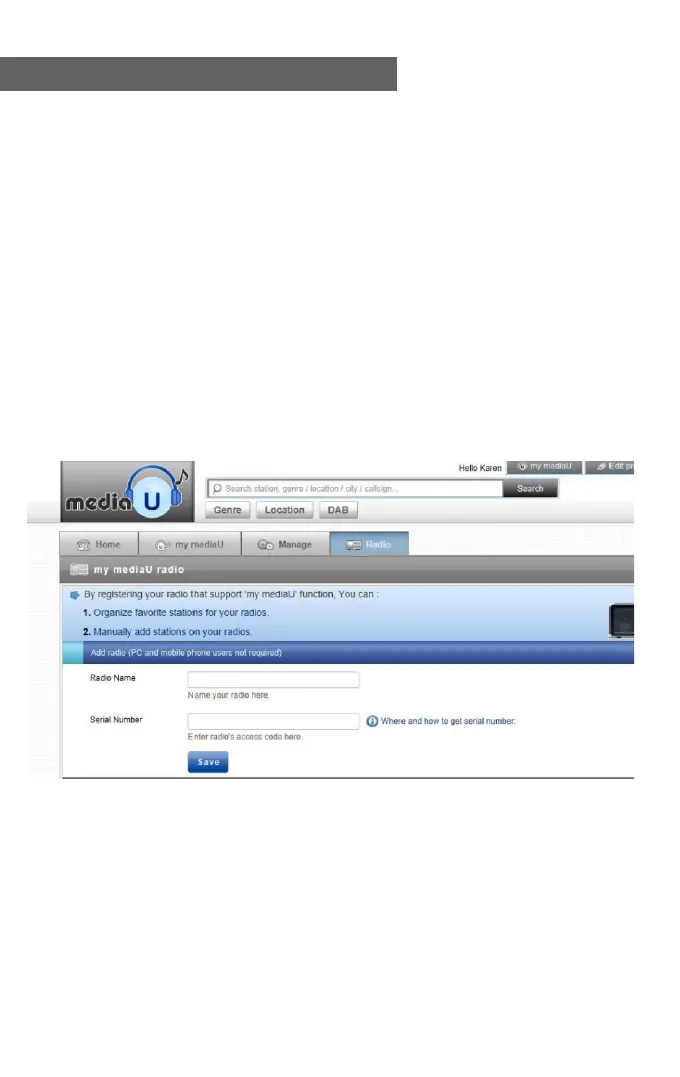
3) Log-in Media U on your computer, click My Media U > Radio,
then input the Radio name and Serial number (i.e. MAC Address)
and save it.
You can then organize your own favorite stations, or add any new
station which is currently not found on the station list. Once the
changes are done, your radio will synchronize the changes
immediately, and you will find your favorite list under <My
MediaU> on the radio menu.
- 11 -















 To Next Page