Connecting to your WiFi Network
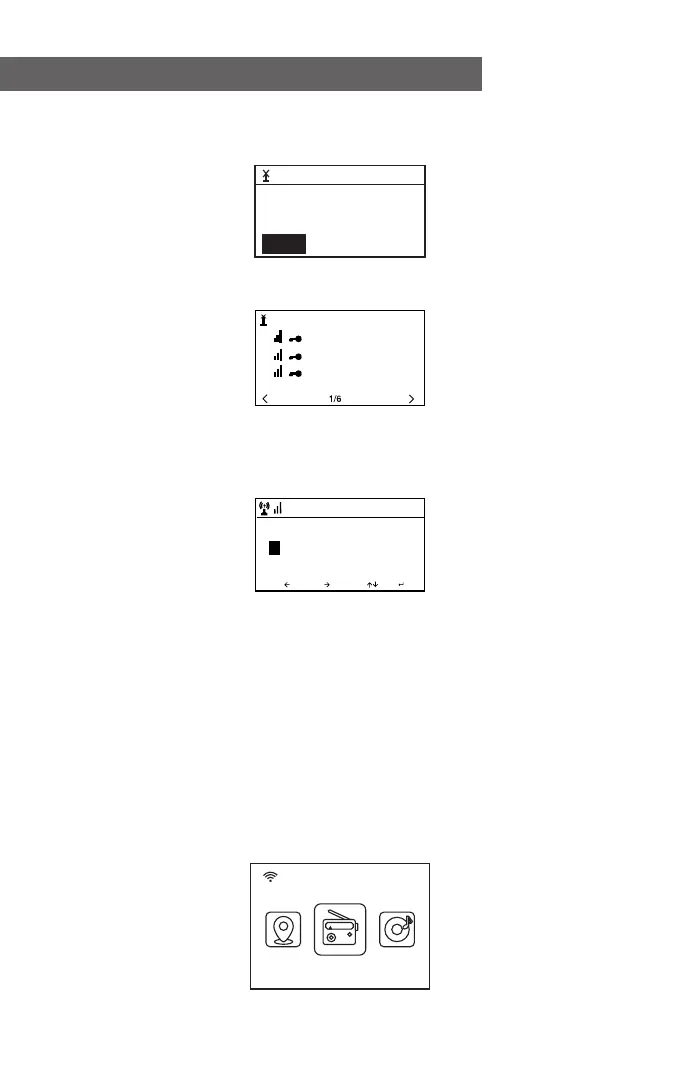
The screen below will appear. You can select <Yes> to proceed to
search for an available WiFi network. If your router has the WPS
function, you can select <Yes(WPS)> to proceed.
It will then start scanning the network. After the search is done, it
will display a list of the available routers.
Choose your router from the list and enter the WEP (Wired
Equivalent Privacy) or WPA(WiFi Protected Access) code. If your
network is not encrypted with the WEP or a WPA code, the unit
will connect to the router automatically.
Note: The encryption code would have been set by the
person who set up and configured your network.
Please follow the steps below to enter the encryption code of
your router.
- Turn the rotary knob to browse the characters
- Press the Ú right button to skip to the next entry
- After you're finished entering the code, press the Rotary knob to
confirm.
The radio will start connecting to the network.
After the router is connected successfully, it will display the main
menu as follows:
You can now start enjoying the internet radio.
01:01
Would you like to
configure Network now?
Yes(WPS) NOYes
01:44
Linksys
Homeaudio
Demo
MOVE INPUT: OK
Enter
Password
1/1
16:23
08:58
Internet Radio
5
- 05 -















 To Next Page