ODYS Multi TV 700 Move
27
EN
12 Troubleshooting
Carry out the problem-solving measures described in the following section before
contacting Customer Support.
Turn off the device immediately as soon as you suspect a malfunction. Unplug the
power plug and check whether the device is unusually warm or whether smoke is
rising from it.
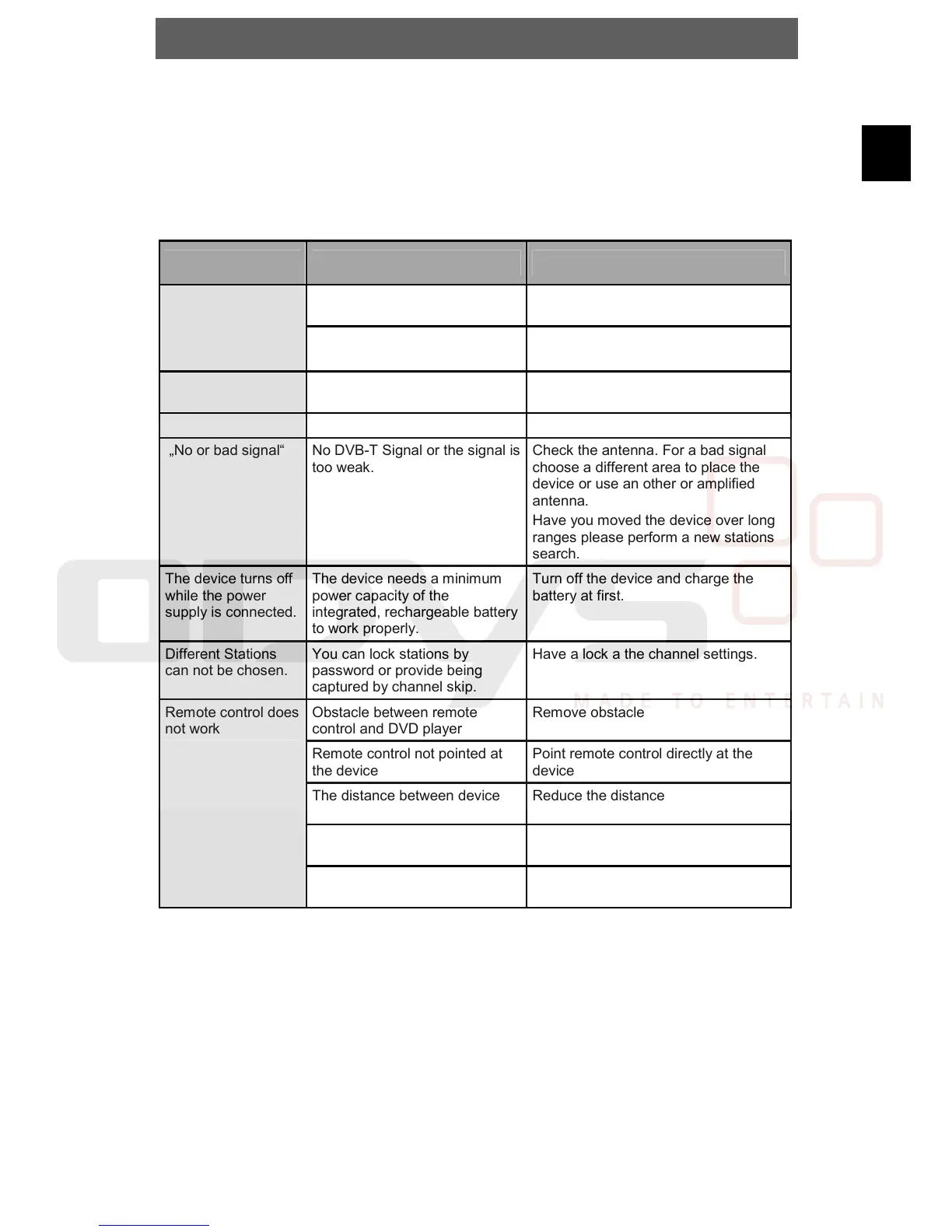
Problem Possible cause Remedy
Device not properly connected Check connexions and connect device
in the correct way
No audio
Headphones connected
(loudspeaker off)
Pull out the headphones
No Picture Device not properly connected Check connexions and connect device
in the correct way
„Database empty“ No DVB-T stations saved Perform a stations search
„No or bad signal“ No DVB-T Signal or the signal is
too weak.
Check the antenna. For a bad signal
choose a different area to place the
device or use an other or amplified
antenna.
Have you moved the device over long
ranges please perform a new stations
search.
The device turns off
while the power
supply is connected.
The device needs a minimum
power capacity of the
integrated, rechargeable battery
to work properly.
Turn off the device and charge the
battery at first.
Different Stations
can not be chosen.
You can lock stations by
password or provide being
captured by channel skip.
Have a lock a the channel settings.
Obstacle between remote
control and DVD player
Remove obstacle
Remote control not pointed at
the device
Point remote control directly at the
device
The distance between device
and remote control is too large.
Reduce the distance
Remote control battery inserted
the wrong way
Check the battery's polarity and, if
necessary, insert battery correctly
Remote control does
not work
Battery too low or completely
discharged
Insert new battery
Other possible causes for problems:
Static discharges or other external interferences can cause the DVD player to
malfunction. When this happens, disconnect the power plug from the mains socket
and plug it back in.
If the problem persists, disconnect the device from the mains again and contact
Customer Service or a repair shop.



 To Next Page