ODYS Multi TV 700 Move
8
EN
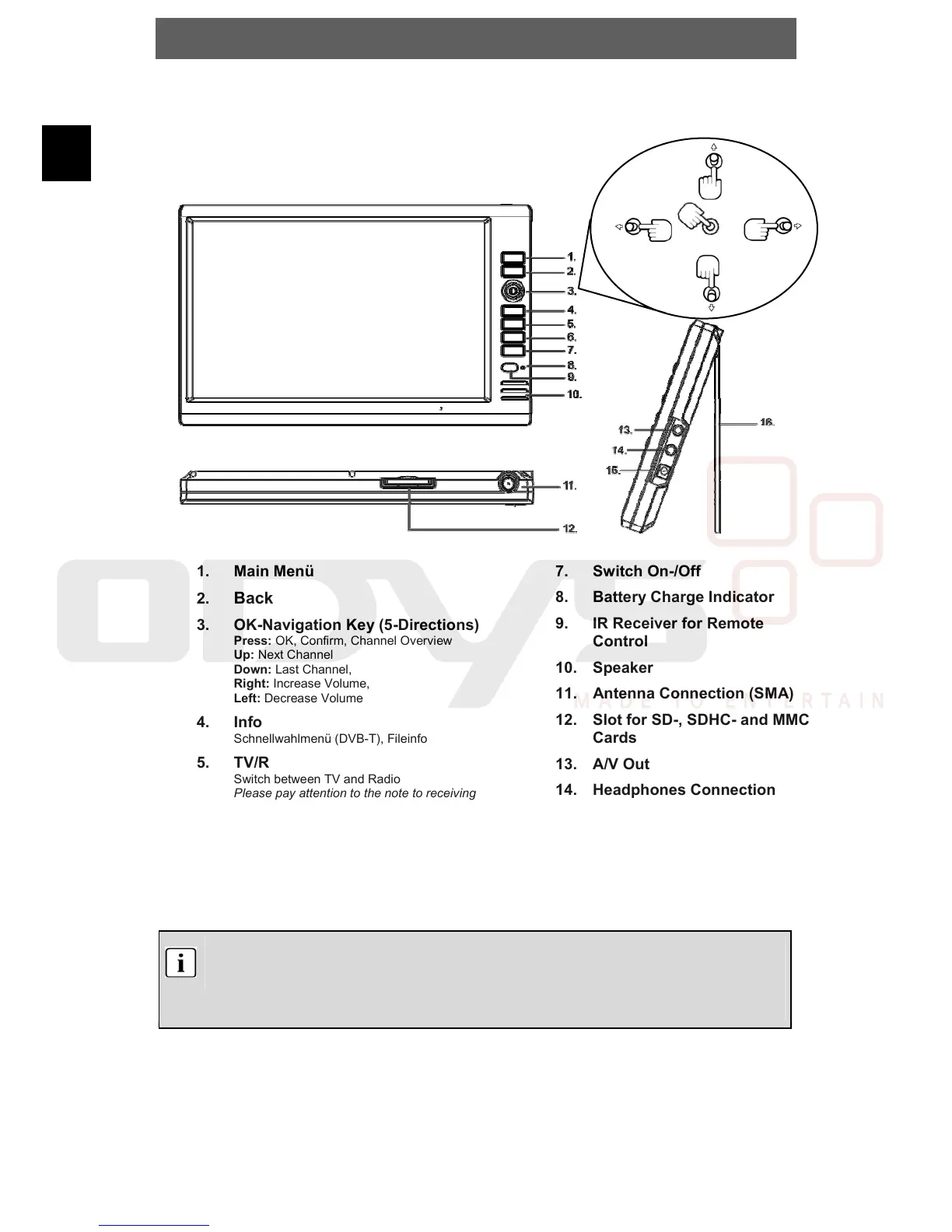
4 Controls
4.1 Buttons and controls on the main unit
1. Main Menü
2.
Back
3. OK-Navigation Key (5-Directions)
Press: OK, Confirm, Channel Overview
Up: Next Channel
Down: Last Channel,
Right: Increase Volume,
Left: Decrease Volume
4. Info
Schnellwahlmenü (DVB-T), Fileinfo
5. TV/R
Switch between TV and Radio
Please pay attention to the note to receiving
radio.
6. Rec
Start Recording
Attention! The Recording can only be started, if
there is a Memory Card in the Slot.
7. Switch On-/Off
8. Battery Charge Indicator
9. IR Receiver for Remote
Control
10. Speaker
11. Antenna Connection (SMA)
12. Slot for SD-, SDHC- and MMC
Cards
13. A/V Out
14. Headphones Connection
15. Power Supply
16. Stand
Note
Charge the battery with the device switched off. This will shorten the charging time
and extend the life of the battery.
Charge the battery fully before using for the first time.
Up
Down
Right
Left
Press



 To Next Page