
 Need help?
Do you have a question about the OEM IPX7A-ION and is the answer not in the manual?
Precautions to prevent electrical shock hazard and component damage during system handling.
Guidelines for safe installation, handling, and environmental considerations for the motherboard.
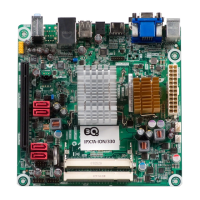
Diagram illustrating the layout of connectors and components on the top side of the motherboard.
Diagram and labels for connectors located on the rear panel of the motherboard.
Details the 'Advanced' BIOS setup menu, covering CPU, SATA, USB, and onboard device configurations.
Explains the 'Power' menu settings related to ACPI, APM, and system power management.
Covers security settings in BIOS, including supervisor and user passwords and boot sector virus protection.
Describes boot-related settings in BIOS, such as Quick Boot, Quiet Boot, and NumLock power-on state.
Details the 'Exit' menu options for saving/discarding changes, loading defaults, and exiting the BIOS setup.
 General
| Memory Type | DDR4 |
|---|---|
| Memory Slots | 2 |
| Storage | 4x SATA 6Gb/s |
| Video Outputs | 1 x HDMI, 1 x VGA |
| LAN | Realtek RTL8111H |

 To Next Page