30
IPX7A-ION Motherboard Reference Guide
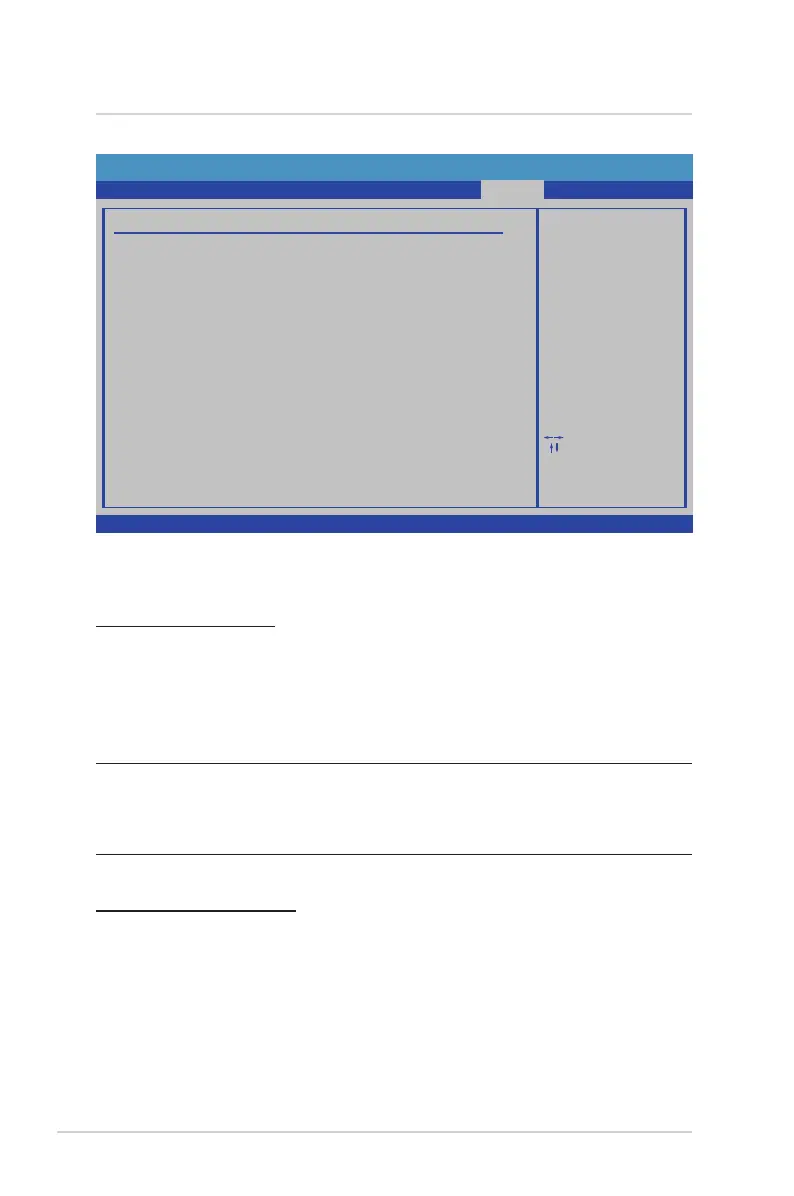
The Exit menu items allow you to load the optimal or failsafe default values for the
BIOS items, and save or discard your changes to the BIOS items.
Save Changes and Exit
Once you are nished making your selections, choose this option from the Exit
menu to ensure the values you selected are saved to the CMOS RAM. An onboard
backup battery sustains the CMOS RAM so it stays on even when the PC is turned
off. When you select this option, a conrmation window appears. Select Ok to save
changes and exit.
NOTE: If you attempt to exit the Setup program without saving your
changes, the program prompts you with a message asking if you want to
save your changes before exiting. Press <Enter> to save the changes while
exiting.
Discard Changes and Exit
Select this option only if you do not want to save the changes that you made to
the Setup program. If you made changes to elds other than System Date, System
Time, and Password, the BIOS asks for a conrmation before exiting.
Exit
8 BIOS Setup reference
BIOS SETUP UTILITY
Main
Boot
Exit
Exit system setup
after saving the
changes.
F1
Select Screen
Select Item
Go to Sub Screen
General Help
Save and ExitF10
ExitESC
Enter
Exit Options
Save Changes and Exit
Discard Changes and Exit
Discard Changes
Load Optimal Defaults
Load Failsafe Defaults
F10 key can be used
for this operation.
Security
Power
Advanced
v02.67 (C) Copyright 1985-2009, American Megatrends, Inc.


 To Next Page